Facts on this page come from each company's public website, documentation and API specification, checked on 14 November 2026. See How we compared for the method and sources.
TL;DR: CraftMyPDF is built for PDF documents such as invoices, contracts and reports. Bannerbear makes PDFs too, but it is built around images, video and animation, and around workflows. A Bannerbear workflow chains template renders with 29 media and AI tools (video, audio, PDF), in one run. CraftMyPDF does not list a workflow builder: its "workflows" are automations in Zapier, Make, n8n and similar tools that call its API. CraftMyPDF is the better choice if PDFs are most of your output. It has a free plan with 50 PDFs a month, it costs less up to about 12,000 PDFs a month, and it lists fillable PDF fields, JavaScript expressions and PDF import that Bannerbear does not. Bannerbear costs less from about 20,000 PDFs a month, and it is the better choice if the same pipeline also makes images, video, GIFs or print files, or if one run must chain several media steps. For a quick look, see the real Bannerbear PDF render below.
At a glance
| Bannerbear | CraftMyPDF | |
|---|---|---|
| Custom workflows (renders + media and AI tools) | ✅ Yes: chain renders with 29 tools (video, audio, PDF, AI) | Not listed. Automations run in Zapier, Make, n8n and others |
| PDFs from templates through an API | ✅ Yes | ✅ Yes (PDF Generation API) |
| Images from templates | ✅ Yes (JPG, PNG, WebP, AVIF) | ✅ Yes, PNG and JPEG |
| Video and animation | ✅ Yes | Not listed (its image page covers still images only) |
| Standalone media tools (video, audio, PDF files you already have) | ✅ 29 tools | PDF only: merge, add text, update fields, watermark (API reference) |
| Multi-page PDF from several files | ✅ Yes, up to 50 JPG, PNG and PDF files for 1 credit | ✅ Yes, merge PDF URLs and merge templates |
| Fillable PDF form fields | Not listed | ✅ Yes (fillable components) |
| Import an existing PDF as a template | Not listed | ✅ Yes (feature page) |
| Expressions and custom JavaScript in templates | Not listed | ✅ Yes (feature page) |
| Native QR code and barcode layers | ✅ Yes | ✅ Yes (feature page) |
| Pin a render to a template version | ✅ Yes | ✅ Yes (version parameter in the API reference) |
| Print DPI metadata (72 to 600) | ✅ Yes | Not listed (its dpi option downsamples images to cut file size) |
| AI face and subject crop | ✅ Yes | Not listed |
| MCP server for AI assistants | ✅ Yes (Automate and up) | Not listed (integrations page) |
| Regional endpoints (US, Europe, Singapore, Australia) | Not listed | ✅ Yes (enterprise features) |
| Free option | Trial: 30 API credits, no card | 50 PDFs or images every month, no card (pricing) |
| Starting paid price | $49/mo | $29/mo (pricing) |
"Not listed" means we searched the company's website, documentation and API specification and found no mention, as of 14 November 2026. It does not prove the feature is absent.
What both products do well
- Template editor with a visual layout, dynamic text and images, and a REST API that fills the template with JSON
- PDF and image output from one template
- Template version pinning in the render request, so a redesign does not change documents you already issued
- Webhooks for asynchronous renders
- Multi-page PDFs made by merging
- Zapier, Make and n8n connections, and your own storage on higher plans
If your need is "fill a template with data and get a PDF back", either product will do the job. The differences are in how deep each goes on PDF documents, and in what else the same account can make.
Workflows and automation
The word "workflow" means two different things here.
A Bannerbear workflow is a chain of steps that render images, render video and animation, transform media and run AI actions in one run, through the public API. The steps come from 29 tools plus template renders, and each step can use the output of the one before. See What Bannerbear Means by Workflows for the tool list. A recipe close to PDF work is Print Certificates and Wallet Cards from a Spreadsheet: it renders a certificate and a wallet card for each person in a list, lays out print sheets, flattens a PDF for print, and turns a PDF page into an image. It has 6 steps (see all ready-made workflows) and returns a PDF pack, a CMYK pack for a print shop, and A4 sheets of 10 wallet cards with cut guides.
CraftMyPDF describes workflows as automations in other tools: "Automate document workflows with Zapier, Make, Bubble, Coda, and REST API integrations" (craftmypdf.com, checked 14 November 2026). Its integrations page describes Make scenarios "with webhooks, routers, databases, HTTP modules" and n8n workflows that generate documents from "APIs, forms, databases, and webhooks" (integrations, checked 14 November 2026). A built-in workflow builder and media or AI steps inside a CraftMyPDF run are not listed on those pages. So a CraftMyPDF automation takes data from a source, makes a PDF, and hands it to the next app. A Bannerbear workflow can also transform the media between those points.
Where CraftMyPDF is stronger at automation: it lists some no-code and app-builder connections by name that Bannerbear's app list does not, such as FlutterFlow, Bubble.io, Backendless and Monkedo (integrations). Its async endpoint POST /v1/create-async queues requests and calls your webhook when the PDF is ready (API reference).
Bottom line: choose CraftMyPDF if data from a CRM or no-code tool becomes a PDF and goes on to the next app. Choose Bannerbear if one run must produce several kinds of files, and you want to see what each step did.
A real Bannerbear PDF render and its request
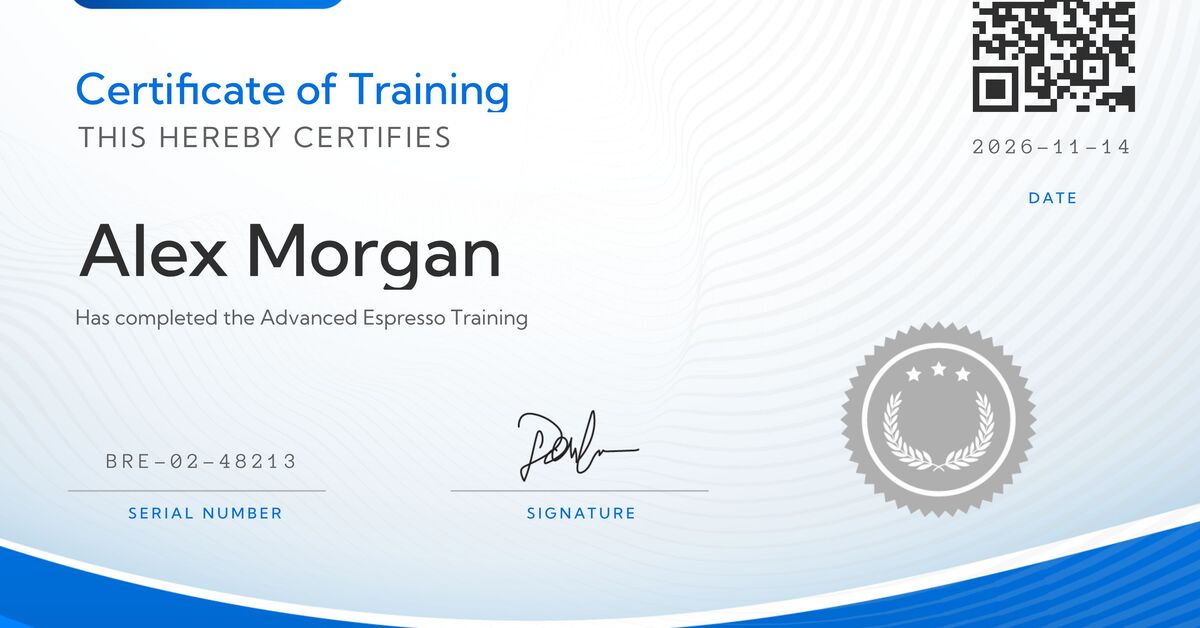
This is a real render from a Bannerbear template, "Modern Certificate of Training", made on 14 November 2026. "Bruze Academy" and "Alex Morgan" are sample text, not a real company or person. The QR code, seal and signature are template layers.
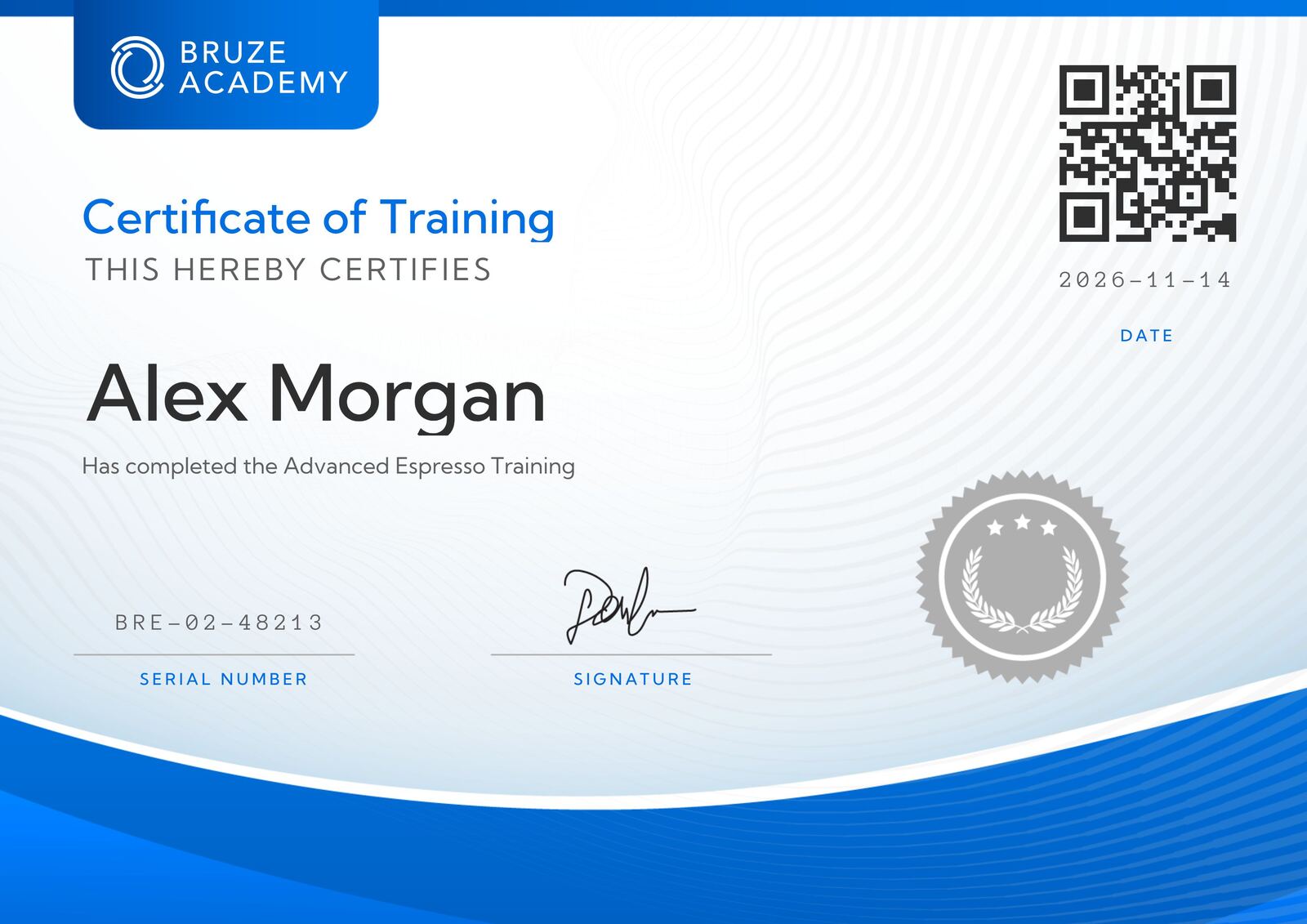 The JPG output of the request below, compressed for the web. The same request also returned a PDF: open the PDF (1 page, PDF 1.4, 463 KB).
The request asks for pdf and jpg in the formats array, and changes four text layers:
bash
curl -X POST https://sync.api.bannerbear.com/v5/images \
  -H "Authorization: Bearer $BANNERBEAR_API_KEY" \
  -H "Content-Type: application/json" \
  -d '{
    "template": "xrj1vqpnNwDpMzbXyn",
    "modifications": {
      "objects": [
        { "name": "name", "text": "Alex Morgan" },
        { "name": "course", "text": "Has completed the Advanced Espresso Training" },
        { "name": "certificate_id", "text": "BRE-02-48213" },
        { "name": "date", "text": "2026-11-14" }
      ]
    },
    "formats": ["pdf", "jpg"]
  }'
Credits are counted per format, so this request costs two: one for the PDF and one for the JPG (PDF API FAQ). We did not send a dpi value, so the PDF page size follows the template's pixel size (2631 by 1860 points). To print at a set physical size, pass dpi between 72 and 600. The Bannerbear PDF API page lists the full set of PDF options.
The equivalent CraftMyPDF request is a POST to https://api.craftmypdf.com/v1/create with a template_id, a data JSON string and an export_type of json or file (API reference). We did not run it, because it needs a CraftMyPDF account and a template, so this page shows no CraftMyPDF output.
Where CraftMyPDF is better
Several of these are real advantages for document work.
- A free plan that renews. The Free plan has "50 PDFs or images per month and 3 templates, and no credit card is required" (pricing). Bannerbear has a one-time trial of 30 API credits.
- Lower price at low and mid volume. Its entry plan is $29 a month for 1,200 PDFs or images, against $49 for 1,000 credits on Bannerbear. See the cost table.
- Features made for PDF documents. Fillable form components such as text fields, checkboxes, dropdowns, radio buttons and signature fields (document automation). Expressions with custom JavaScript for currency, dates and logic (expressions). Import of an existing PDF, with AI and computer vision that detect fields (import PDFs). Chart components such as bar, line, area and pie (charts). None of these is listed on Bannerbear's PDF API page.
- PDF output options. Password protection, a choice of PDF 1.4 or 1.7, and a ZUGFeRD or Factur-X PDF/A-3 e-invoice option (API reference). CMYK and print DPI metadata are not listed there.
- More PDF operations in the API. Endpoints to merge PDF URLs, add text, update PDF fields, add a watermark and read PDF information (API reference). These cost 0.5 credit each for watermark and other PDF operations (pricing).
- E-signatures. An e-signature API, at 10 credits per request (e-sign API, pricing). E-signatures are not listed on the Bannerbear pages we used.
- Data residency and storage. Four regional endpoints (US, Europe, Singapore and Australia), and output to your own AWS S3 or Cloudflare R2 bucket (enterprise features). Your own storage is on the Professional plan and up (pricing).
- Compliance. CraftMyPDF says it completed a SOC 2 Type II audit (homepage), and it publishes a 99.9% availability commitment in an SLA. A SOC 2 report is not listed on the Bannerbear pages we used, so ask both vendors for the documents.
- A higher request rate. The API allows 100 requests per 10 seconds per IP address and 100 concurrent synchronous requests per account (API reference). Bannerbear allows 60 POST requests per 10 seconds.
Bottom line: if most of your output is invoices, contracts, reports or forms, and you want a free plan and a lower price at low volume, CraftMyPDF is the better fit.
Where Bannerbear is better
- Video, animation and GIFs. Bannerbear makes video and animated GIFs from templates, with a keyframe timeline, subtitles and voiceover. CraftMyPDF's pages describe PDFs and still images only.
- Workflows with 29 tools. One run can render, transform video, audio and PDF files, and call AI models. See Workflows and automation.
- Tools for PDF files you already have. Create a multi-page PDF from up to 50 JPG, PNG and PDF files for one credit, flatten a PDF for print, lay out print sheets and turn a PDF into an image.
- Print controls. DPI metadata from 72 to 600 on images and PDFs, and a CMYK option used by the certificate recipe above.
- AI on the media. AI face and subject cropping, AI background generation and background removal.
- MCP server. AI assistants such as Claude can create templates, make images and run workflows from chat. An MCP server is not listed on CraftMyPDF's pages.
What CraftMyPDF's comparison page says about Bannerbear
CraftMyPDF has its own page about Bannerbear (craftmypdf.com/alternatives/bannerbear, checked 14 November 2026). We compared its claims with Bannerbear's current public pages.
| CraftMyPDF's page says | Bannerbear's pages say |
|---|---|
| A free plan of 50 PDFs a month versus "30 credits, one-time trial" | Correct. Bannerbear has a one-time trial of 30 API credits. |
| Entry plans: $29 for 1,200 PDFs versus $49 for 1,000 credits | Correct. Both match the pricing pages. |
| Bannerbear PDFs use "more than 1 credit" and the multiplier is "not disclosed" | The PDF API FAQ says a PDF costs one credit, and asking for pdf and jpg together costs two because credits are counted per format. The pricing page uses general wording ("PDFs, animations and video operations … cost more depending on the work involved"), which is why it can look unclear. |
| Template versioning: "No" for Bannerbear | Bannerbear lets a render target a saved template version (PDF API FAQ). |
| Bannerbear mid tier: "$149/month, 3,000 credits" | The Scale plan is $149 a month for 10,000 API credits (pricing). |
| Fillable PDF components, expressions, importing existing PDFs: "No" for Bannerbear | Correct. These are not listed on Bannerbear's PDF API page. |
| Bannerbear is for "marketing visuals" and has video and face detection | Correct, and a large part of the product. |
CraftMyPDF's own pricing page and its comparison page do not agree on every figure. For example, its comparison page lists a $69 mid tier with 12,000 PDFs, while its pricing page lists Professional at $99 for 12,000. This page uses the pricing page.
Developer experience
| Bannerbear | CraftMyPDF | |
|---|---|---|
| API specification | OpenAPI 3.1 for the V5 REST API | OpenAPI file behind the API reference |
| Code examples and SDKs | Official SDKs for Ruby, Node, Python, PHP; MCP package | cURL, Node.js and Python examples, no SDK list (homepage) |
| Rate limits | 60 POST requests per 10 seconds | 100 requests per 10 seconds per IP; 100 concurrent synchronous requests (API reference) |
| Async rendering | Queued render, collected by webhook or polling | POST /v1/create-async with a webhook call when ready (API reference) |
| Receive the file | Hosted file URL | JSON with a CDN URL (kept 1 minute to 7 days) or the binary file, which is not stored (API reference) |
| Template management by API | Public V5 API | List, get, create, update, delete and transfer templates, plus version endpoints (API reference) |
| Pin a render to a template version | Yes | Yes |
| Your own storage | Custom S3, Scale plan and up | AWS S3 or Cloudflare R2, Professional plan and up (pricing, enterprise features) |
Bottom line: both are plain REST APIs with template management. CraftMyPDF's API reference covers more PDF-specific parameters. Bannerbear's covers more media types.
Integrations
Both connect to Zapier, Make, n8n, Airtable, Coda and HubSpot, and both have HTTP APIs for your own code.
- CraftMyPDF lists Zapier, Make.com, Bubble.io, n8n, HubSpot, FlutterFlow, Coda, Backendless, Airtable and Monkedo (integrations). An MCP server is not listed.
- Bannerbear lists 50+ data-source integrations with field mapping and write-back, an MCP server on Automate and up, and a Figma plugin. FlutterFlow, Bubble.io, Backendless and Monkedo connections are not in Bannerbear's app list, so check it if you need one.
Pricing
| Bannerbear | CraftMyPDF | |
|---|---|---|
| Free option | One-time trial: 30 API credits, no card | Free: 50 PDFs or images every month, 3 templates, no card |
| Entry plan | Automate: $49/mo, 1,000 credits | Lite: $29/mo, 1,200 PDFs or images, 6 templates |
| Next plans | Scale: $149 to $296/mo, 10,000 to 40,000 credits | Plus: $49/mo, 3,000 (15 templates). Professional: $99/mo, 12,000 (50 templates) |
| High volume | Enterprise: $299/mo for 50,000 credits, up to $1,253/mo for 2,000,000 | Premium: $299/mo, 40,000 (1,000 templates). Business: $499/mo, 150,000 (10,000 templates) |
| Annual pricing | Not shown on the pricing page | 12 months for the price of 10 ($290, $490, $990, $2,990, $4,990) |
| Unused credits | Reset on the 1st of each month | Reset monthly, do not roll over |
| Cost of one PDF | 1 credit (1 per format) | 1 credit; watermark and other PDF operations 0.5; e-signature 10 |
| Overage | Not stated | Not stated on the pricing page |
| Team members | Scale plan and up | Professional plan and up |
| Support | Priority support on Enterprise | Email on Lite; email and live chat on Plus and Professional; priority with Zoom on Premium and Business |
Sources: craftmypdf.com/pricing and bannerbear.com/pricing, both checked 14 November 2026. For plans above Business, CraftMyPDF's pricing page says to email its team.
Cost for the same job
PDFs from a template, one format, no AI features, on the cheapest plan that fits, with monthly billing. For this job, 1 Bannerbear API credit and 1 CraftMyPDF credit each make one PDF.
| PDFs per month | Bannerbear | CraftMyPDF | Lower price |
|---|---|---|---|
| 50 | $49 (Automate) | $0 (Free) | CraftMyPDF |
| 1,000 | $49 (Automate) | $29 (Lite, 1,200) | CraftMyPDF |
| 3,000 | $149 (Scale, 10,000) | $49 (Plus, 3,000) | CraftMyPDF |
| 10,000 | $149 (Scale, 10,000) | $99 (Professional, 12,000) | CraftMyPDF |
| 12,000 | $198 (Scale, 20,000) | $99 (Professional) | CraftMyPDF |
| 20,000 | $198 (Scale) | $299 (Premium, 40,000) | Bannerbear |
| 30,000 | $247 (Scale, 30,000) | $299 (Premium) | Bannerbear |
| 40,000 | $296 (Scale, 40,000) | $299 (Premium) | Bannerbear |
| 50,000 | $299 (Enterprise, 50,000) | $499 (Business, 150,000) | Bannerbear |
| 100,000 | $458 (Enterprise, 100,000) | $499 (Business) | Bannerbear |
| 150,000 | $617 (Enterprise, 500,000) | $499 (Business) | CraftMyPDF |
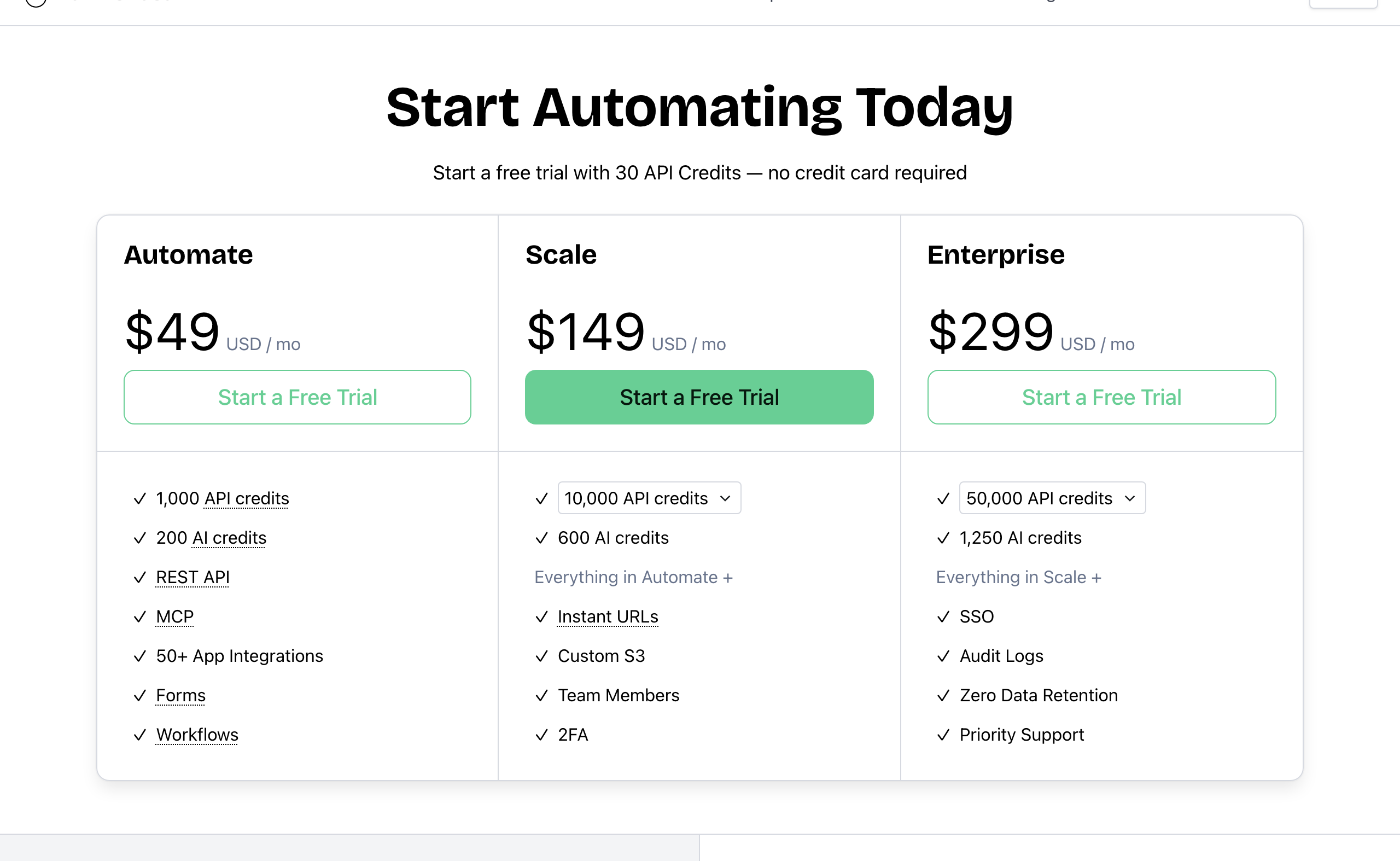 Bannerbear pricing. Source: bannerbear.com/pricing, captured 25 October 2026. The table above uses the prices on the page on 14 November 2026.
For PDFs, CraftMyPDF costs less up to about 12,000 a month, and it has a free plan. Bannerbear costs less from about 20,000 to 100,000 a month. The table uses plan prices only. CraftMyPDF's plans also limit the number of templates (3, 6, 15, 50, 1,000 and 10,000 from Free to Business), and the table does not account for that. Bannerbear's pricing page lists no template limit. The price gap also changes if you ask for several formats from one render: Bannerbear counts credits per format.
Images: CraftMyPDF's plans count "PDFs or images" in one monthly quota, and a standard image on Bannerbear is one credit, so the table also gives a rough guide for plain images. CraftMyPDF's pricing page does not state a credit cost for images, so we do not make a separate image table.
Video: Bannerbear charges 1 credit plus 2 credits per second of animation. CraftMyPDF does not list video.
Who should choose CraftMyPDF
CraftMyPDF is the right choice if:
- Your output is mostly PDF documents: invoices, contracts, reports, labels or forms
- You want a free plan that renews, or you make fewer than about 12,000 PDFs a month
- You need fillable PDF fields, JavaScript expressions in templates, or to import PDFs you already have
- You need an e-signature API, PDF/A-3 e-invoices or password-protected PDFs
- Your data must stay in the US, Europe, Singapore or Australia
- Your security review asks for a SOC 2 Type II report
- Your automations start in FlutterFlow, Bubble.io or Backendless
Who should choose Bannerbear
Bannerbear is the better fit for teams who:
- Make PDFs together with images, video, GIFs or animations from the same templates
- Chain several steps in one run, for example render, build a multi-page PDF, make a video and overlay a tag, and want a run history of each step
- Process PDF and video files that start outside a template
- Print tickets, badges, certificates or labels that need DPI metadata, a CMYK option or print sheets
- Start from user photos that need face or subject cropping
- Want an MCP server so an AI assistant can build and run renders
- Make more than about 20,000 PDFs a month and want the lower plan price
To test it on your own template, start a free trial with 30 API credits (no card) from the Bannerbear PDF API page. It is enough for a few renders like the one above.
FAQ
Is CraftMyPDF cheaper than Bannerbear? For PDFs at low and mid volume, yes. CraftMyPDF starts at $29 a month for 1,200 PDFs or images, and it has a free plan with 50 a month. Bannerbear costs less from about 20,000 PDFs a month on monthly billing. See the cost table.
Does CraftMyPDF have a free plan? Yes. The Free plan has 50 PDFs or images a month and 3 templates, with no card (pricing). Bannerbear has a one-time trial of 30 API credits.
Can Bannerbear make PDFs?
Yes. Any image template can return a PDF if you ask for pdf in the formats array, and one credit makes one PDF. You can also merge up to 50 JPG, PNG and PDF files into one PDF. See the PDF API.
Does CraftMyPDF support video or animation? Not on the pages we checked. Its image generation page describes PNG and JPEG output only (image generation). Bannerbear makes video and animated GIFs from templates.
Does CraftMyPDF have workflows? Not as a built-in builder, on the pages we checked. It lists automations through Zapier, Make, n8n, Bubble, Coda and its REST API (integrations). A Bannerbear workflow chains renders with media and AI tools. See Workflows and automation.
Can I make fillable PDFs with Bannerbear? Fillable PDF form fields are not listed on Bannerbear's PDF API page. CraftMyPDF lists them (document automation).
Do both pin a render to a template version? Yes. Both let a request name a saved template version, so a redesign does not change documents you already issued.
Do both work with AI assistants like Claude? Bannerbear has an MCP server on Automate and up. An MCP server is not listed on CraftMyPDF's pages (as of 14 November 2026).
How we compared
- Sources: for CraftMyPDF, only its own website: pricing, homepage, PDF Generation API, document automation, image generation, integrations, enterprise features, API reference and its comparison page for Bannerbear. For Bannerbear: our pricing, PDF API and workflow pages, the public OpenAPI file and the workflow recipes.
- Date: all facts were checked on 14 November 2026. Plans and prices change, so check the current pages before you decide.
- "Not listed" means we searched the company's own pages for the feature and found no mention. It is not proof that the feature does not exist.
- The render is a real output of a Bannerbear template. We did not run CraftMyPDF, so the page shows none of its output, and we did not measure rendering speed, render quality or reliability.
- Cost table: plan prices only, monthly billing, one format per PDF, no overage, and no template limits. CraftMyPDF's API reference was read from its public OpenAPI file.
- What we did not measure: support response times, ease of use and third-party reviews. We did not include them.
- Disclosure: this page is published by Bannerbear.
What Bannerbear Means by Workflows
A Bannerbear workflow is a chain of steps that render images, render video and animation, transform media and run AI actions. You build it yourself from the tools below, and one run produces the finished files.
Many products use the word "workflow" for something different: send data from a source, render a template, deliver the result to a destination. That is a useful automation, but it centres on rendering one template. A Bannerbear workflow can have many media and AI steps, and each step can use the output of the one before it.
29 tools to build with
- Image (2): Remove background, Video thumbnails
- Video (13): Add cover art to video, Apply colour filter, Join videos, Create GIF preview, Create narrated slideshow, Create video slideshow, Crop video, Add image overlay, Overlay video, Resize video, Soften video, Transcribe and burn subtitles, Trim video
- Audio (4): Add or replace audio, Generate music, Generate voiceover, Trim audio
- PDF and print (4): Create multi-page PDF, Flatten PDF for print, Lay out print sheet, PDF to image
- AI (4): Find moments, Generate AI image, Generate AI video, Generate text
- Text and data (2): Extract article, Render spreadsheet
Template renders for images and animations can be steps in the same chain.
Example: Turn One Product Photo into AI Scenes and Video Ads
Cut out a product photo, place it in AI scenes, animate them and get narrated ads in three sizes.

18 steps, in order:
- Remove Background
- Generate AI Image (x4)
- Generate AI Video (x3)
- Generate Voiceover
- Join Videos
- Add Or Replace Audio
- Resize Video
- Add Image Overlay
- Resize Video
- Add Image Overlay
- Resize Video
- Create Gif Preview
- Add Image Overlay
See all ready-made workflows or read about the Workflow API.
Compare Bannerbear With Other Tools