Facts on this page come from each company's public website, API documentation, help center, pricing page and blog, checked on 25 October 2026. See How we compared for the method and sources.
A note on the name: Creatopy is now called The Brief. creatopy.com redirects to thebrief.ai, and every Creatopy fact on this page comes from thebrief.ai pages. From here on, we use the name The Brief.
TL;DR: The two products are built for different jobs. The Brief is an ad platform for marketing teams: you design ads, publish them to Meta, Google Ads and other networks, serve them, and test which version wins. Bannerbear is a media generation API for developers: you render images, video and PDFs from templates inside your own product or pipeline. The Brief costs less to start, at $29 per month billed annually against Bannerbear's $49 per month. But The Brief's pricing page lists its public REST API only under its Scale (Enterprise) plan, which has no public price, while Bannerbear's REST API is on every paid plan. Choose The Brief if you want one tool to make, publish and optimize ads. Choose Bannerbear if you need to generate media automatically, through an API, a workflow or a no-code form.
Which tool fits which job
- The ad-operations job. A marketing team designs ads, makes size and language variations, publishes them to ad networks, and reads the results. The Brief is built for this, and it covers more of the job than Bannerbear does.
- The developer and automation job. A product or back-end team needs images, video or PDFs made from data, on demand, inside an app, a CMS or a scheduled job. Bannerbear is built for this. It lists more API, workflow, video-processing and render-control features than The Brief does.
If your job is the first one, the Who should choose The Brief section is the quickest place to start.
At a glance
| Bannerbear | The Brief (formerly Creatopy) | |
|---|---|---|
| Public REST API | All paid plans, from $49/mo | Scale (Enterprise) plan only, no public price |
| OpenAPI specification | ✅ Full OpenAPI 3.1 file | Not listed |
| Official SDKs | ✅ Ruby, Node, Python, PHP | Not listed |
| Scoped API keys | ✅ 22+ scopes, origin allowlists | Not listed (one client ID and secret per team) |
| Synchronous rendering | ✅ Yes | Not listed (exports are asynchronous) |
| Batch rendering | ✅ Batch endpoint, 100 images per request | Batch Design Generator in the app; no batch endpoint in the API docs |
| Multi-step media workflows | ✅ Built-in Workflows API with a visual builder | Automation through Zapier (Ultra plan and up) |
| No-code generation forms | ✅ Yes | Not listed |
| Render from a URL (Instant URLs) | ✅ Yes, open or HMAC-signed (Scale and up) | Not listed |
| MCP server for AI assistants | ✅ Yes | Not listed |
| Video trim, crop, join, overlay, audio | ✅ As API tools | In the app's video tools; not listed as API tools |
| Per-layer overrides in API renders | ✅ Text, image, colour, position, size, rotation, opacity, border | ✅ Text, image, colours, visibility, font and spacing |
| Text fitting (auto-fit) | ✅ Yes | Not listed |
| Publish ads to Meta, Google Ads and other networks | Not listed | ✅ Yes (25+ networks) |
| Automated A/B testing of ads | Not listed | ✅ Yes |
| Data feeds (CSV or scheduled URL sync) | Not listed | ✅ Yes |
| Brand kits | Not listed | ✅ Yes |
| Starting price | $49/mo | $29/mo billed annually ($39 billed monthly) |
"Not listed" means we searched the company's website, API docs, blog and the help center pages we could reach, and found no mention, as of October 2026. It does not prove the feature is absent. Most of The Brief's help center blocks automated access, so its "Not listed" entries carry less weight than usual.
What both products do well
Before the differences, the common ground.
- A REST API that exports designs from templates, with webhooks, job status checks and a templates API
- A template editor with responsive layouts, version history, a template library and custom fonts
- Many output formats, with scale, quality and print DPI settings, PDF export and CMYK PDF
- Animation with a keyframe timeline, automatic animation from a layout, and transparent video
- AI image tools: background removal, background generation and text-to-image, plus AI video generation
- Zapier and a Figma plugin
- Team members with roles, workspaces, and SSO on the top plan
- A free trial with no credit card
If you need to fill a template with new text and images through an API and get a file back, both products can do it. The differences are in who the product is built for, and what surrounds that API call.
A developer API on every plan
Bannerbear's REST API is on all paid plans, from Automate at $49 per month. The developer tooling around it includes:
- A full OpenAPI 3.1 file you can generate client code from
- Official SDKs for Ruby, Node, Python and PHP
- Scoped API keys with 22+ permission scopes, browser-origin allowlists and workspace keys
- Synchronous rendering, where the image comes back in the same request, as well as asynchronous jobs
- A batch endpoint for up to 100 images per request
- Template version pinning, so a redesign does not change what production renders
- Render metadata, an API console with request logs, an image URL proxy, and a
failedstatus with anerror_messagefield - A hosted and local MCP server, so Claude, Cursor and ChatGPT can create assets
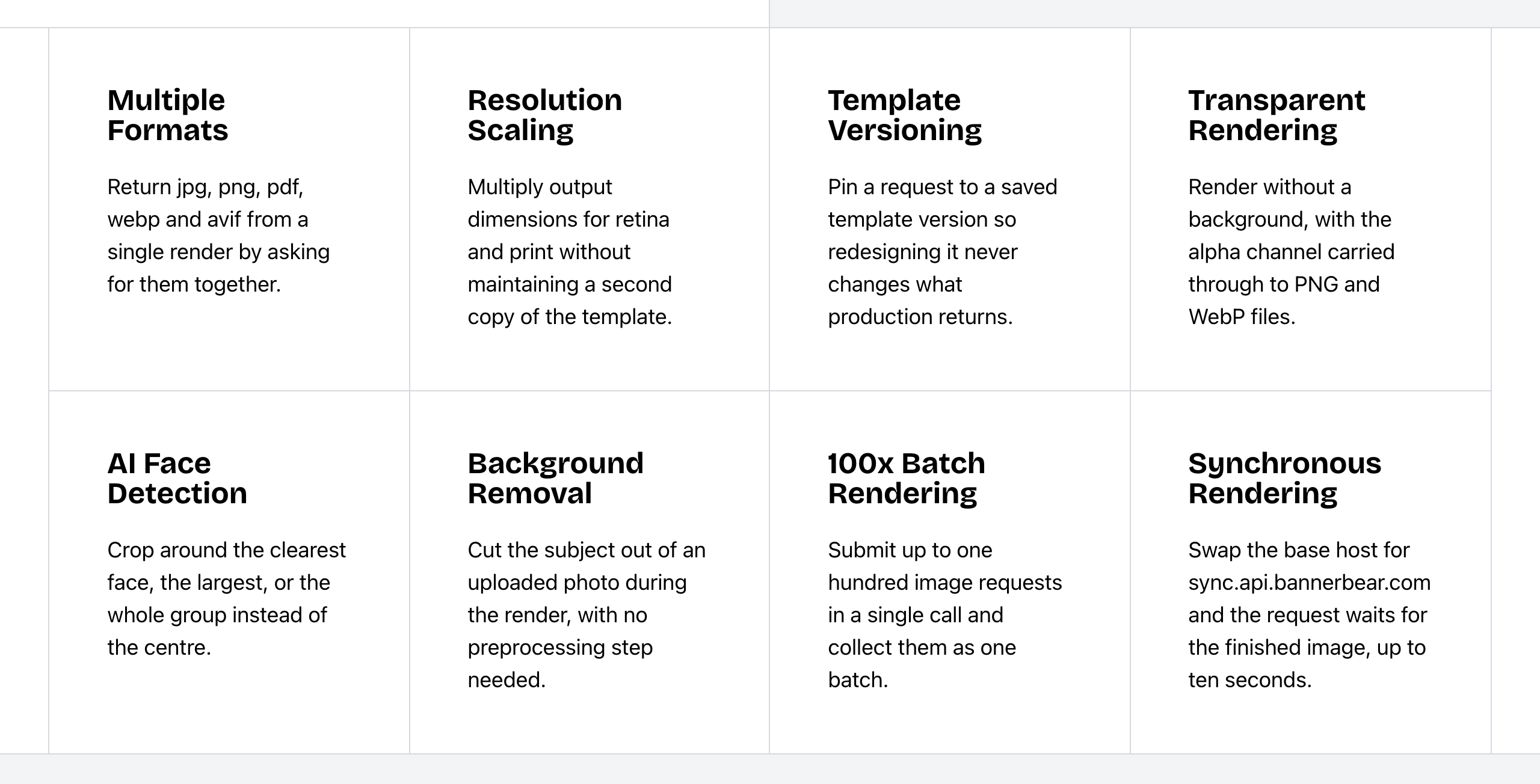 Bannerbear Image API features. Source: bannerbear.com/v5/products/image-api, captured 25 October 2026.
The Brief has a public REST API that exports designs and templates with changes to their elements, plus webhooks, export status checks, a templates and designs API, and a GraphQL endpoint. Its pricing page lists the API under the Scale (Enterprise) plan only, which is "contact sales" with no public price.
Around that API, The Brief's documentation shows:
- No OpenAPI file listed. A Postman collection exists for the GraphQL API only.
- No official SDKs listed. The docs show a Node.js snippet for signing the access token, and there is a Zapier app.
- One client ID and secret per team, exchanged for a JWT. No key scopes are listed.
- Exports are asynchronous: the status starts as
pending, and you poll or wait for a webhook. - No batch endpoint in the API docs. In the app, the Batch Design Generator makes variants from a CSV file or live feed, bulk export handles 100 files on Pro and 1,000 on Ultra and Team, and the export API takes a
feed.rowsoption. - Errors come back as an
errorLogand HTTP codes. - Design version endpoints exist, but the docs do not say that an export can name a version.
- No MCP server listed. The Brief's Create, Optimize and Discover agents work inside its app.
What this means: with Bannerbear, a developer can start on the $49 plan with a spec, an SDK and scoped keys. With The Brief, API access starts with a sales conversation.
Bottom line: if image or video generation is a feature of your own product, Bannerbear gives you the API and its tooling on every plan.
Workflows and no-code generation
Bannerbear Workflows chain image, animation and media-tool steps behind one API endpoint. For example: render a template, add subtitles, add a voiceover, overlay an animation, then export. You build them in a visual builder, see each step's inputs and outputs in the run history, and can publish a workflow with its templates.
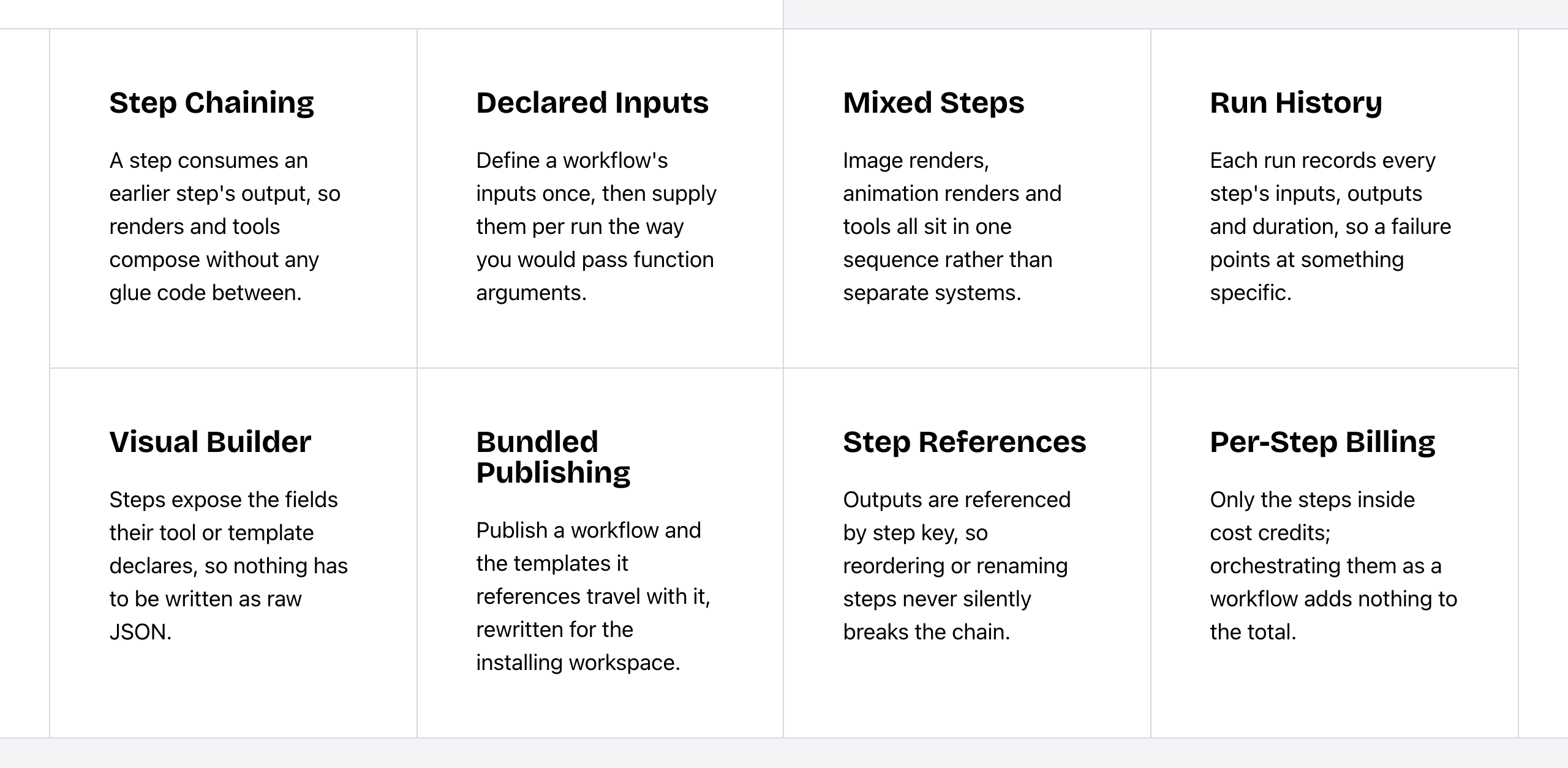 Bannerbear Workflows features. Source: bannerbear.com/v5/products/workflow-api, captured 25 October 2026.
For people who do not write code, Bannerbear has hosted Forms that make an image from a filled-in form, and Instant URLs that render an image from URL parameters (Scale plan and up). It also connects to Make and Airtable.
The Brief lists ad workflow automation for repetitive ad production and optimization tasks. Custom workflows run through Zapier triggers and actions, on the Ultra plan and up. A built-in visual workflow builder or multi-step workflow API is not listed on The Brief's website (as of October 2026). Run history for workflows, workflow publishing, generation forms, Instant URLs, Make and Airtable are also not listed there.
Bottom line: if producing one asset takes several processing steps, or a colleague needs to make images without the API, Bannerbear does this natively. If Zapier is enough for your automation, The Brief covers it on its Ultra plan and up.
Video and animation through the API
Both products make animated output and video from templates.
The Brief has an online video editor with a timeline, Magic Animator, transparent video import and export, and AI video generation. The Brief edits video in the app: its tools trim, crop, resize and merge clips, add watermarks and text, and add music. These are not listed as API tools. Through the API, animated designs export as GIF or MP4 from a design template. Its pricing page says it can "automatically transcribe and add subtitles" to videos, and its AI UGC video feature includes a voiceover.
Bannerbear's advantage is the set of video tools that a program can call:
- Animation templates that render to MP4 or MOV at 24, 30 or 60 fps, and an endpoint that applies a named animation preset
- Per-word text effects, animated backgrounds, Lottie layers, and conversion of image templates into animation templates
- Video tools by API: trim, crop, resize, join, overlay, colour filters, audio, slideshows, GIF previews, thumbnails and cover art
- Auto subtitles with style presets, 1 to 10 words per segment, non-English audio and custom fonts
- AI voiceover for any video
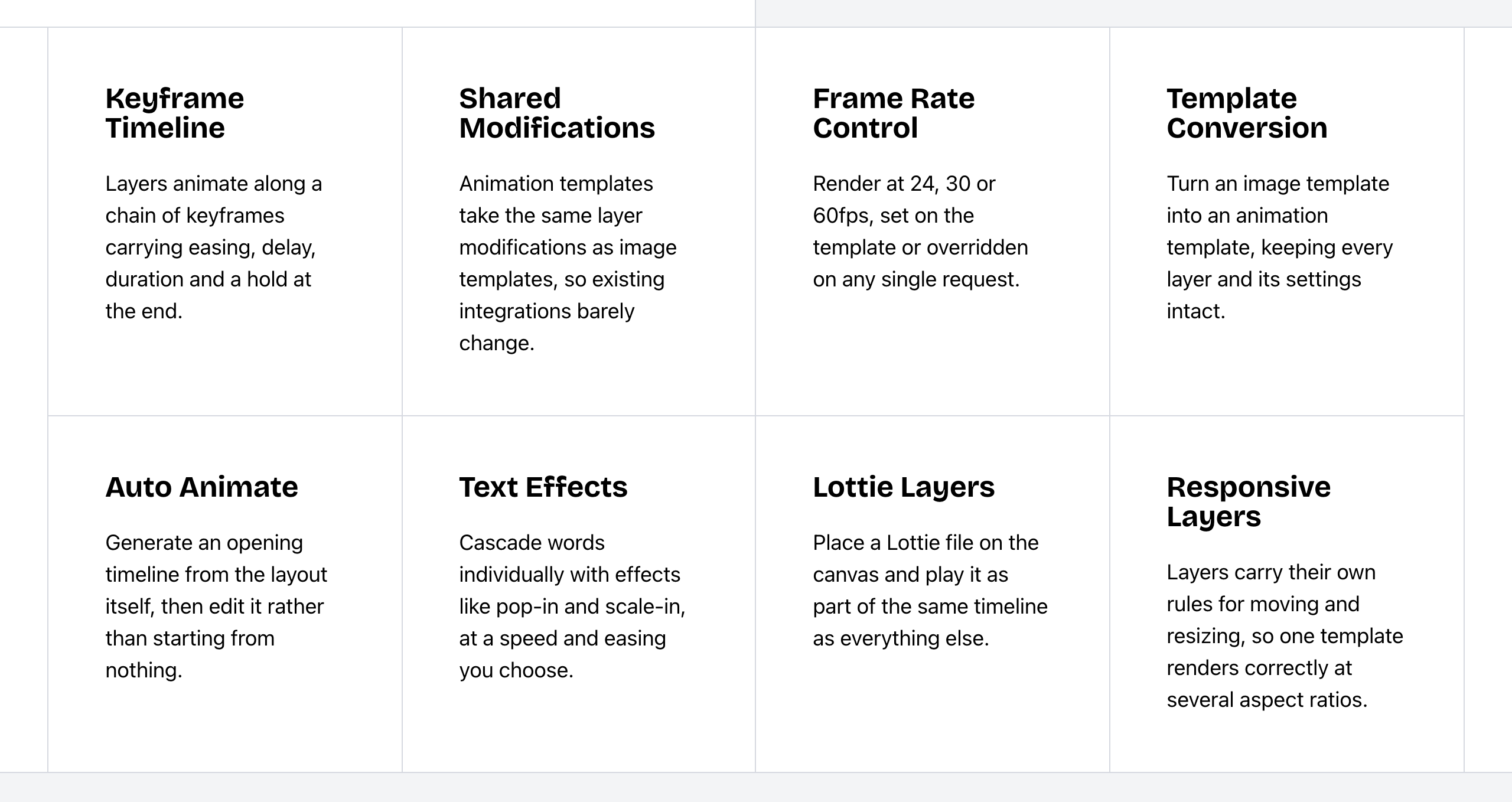 Bannerbear Animation API features. Source: bannerbear.com/v5/products/animation-api, captured 25 October 2026.
An animation preset endpoint, per-word text effects, animated backgrounds, Lottie layers, colour filters, slideshows, GIF previews and video thumbnails are not listed on The Brief's website (as of October 2026).
Bottom line: if a person edits each video, The Brief's editor does the job. If a program makes the videos at volume, Bannerbear lists the API tools for it.
Control of each layer in data-driven renders
When text length, images and layout change on every render (product cards, certificates, listings), the detail of what the API can change matters.
Bannerbear lets each render override a layer's text, image, colours, position, size, rotation, opacity and border. It also offers:
- Text fitting that shrinks text to fit or grows the box
- Special objects: star ratings, barcodes, QR codes and text image masks
- Image effects, text backgrounds and fit options for picture layers
- Text styling with an alternate style inside one text layer
- Transparent rendering, with the alpha channel kept in PNG and WebP
- AI face and subject detection that crops on a face, several faces, a group or the main subject
- Multi-page PDFs and PDF print tools
The Brief's export API changes a layer's text, image source, colours, visibility, font and spacing. Text can use bold, italic and link markdown. Text fitting, special objects, image effects, text backgrounds, picture fit options, transparent rendering, face and subject detection, multi-page PDF merging and PDF print tools are not listed on The Brief's website (as of October 2026).
Both have AI background removal. The Brief has it in the editor. Bannerbear also runs it during a render and as an API tool.
Bottom line: if your renders must adapt to unpredictable data without a person checking each one, Bannerbear gives you more control over each layer through the API.
Ad operations: where The Brief leads
This is the part of the job The Brief is built for.
- Publishing and serving. The Brief publishes ads to Meta, Google Ads and 25+ networks (its comparison pages say 40+), serves them through ad tags with live updates, and exports HTML5 ads tuned to each network, with click tags and a fallback image. Ads can carry CTA buttons and widgets.
- Testing and reports. Automated A/B tests declare a winner at 85% probability, and performance reports can be shared.
- AI agents for the ad lifecycle. A Create agent, an Optimize agent and a Discover agent for competitor ad intelligence, plus generative flows, Smart Apply (pull brand content from a URL) and UGC video. A Launch agent is announced.
- AI text and localization. AI copywriting rewrites, shortens or translates text layers, AI Translate localizes ads by country, and AI smart resize adapts designs to new sizes.
- Data feeds. Bind layers to CSV columns, by upload or scheduled URL sync.
- Design-team collaboration. Canvas for ideas, PSD import, bulk editing of 100 ads at once, brand kits, locked elements, a light editor for non-designers, Brand Control, review and approval permissions, custom branded share links, and an online video editor.
- A white-label embeddable editor on the Scale (Enterprise) plan.
Bannerbear's output goes to files, your own S3 bucket, webhooks and integrations. Publishing to ad platforms, ad serving, ad A/B testing, performance reports, AI copywriting, AI translation and data-feed sync are not listed on Bannerbear's website (as of October 2026). Its AI features work on images, video and audio. Its adaptive sizing is rule-based, and only the face and subject crop uses AI. Bannerbear has a video API and an animation template editor, and an interactive video editor for ads is not listed. Bannerbear has an embeddable editor on its older V3 platform, and it still works there. The current V5 platform does not include one.
Bottom line: if your team designs, launches and optimizes ad campaigns, The Brief does that whole job in one place. Bannerbear would cover only the rendering step.
Integrations
Both connect to Zapier, both have a Figma plugin, and both send webhooks.
- Bannerbear lists 50+ native data-source integrations with field mapping and write-back, including Notion, Shopify, Stripe and HubSpot. WordPress, Webflow and Ghost are data sources that pull content, and the WordPress plugin makes Open Graph images and Pinterest pins. It also connects to Make and Airtable, and has an MCP server for AI assistants.
- The Brief lists integrations with ad networks and DSPs (Google Ads, Display & Video 360, Campaign Manager 360, Meta), DAM systems (Bynder, Frontify, Orange Logic, Veeva), and cloud storage (Google Drive, Dropbox), plus a GraphQL API.
Make, Airtable and an MCP server are not listed on The Brief's website. Google Drive, Dropbox and Bynder integrations are not listed on Bannerbear's, which can store output in your own S3 bucket instead. All as of October 2026.
Developer experience
| Bannerbear | The Brief | |
|---|---|---|
| API access by plan | All paid plans | Scale (Enterprise), contact sales |
| API specification | Full OpenAPI 3.1 file | Not listed (GitBook docs; Postman collection for GraphQL) |
| Official SDKs | Ruby, Node, Python, PHP | Not listed |
| API keys | Scoped keys (22+ scopes), origin allowlists, workspace keys | One client ID and secret per team, exchanged for a JWT |
| Rendering mode | Synchronous or asynchronous | Asynchronous (poll or webhook) |
| Error reporting | failed status with error_message |
errorLog and HTTP codes |
| Request logs in an API console | Yes | Not listed |
| Rate limits (vendor-stated) | 60 POST requests per 10 seconds | Export: 15 requests per 10 seconds per team; other routes: 100 per 10 seconds |
| Uptime figure and status page | 99.9% trailing 12-month claim; public status page | Not listed |
| Support on the top plan | Priority support | Dedicated account manager, priority SLAs, onboarding |
The rate limits count different kinds of requests, so they do not show which API is faster. These are what each company states. We did not test either API.
Security and enterprise
| Bannerbear | The Brief | |
|---|---|---|
| Single sign-on (SSO) | Enterprise plan | Enterprise plan (SAML 2.0 or OpenID) |
| Two-factor authentication | Scale plan and up | Authenticator-app 2FA (plan not stated) |
| GDPR | Standard DPA on request; data hosted in the USA | GDPR and CCPA compliance |
| ISO certifications | Not listed | ISO 9001, 27001 and 20000-1 |
| Output stored in your own S3 bucket | Scale plan and up | Not listed (exports served from Brief-hosted links valid for 1 hour) |
| Zero data retention | Enterprise plan | Not listed |
| Restrict team sign-up to your email domain | Yes | Not listed |
If your security review asks for ISO certifications, The Brief lists three. ISO certifications are not listed on Bannerbear's website (as of October 2026); it has a GDPR DPA. If you must keep generated files in your own storage, or need zero data retention, Bannerbear lists both.
Bottom line: the two products answer different security questions. Check the list your security team uses against both before you decide.
Pricing
The two products charge for different things. Bannerbear bills by API credits: 1 credit per image per output format, multiplied by the scale value. Credits reset on the 1st of each month and do not roll over. The Brief's current plans bill by ad impressions (served ads), not by images made, and do not count export credits.
| Bannerbear | The Brief | |
|---|---|---|
| Free trial | 30 API credits and 50 AI credits, no card | 7 days on Pro, Ultra and Team, no card |
| Entry plan | Automate: $49/mo, 1,000 API credits, 200 AI credits | Create (Pro): $29/mo billed annually ($348/yr), or $39 billed monthly; 1 seat, 5 brand kits, 250 GB |
| Next plans | Scale: $149–$296/mo, 10,000–40,000 API credits | Amplify (Ultra): $79/mo billed annually ($99 monthly), 100,000 impressions · Collaborate (Team): $49 per seat/mo billed annually ($59 monthly), 2 to 10 seats |
| Top plan | Enterprise: from $299/mo, from 50,000 API credits | Scale (Enterprise): contact sales, usage-based contract |
| Public REST API | All plans | Scale (Enterprise) only |
| Annual pricing | Not shown on the pricing page | Shown (the prices above are annual unless marked monthly) |
| AI features | Separate AI credit pool (200/mo on Automate) | Pro plan: AI "included for normal use" |
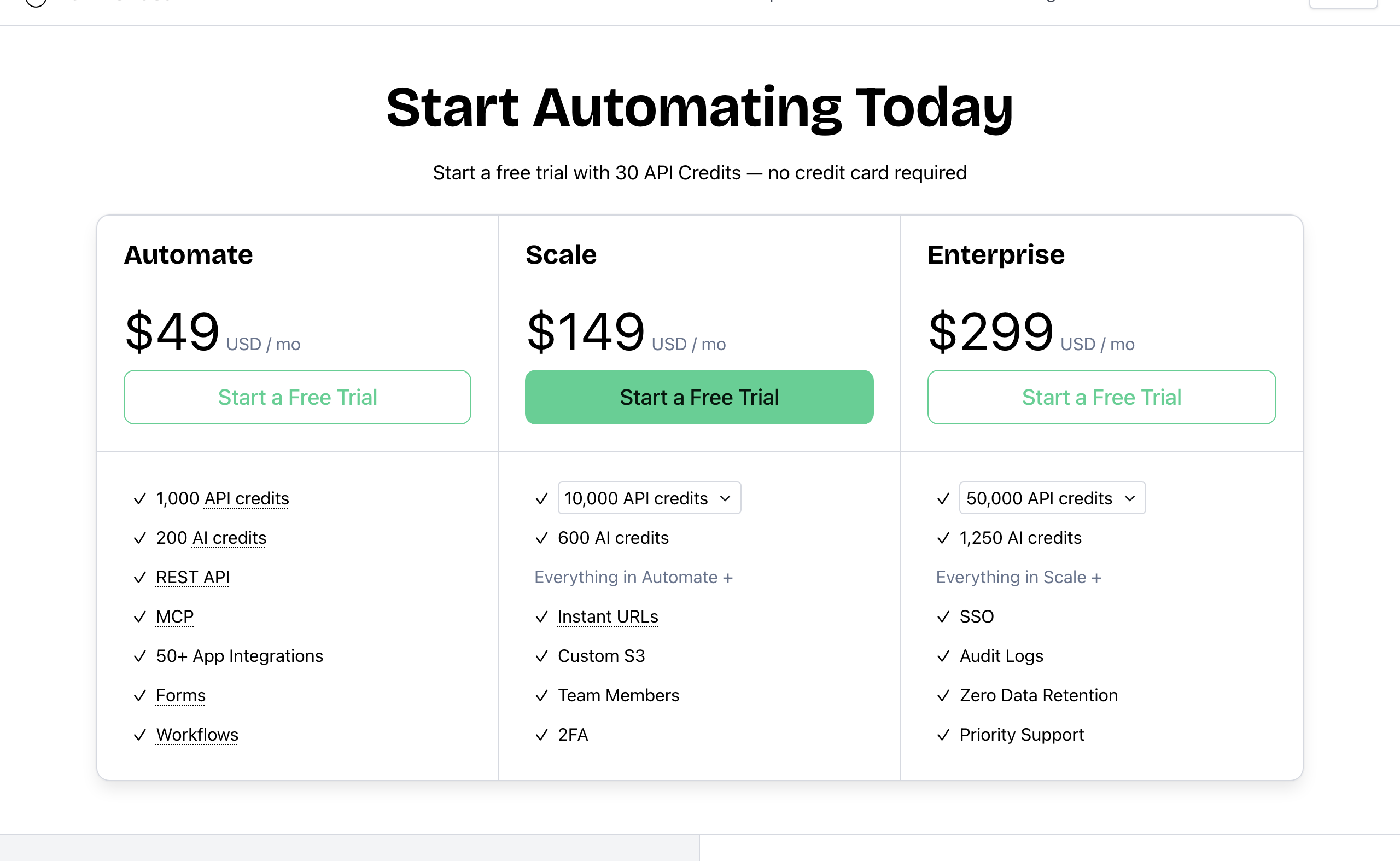 Bannerbear pricing. Source: bannerbear.com/pricing, captured 25 October 2026.
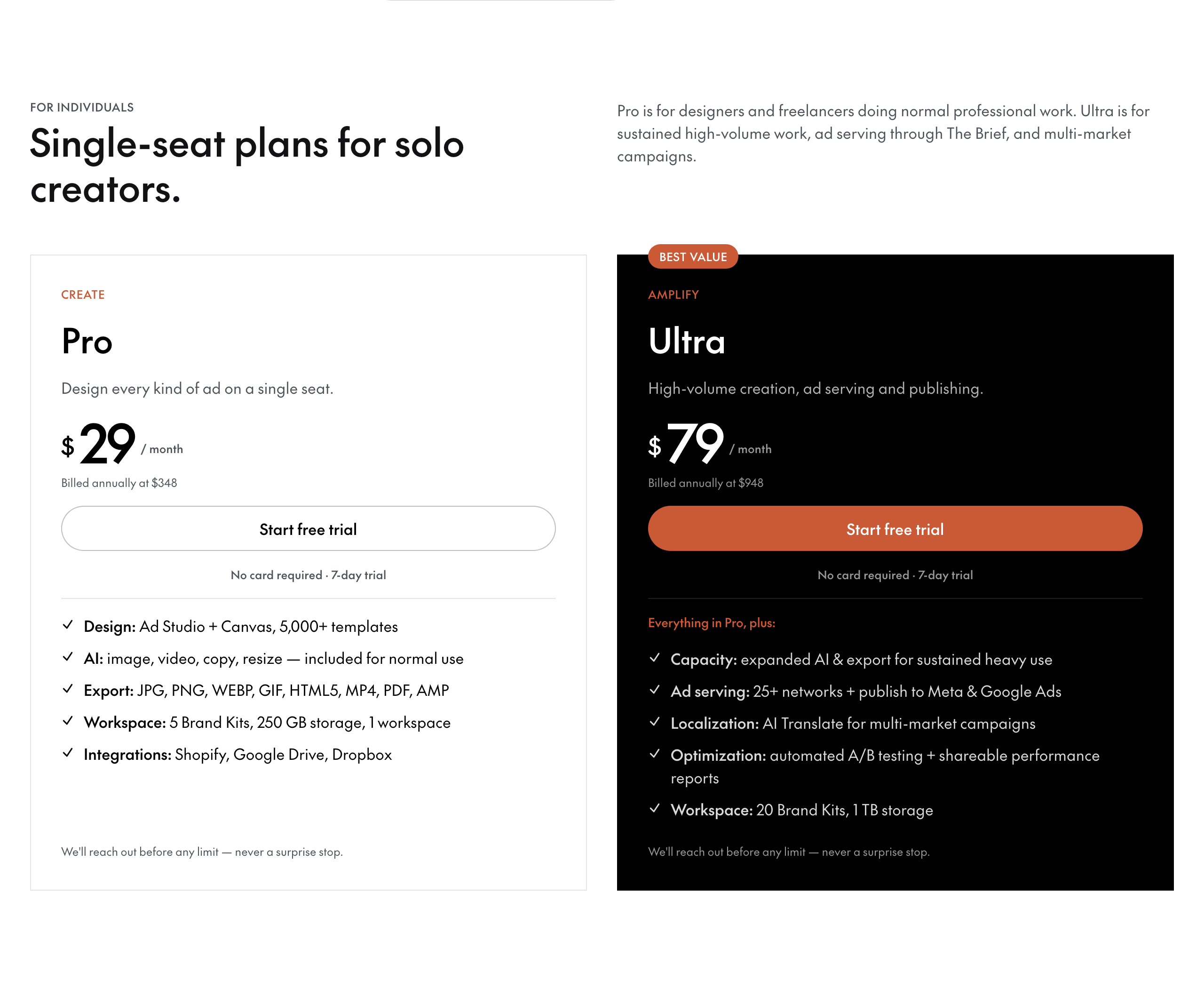 The Brief single-seat plans. Source: thebrief.ai/pricing, captured 25 October 2026.
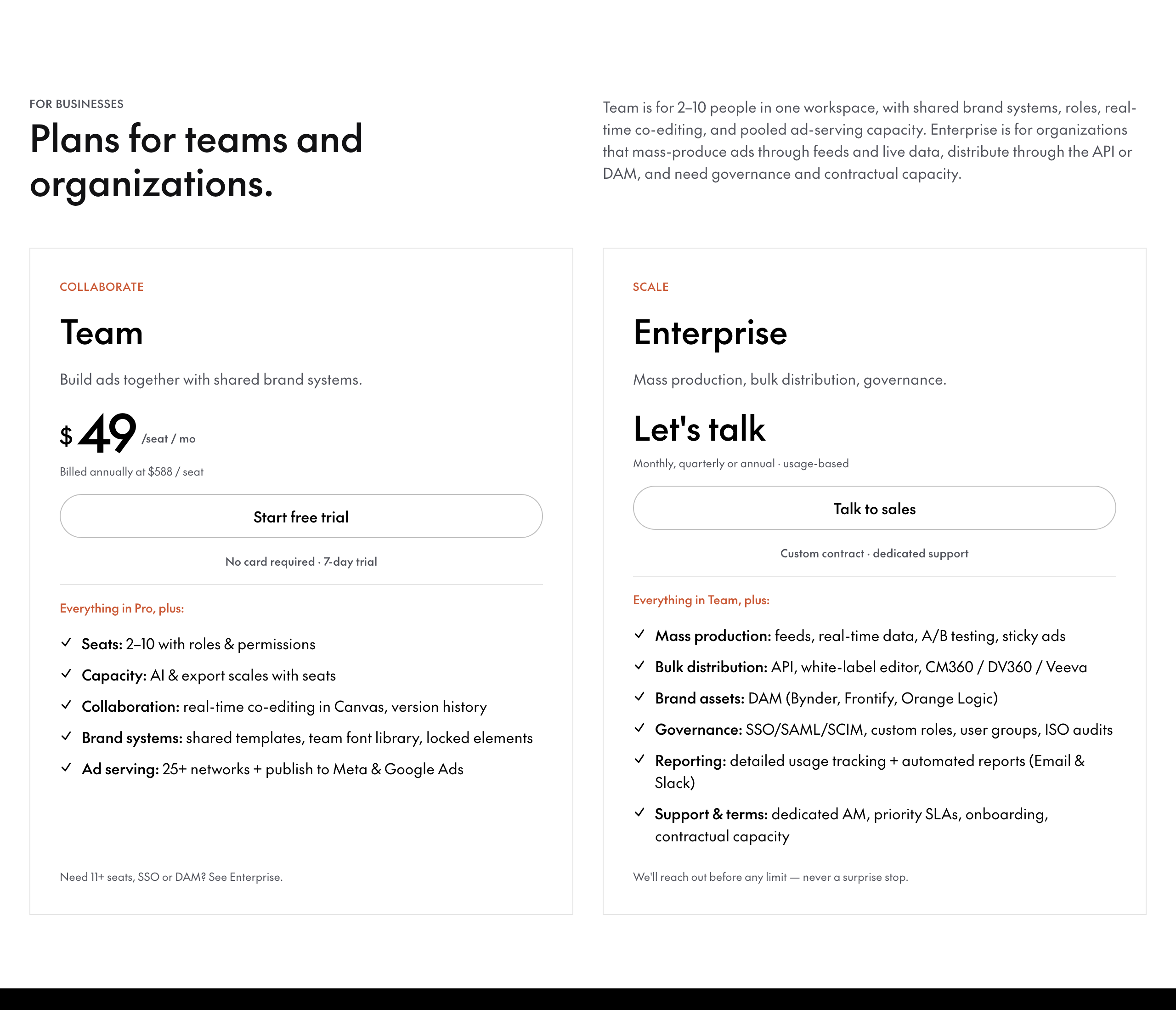 The Brief team and organization plans. Source: thebrief.ai/pricing, captured 25 October 2026.
The Brief costs less to start. Its Create plan is $29 per month billed annually, against $49 per month for Bannerbear's Automate plan. Billed monthly, Create is $39. Bannerbear does not publish annual prices. The Brief also includes a lot on its plans: unlimited designs, 250 GB to 1 TB of storage, no export credits, and a promise on the pricing page: "We'll reach out before any limit - never a surprise stop."
Cost for the same job
Same job: generate standard images from a template through the API, one format, at scale 1, on the cheapest plan that fits.
| Images per month | Bannerbear | The Brief |
|---|---|---|
| 500 | $49 (Automate) | Scale (Enterprise), price not public |
| 1,000 | $49 (Automate) | Scale (Enterprise), price not public |
| 2,500 | $149 (Scale, 10k tier) | Scale (Enterprise), price not public |
| 10,000 | $149 (Scale) | Scale (Enterprise), price not public |
| 25,000 | $247 (Scale, 30k tier) | Scale (Enterprise), price not public |
| 50,000 | $299 (Enterprise) | Scale (Enterprise), price not public |
| 100,000 | $458 (Enterprise) | Scale (Enterprise), price not public |
Bannerbear's API price is public at every volume. The Brief's API is on a plan with no public price. We do not estimate a cost per image for The Brief, because its plans count ad impressions, not images.
Bannerbear's AI features (background removal, AI image models, subtitles, voiceover) use a separate pool of AI credits: 200 per month on Automate, more on higher plans, with top-ups that do not expire. Plan for that pool if your pipeline uses AI on every render.
If you design ads by hand in the editor and do not need the API, The Brief's Create plan, at $29 per month billed annually, is the cheaper way in.
Who should choose The Brief
The Brief (formerly Creatopy) is the right choice if:
- You want a lower entry price for a design tool than Bannerbear's: $29 per month billed annually
- You publish ads to Meta, Google Ads or other ad networks, or serve them through ad tags
- You need HTML5 ads with click tags for each network
- You want automated A/B tests and performance reports for your ads
- You want AI agents to create, optimize and research ads, or AI to write and translate ad copy
- You make ad variations from a CSV file or a scheduled data feed
- Your design team needs brand kits, locked elements, PSD import, bulk editing, approvals and a video editor
- You want to embed a white-label editor in your own product, on the Enterprise plan
- Your security review needs ISO 9001, 27001 or 20000-1
- You store assets in Google Drive, Dropbox or a DAM such as Bynder
Who should choose Bannerbear
Bannerbear is built for teams who:
- Add image, video or PDF generation to their own app, CMS or back-end job, and want the API on a public-price plan
- Want an OpenAPI file, official SDKs and scoped API keys
- Need the image returned in the same request, or 100 images per batch request
- Run multi-step media pipelines from one API call, or give colleagues a form instead of the API
- Process video by API: trim, join, overlay, add audio, subtitles or voiceover
- Render data that changes on every image, with text fitting, barcodes, QR codes and face-aware cropping
- Must keep output in their own S3 bucket
- Want AI assistants such as Claude to create assets through an MCP server
- Want answers from real people: email and chat support from two full-time human support staff, who answer at almost any hour, plus priority support on Enterprise
- Want a provider with a track record: Bannerbear launched in January 2020, publishes a 99.9% uptime figure with a public status page, and runs Enterprise plans of up to 2,000,000 credits per month
FAQ
Is Creatopy the same as The Brief? Yes. Creatopy is now called The Brief, and creatopy.com redirects to thebrief.ai.
Does Creatopy have an API? Yes. The Brief has a public REST API and a GraphQL API. Its pricing page lists the REST API under the Scale (Enterprise) plan only, which has no public price. Bannerbear's REST API is on every paid plan, from $49 per month.
Is Bannerbear or Creatopy cheaper? The Brief costs less to start: $29 per month billed annually ($39 billed monthly), against $49 per month for Bannerbear. For image generation through an API, Bannerbear's prices are public at every volume, and The Brief's API plan has no public price.
Can Bannerbear publish ads to Meta or Google Ads? Ad publishing is not listed on Bannerbear's website as of October 2026. Its output goes to files, your own S3 bucket, webhooks and integrations. The Brief publishes to Meta, Google Ads and 25+ networks.
Which one makes video automatically? Both make video from templates. The Brief edits video in its app. Bannerbear lists trim, crop, join, overlay, audio, subtitles and voiceover as API tools, and can chain them in a workflow.
Can I embed the editor in my own app? The Brief offers a white-label embeddable editor on its Enterprise plan. Bannerbear has an embeddable editor on its older V3 platform, and it still works there. The current V5 platform does not include one.
How we compared
- Sources: each company's marketing website, pricing page, API documentation, help center and blog. For The Brief, we read the 60 pages of its API docs, its 192 marketing and landing pages, its pricing page data and its blog posts. For Bannerbear, the API comparison used its published OpenAPI file, which we read in part.
- Help center access: The Brief's help center (help.thebrief.ai) blocks automated access. We read about 40 of its 118 articles through its API. So "Not listed" on The Brief's side means less than usual.
- Date: all facts were checked on 25 October 2026. Products change; check the current pages before you decide.
- "Not listed" means we searched the company's own sites for the feature and found no mention. It is not proof that the feature does not exist.
- Screenshots show public pages as they appeared on the capture date in each caption.
- Pricing comes from the public pricing pages. The two products use different billing units (API credits and ad impressions), so we do not compare cost per image.
- What we did not measure: support response times, ease of use, rendering speed, output quality and reliability. We did not include third-party reviews.
- Disclosure: this page is published by Bannerbear.