Facts on this page come from each company's public website, documentation, help center and API files, checked on 25 October 2026. See How we compared for the method and sources.
TL;DR: Bannerbear and APITemplate.io both turn templates into images and PDFs through an API and no-code tools. APITemplate.io is built around documents. It converts HTML, web pages and Markdown to PDF, and it gives you page layout controls, Jinja2 templates, SOC 2 Type II and four regional endpoints. It also costs less for plain image generation at most volumes, and it has a free plan. Bannerbear covers more of the media work: it animates templates, edits and generates video, removes and generates backgrounds with AI, and chains these steps into one workflow. Choose APITemplate.io for invoices, reports and low-cost image volume. Choose Bannerbear when the job includes motion, video, AI image editing or multi-step pipelines.
At a glance
| Bannerbear | APITemplate.io | |
|---|---|---|
| Images and PDFs from templates | ✅ Yes | ✅ Yes |
| Animation and video from templates | ✅ Yes | Not listed |
| AI voiceover and auto subtitles | ✅ Yes | Not listed |
| AI background removal | ✅ Yes, in the render | Not listed |
| Text-to-image generation | ✅ Built in (Flux, Nano Banana, GPT Image 2) | Not listed |
| Automatic cropping | ✅ Smart Crop, plus face, group and subject detection | ✅ Smart Crop |
| Multi-step workflows in one API call | ✅ Yes, with a visual builder | No built-in workflow builder listed |
| Render from a URL (Instant URLs) | ✅ Yes, open or HMAC-signed (Scale and up) | ✅ Yes, Direct URL with an auth code (all plans) |
| Batch endpoint | ✅ Up to 100 images per request | Not listed |
| Official MCP server for AI assistants | ✅ Yes | Not listed |
| Figma plugin | ✅ Yes | Not listed |
| SSO and audit logs | ✅ Yes (Enterprise) | Not listed (API request logs are kept 2 weeks) |
| HTML, URL and Markdown to PDF | Not listed | ✅ Yes |
| SOC 2 Type II audit | Not listed | ✅ Yes |
| Regional API endpoints | Not listed | ✅ Yes (4 regions) |
| Free option | One-time trial (30 API credits) | Free plan (50 images or PDFs per month) |
| Starting paid price (monthly billing) | $49/mo | $35/mo (image + PDF plans) |
"Not listed" means we searched the company's website, docs, help center and API files and found no mention, as of October 2026. It does not prove the feature is absent.
What both products do well
Before the differences, the common ground.
- Drag-and-drop template editor with responsive templates, dynamic layers, special objects such as QR codes, fonts and a template library
- Image API with synchronous and asynchronous rendering, webhooks, transparent output and an API to manage templates
- Smart Crop that crops photos automatically
- Bulk generation from one template with different data per image
- PDF output and merging of several PDFs into one PDF
- Image generation from a URL (Bannerbear Instant URLs, APITemplate.io Direct URL)
- Zapier and Make integrations
- Your own storage bucket for output, team workspaces and a data processing agreement (DPA)
- A public status page
Output formats differ a little. Bannerbear returns JPG, PNG, PDF, WebP and AVIF. APITemplate.io returns JPEG and PNG images, and PDF or PDF/A-3b documents.
If your need is "fill a template with data and get an image back", either product will do the job. The differences are in what happens around that render.
Video and animation
Bannerbear makes video and animation from templates, with the same layers you use for images.
- Keyframe timeline with easing, delay and hold controls, plus an Auto Animate option and an animation presets endpoint
- Per-word text effects, animated backgrounds and Lottie layers
- Transparent animations to place over other video
- Convert an image template into an animation template
- Video tools: trim, crop, resize, join, overlay, colour filters, audio, slideshows, GIF previews, thumbnails and cover art
- Auto subtitles and AI voiceover
- AI video generation with Seedance, Kling and Veo models
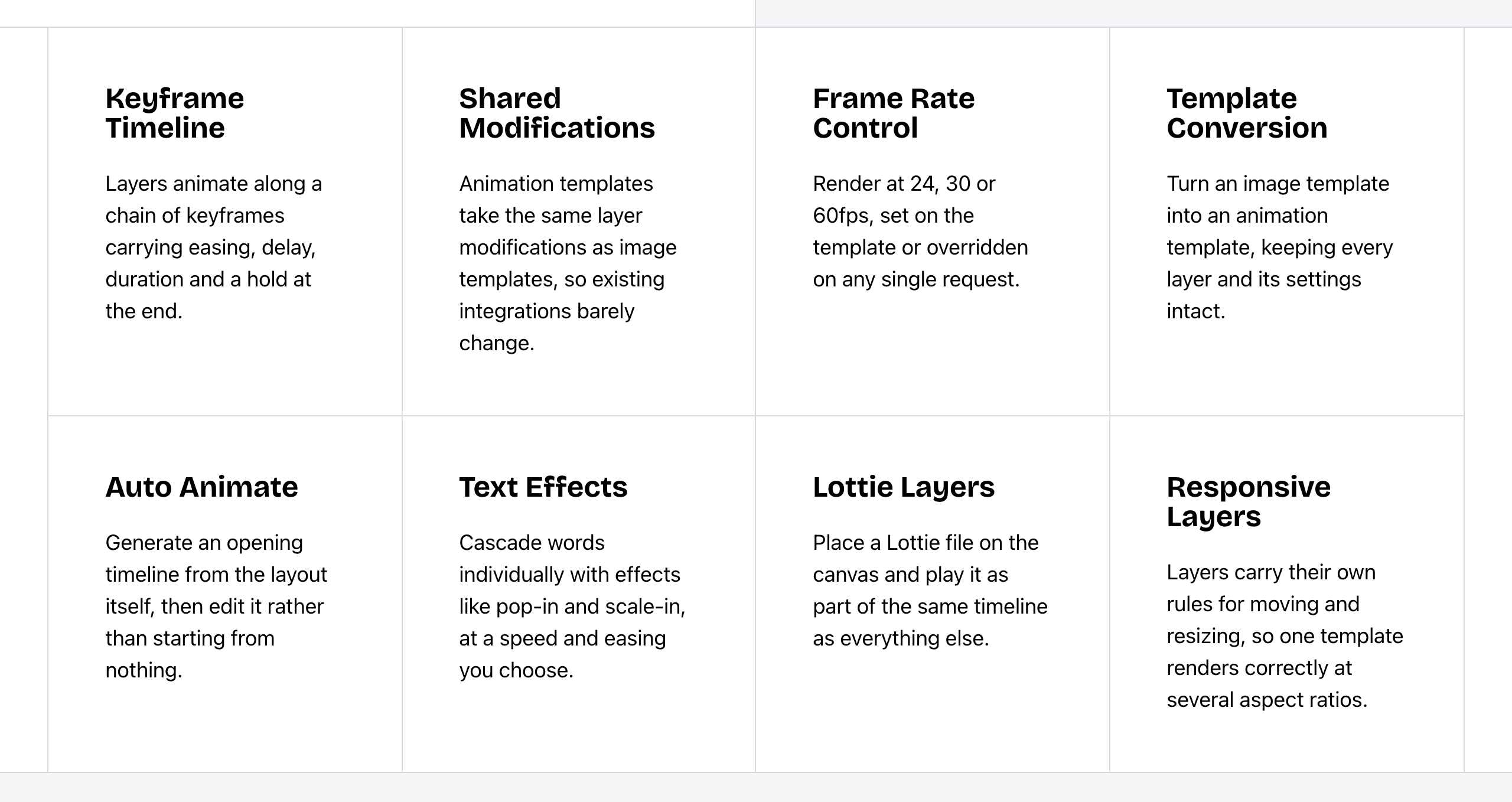 Bannerbear Animation API features. Source: bannerbear.com/v5/products/animation-api, captured 25 October 2026.
APITemplate.io makes images and PDFs. It has no video or animation product listed on its website as of October 2026. Video joining, auto subtitles and AI voiceover are also not listed. It does merge PDF files.
What this means: this is a difference in what each product covers. If your output includes social video, animated ads or subtitled clips, Bannerbear makes them from templates, and it can convert your image templates into animation templates. With APITemplate.io, you would make the video in a separate tool.
Bottom line: choose Bannerbear if any of your assets move.
AI image editing
Both products have Smart Crop. APITemplate.io's Smart Crop finds the best crop for a photo. Bannerbear adds AI detection that crops around the clearest face, the largest face, a group or a subject, with a choice of zoom.
Bannerbear also applies AI inside the render:
- Background removal from an uploaded photo
- Background generation from a text prompt
- Text-to-image generation with a choice of models (Flux Schnell, Flux 1.1 Pro, Nano Banana, GPT Image 2)
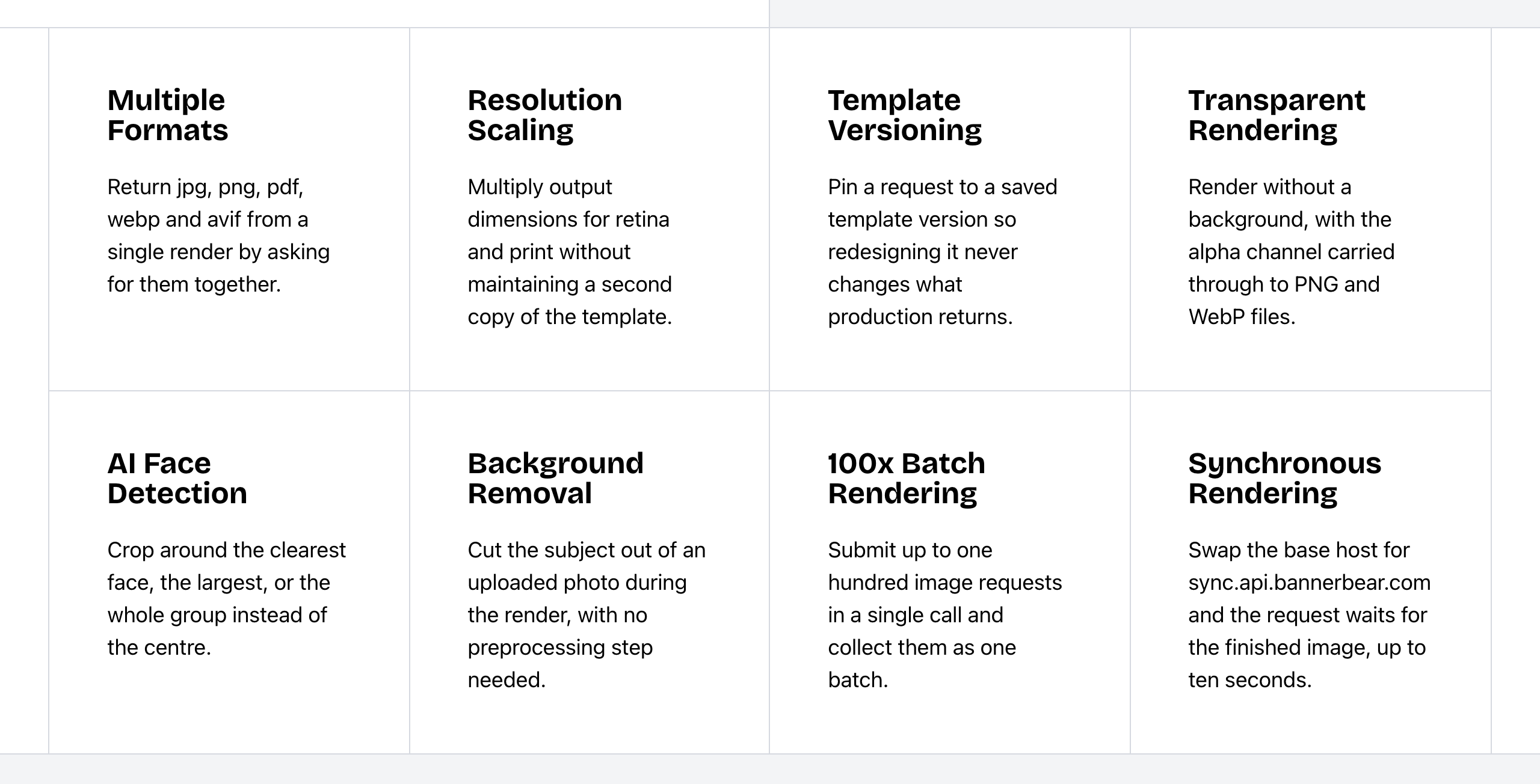 Bannerbear Image API features. Source: bannerbear.com/v5/products/image-api, captured 25 October 2026.
These AI features use a separate AI credit pool. Each plan includes some (200 AI credits per month on Automate), and you can top it up.
AI background removal, AI background generation, AI image generation and face or subject detection are not listed on APITemplate.io's website as of October 2026.
What this means: if your source images are product photos, user uploads or headshots, Bannerbear can clean them up in the same request that renders the final image. With APITemplate.io, you would prepare those photos first in another tool.
Bottom line: choose Bannerbear for e-commerce catalogs, marketplace listings and team photo pipelines.
Workflows, automation and AI agents
Bannerbear Workflows chain image, animation and video-tool steps into one API endpoint. For example: render a template, animate it, add subtitles and a voiceover, then export. You build them in a visual builder, see each step's inputs and outputs in the run history, and can publish a workflow with its templates.
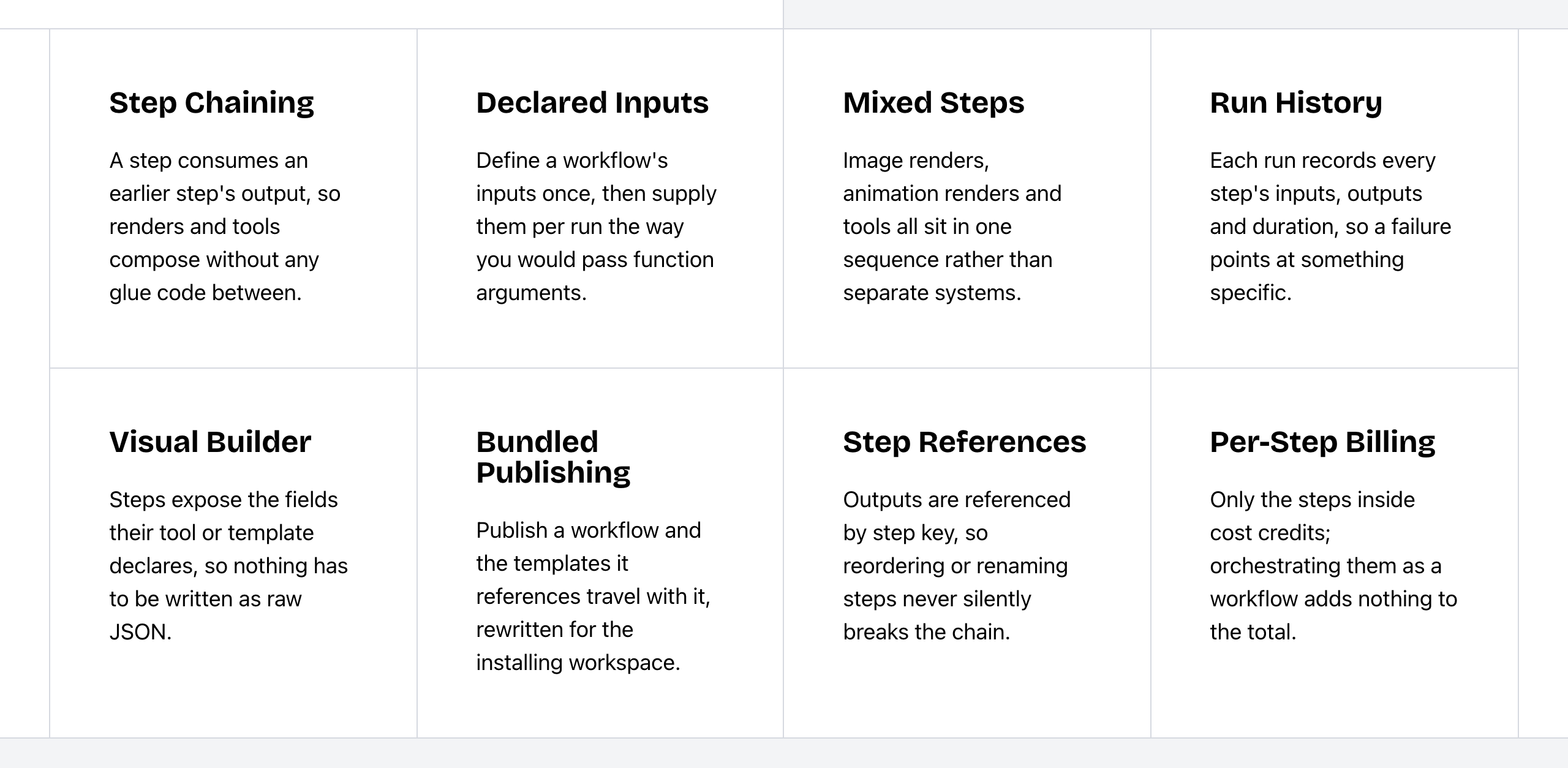 Bannerbear Workflows features. Source: bannerbear.com/v5/products/workflow-api, captured 25 October 2026.
APITemplate.io documents automated workflows through Zapier, Make, n8n, Airtable and webhooks. A built-in workflow builder is not listed on its website as of October 2026.
Other differences:
- Batch endpoint: both products do bulk generation from one template. Bannerbear also has a batch endpoint that takes up to 100 images in one request. No batch endpoint is listed for APITemplate.io.
- Forms: Bannerbear has hosted, embeddable forms that create images, animations or workflow runs when someone fills them in. Forms are not listed on APITemplate.io's website.
- AI assistants: Bannerbear has an official MCP server, hosted and local, for Claude, Cursor, ChatGPT and other agents. No official MCP server is listed for APITemplate.io. Third-party MCP connectors for APITemplate.io exist.
- Airtable: Bannerbear connects to an Airtable base with field mapping. APITemplate.io has an Airtable page, and generation runs through Zapier, Make or scripts.
Bottom line: both products automate through Zapier and Make. Choose Bannerbear if one asset takes several processing steps, or if you want to start renders from a form or an AI assistant.
Templates and design
Both products have a drag-and-drop editor, responsive templates, fonts, dynamic layers and special objects. Bannerbear adds more controls on top of the editor:
- Figma and Sketch plugins that turn designs into templates
- Text fitting, which shrinks text or grows the box to fit
- Multilingual text, including Chinese, Japanese and right-to-left scripts such as Arabic and Hebrew
- Version history with revert, and render requests that name a template version
- Resolution scaling (1x to 4x) and image quality settings
- CMYK conversion for print PDFs
- Fit and position options for picture layers
- An asset library for uploaded files
These controls are not listed on APITemplate.io's website as of October 2026. APITemplate.io stores generated files in your own storage bucket on its Enterprise plans.
Two smaller differences:
- Template limits: Bannerbear's help center says there is no limit on templates. APITemplate.io gives unlimited templates on its Enterprise plans; smaller plans have set limits (for example, 15 templates on Starter).
- Shapes: Bannerbear has many shape types (stars, arrows, polygons and custom SVG). APITemplate.io's docs mention rectangles, circles and lines.
APITemplate.io includes stock images from Unsplash and Pexels in its editors. Bannerbear does not offer stock images in its editor.
Bottom line: choose Bannerbear if your designers work in Figma or Sketch, or if one template must render many sizes and languages.
Document and PDF generation: where APITemplate.io leads
APITemplate.io is built for documents such as invoices, reports and certificates.
- HTML, URL and Markdown to PDF, each with its own API endpoint
- Two PDF editors: an HTML, CSS and JavaScript code editor, and a rich-text visual editor
- Jinja2 template language with variables, loops, conditions and filters for QR codes, barcodes, tables, dates and currency
- Page layout controls: headers and footers with page numbers, paper size and margins, page breaks and repeating table headers
- Charts from ApexCharts, Chart.js or D3.js, and custom CSS and JavaScript
- Image optimization inside PDFs (downsampling and resizing)
- E-invoices in ZUGFeRD or Factur-X format (marked experimental)
- Delivery options: CDN storage with a set expiry, or a direct download with a custom file name
None of these are listed on Bannerbear's website as of October 2026. Bannerbear has related features that work differently: a drag-and-drop layer editor (not a rich-text PDF editor), render-level quality settings (not downsampling of images inside a PDF) and a custom S3 bucket option (not CDN storage with an expiry setting).
Bannerbear makes PDFs from its layer-based design templates. Any image template can return a print-ready PDF, and you can merge up to 50 JPG, PNG and PDF files into one PDF. It also has tools to flatten a PDF for print and to convert a PDF to an image. APITemplate.io lists PDF-to-PNG and PDF-to-JPEG converters; a flatten-for-print tool is not listed.
Bottom line: if your main output is documents built from HTML or data, such as invoices and reports, APITemplate.io is the better fit. Bannerbear's PDFs suit designed pages such as certificates, flyers and print-ready graphics.
Integrations
Both connect to Zapier and Make, both generate images from a URL, and both send webhooks.
- Bannerbear lists 50+ data-source integrations with field mapping and write-back. It also has a WordPress plugin that makes Open Graph images and Pinterest pins, a Webflow CMS integration that pulls items and can write image URLs back, a Ghost integration that pulls posts and pages, and a Figma plugin.
- APITemplate.io has guides for n8n, Bubble, Power Automate, Pipedream and UiPath, as well as Airtable.
No WordPress plugin, Webflow CMS integration or Ghost integration is listed on APITemplate.io's website as of October 2026. You can still place an APITemplate.io image URL in those sites.
Developer experience
| Bannerbear | APITemplate.io | |
|---|---|---|
| API specification | OpenAPI 3.1 file for the V5 REST API | OpenAPI 3.0 file for API v2 |
| Official libraries | Ruby, Node, Python, PHP | Python, C#, Java, PHP, JavaScript, plus a UiPath integration |
| API keys | Scoped keys (22+ permission scopes), browser-origin allowlists, workspace keys | Separate team keys and key rotation; scopes and origin allowlists not found |
| API request logs | Yes | Yes, kept 2 weeks by default |
| Support channels | Priority support on Enterprise | Email support on all plans; SLA support on Enterprise |
| Status page | Public status page | Public status page with notifications |
| Team access | Team members on Scale and up | Shared team workspaces on Standard and up |
These are what each company states. We did not test support, speed or uptime.
APITemplate.io has libraries in more languages. Bannerbear's scoped keys help when you give limited keys to front-end apps or AI agents.
Security and compliance
The two companies list different controls.
| Bannerbear | APITemplate.io | |
|---|---|---|
| SOC 2 Type II audit | Not listed | Yes |
| Regional endpoints (data kept in region) | Not listed | Singapore, Frankfurt, N. Virginia, Sydney |
| SLA | Not listed | Enterprise add-on (figures not stated) |
| File retention policy | Not listed | Yes |
| Fixed outbound IP addresses | Not listed | Yes, per region |
| Two-factor authentication | Scale plan and up | Listed, with no plan restriction stated |
| DPA for GDPR | Yes | Yes |
| Team member roles and permissions | Yes (Scale and up) | Yes (per-member permissions) |
| Single sign-on (SSO) | Enterprise plan | Not listed |
| Audit log of user actions | Enterprise plan | Not listed (API request logs are kept 2 weeks) |
| Zero data retention | Enterprise plan | Not listed |
| Restrict team sign-up to your email domain | Yes | Not listed |
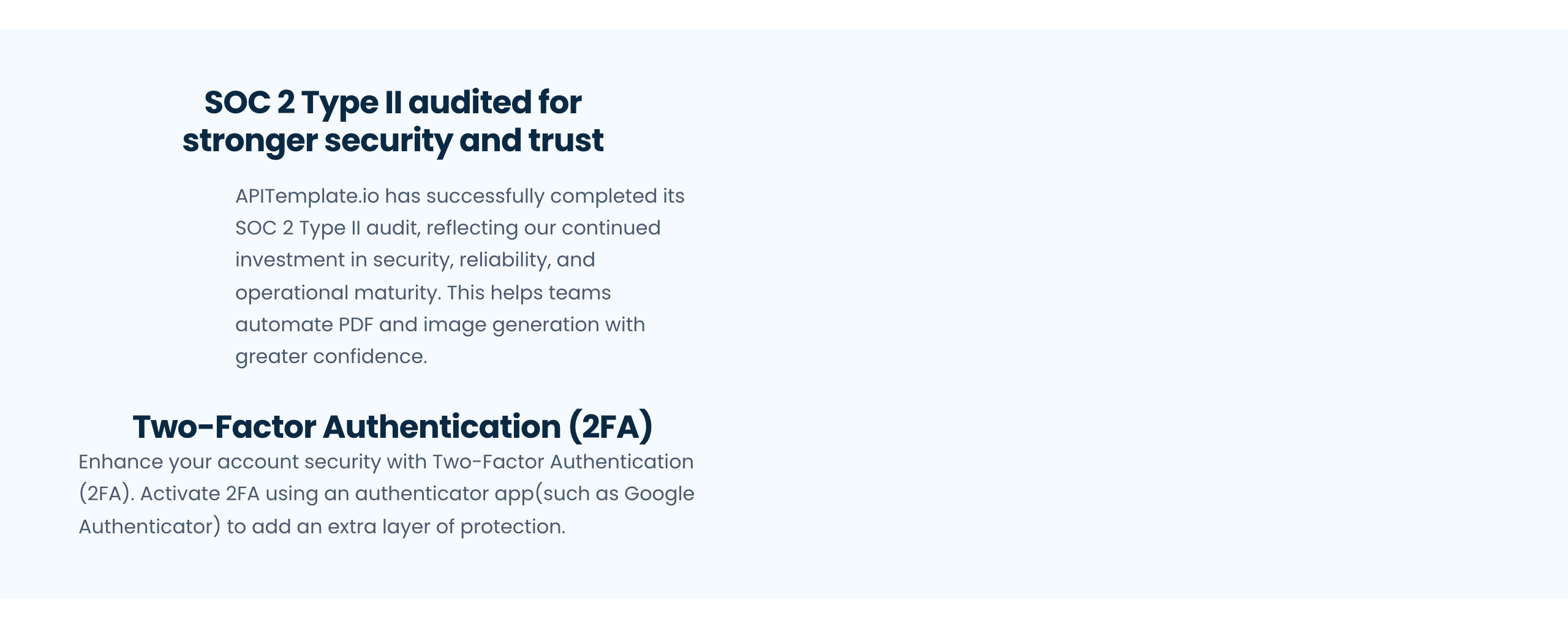 APITemplate.io security features. Source: apitemplate.io/enterprise-features, captured 25 October 2026.
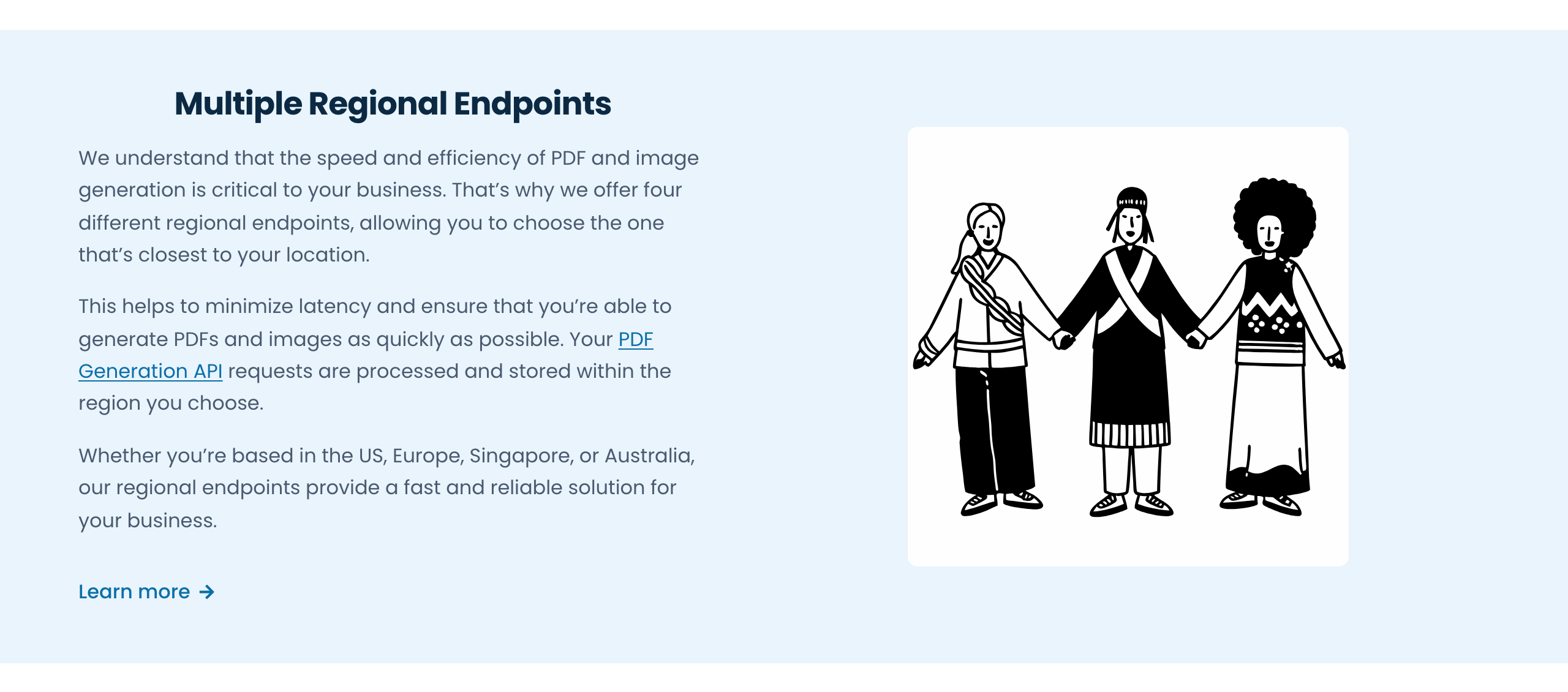 APITemplate.io regional endpoints. Source: apitemplate.io/enterprise-features, captured 25 October 2026.
Bottom line: if your security review asks for a SOC 2 report or data kept in a set region, APITemplate.io lists both. If it asks for SSO, audit logs of user actions or zero data retention, Bannerbear's Enterprise plan lists them. Ask each company about the items it does not list.
Pricing
| Bannerbear | APITemplate.io (image + PDF plans) | |
|---|---|---|
| Free option | One-time trial: 30 API credits, no card | Free plan: 50 images or PDFs per month, no card |
| Entry plan | Automate: $49/mo, 1,000 credits | Starter: $35/mo, 1,500 documents |
| Mid plans | Scale: $149–$296/mo, 10,000–40,000 credits | Standard: $89/mo, 9,000 documents |
| High volume | Enterprise: from $299/mo, 50,000 credits and up | Enterprise: $179/mo, 20,000 · Enterprise 40K: $280/mo, 40,000 |
| Annual pricing | Not shown on the pricing page | Public: $29, $69, $139 and $224 per month |
| Usage above the plan | Requests stop when API credits run out; AI credits can be topped up | Pay-as-you-go on Enterprise, invoiced at the end of the cycle |
| Unused credits | Reset each month | Do not roll over |
| AI features | Separate AI credit pool (200/mo on Automate, 600–1,250 on Scale) | — |
APITemplate.io also sells PDF-only plans, from $24 per month for 3,000 documents. We leave them out of the image comparison below.
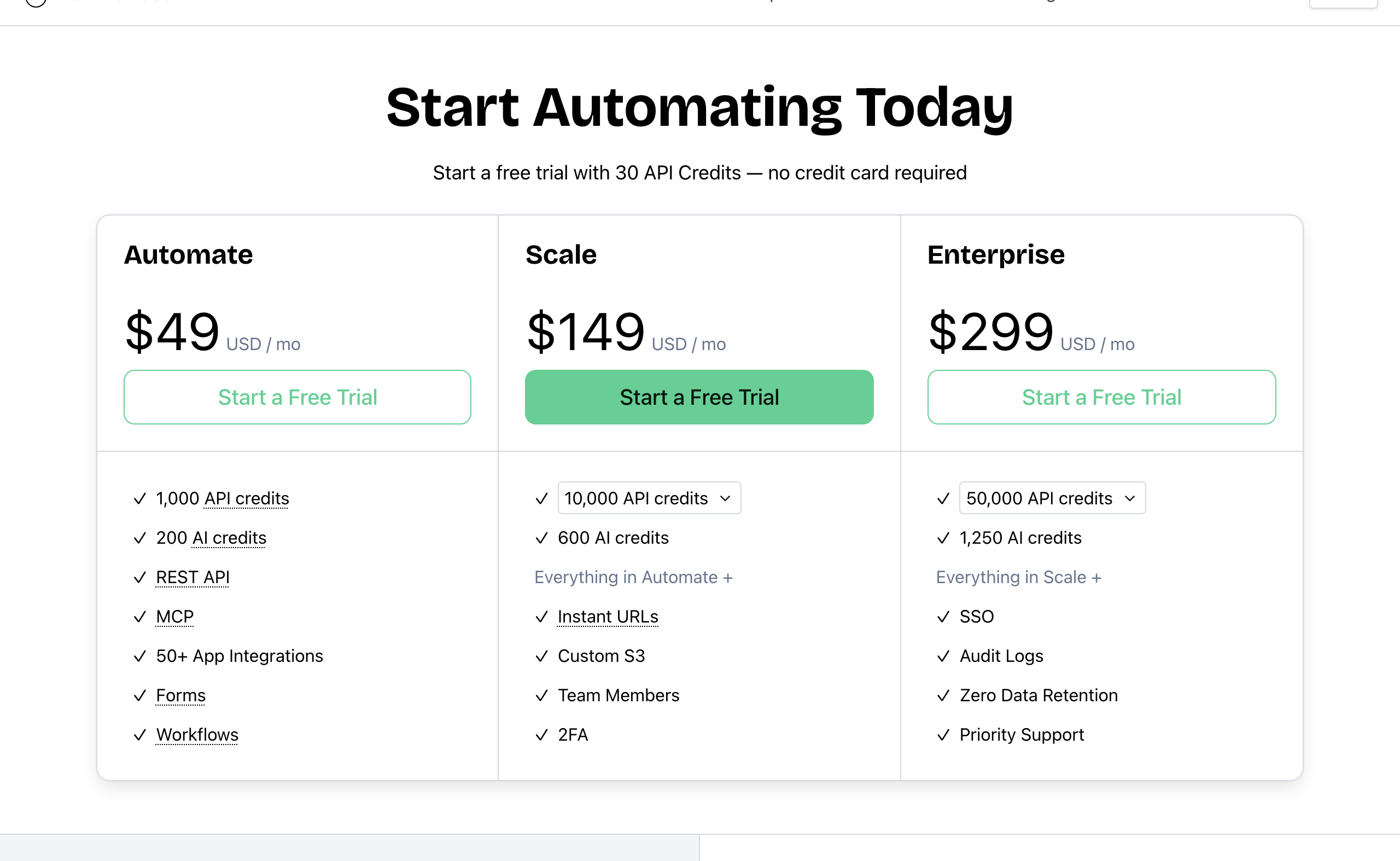 Bannerbear pricing (monthly). Source: bannerbear.com/pricing, captured 25 October 2026.
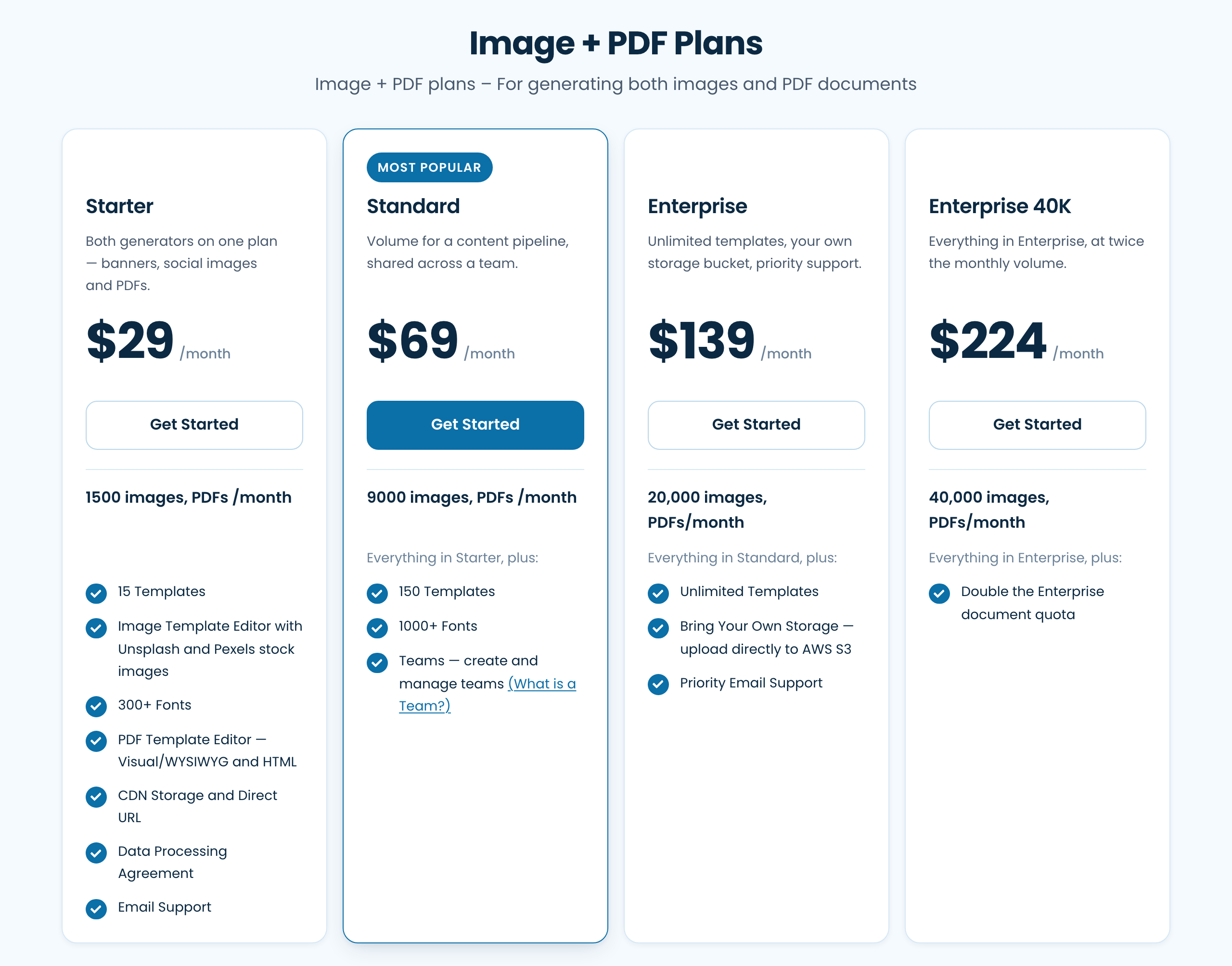 APITemplate.io Image + PDF plans, annual-billing prices (monthly prices are $35, $89, $179 and $280). Source: apitemplate.io/pricing, captured 25 October 2026.
Cost for the same job
Standard images, one output format, on the cheapest plan that fits, monthly billing. We count one APITemplate.io document as one image, as its FAQ states.
| Images per month | Bannerbear | APITemplate.io | Cheaper |
|---|---|---|---|
| 50 | $49 (Automate) | $0 (Free) | APITemplate.io |
| 500 | $49 (Automate) | $35 (Starter) | APITemplate.io |
| 1,000 | $49 (Automate) | $35 (Starter) | APITemplate.io |
| 1,500 | $149 (Scale 10k) | $35 (Starter) | APITemplate.io |
| 5,000 | $149 (Scale 10k) | $89 (Standard) | APITemplate.io |
| 10,000 | $149 (Scale 10k) | $179 (Enterprise) | Bannerbear |
| 20,000 | $198 (Scale 20k) | $179 (Enterprise) | APITemplate.io |
| 25,000 | $247 (Scale 30k) | $280 (Enterprise 40K) | Bannerbear |
| 40,000 | $296 (Scale 40k) | $280 (Enterprise 40K) | APITemplate.io |
| 50,000 | $299 (Enterprise) | Not public (Enterprise plus pay-as-you-go) | Cannot compare |
For plain image generation, APITemplate.io costs less at most volumes. It also has a free plan, and Bannerbear does not. APITemplate.io on annual billing is cheaper than Bannerbear monthly billing at every listed volume up to 40,000. Bannerbear's annual prices are not public.
The comparison changes when your pipeline needs the video, animation or AI image features above. They are available on Bannerbear's plans: video and animation use API credits, and AI features use the AI credit pool. They are not listed on APITemplate.io's website at any price, so you would add a separate tool for them, at its own cost.
On both products, unused monthly credits do not roll over.
We do not compare PDF prices, because the two products make PDFs in different ways (HTML or URL source against a layer template). We do not compare video prices, because APITemplate.io lists no video product.
Who should choose APITemplate.io
APITemplate.io is the right choice if:
- You mainly make documents, such as invoices, reports or certificates, from HTML, a URL or Markdown
- You need page controls: headers, footers, page numbers, paper size, page breaks, charts or Jinja2 logic
- You need ZUGFeRD or Factur-X e-invoices
- Price is the main factor for plain images, or you want a free plan
- Your security review asks for SOC 2 Type II or data kept in a set region
- You want shared team workspaces on a mid-priced plan ($89 per month on Standard)
- You want to pay for usage above your plan instead of having requests stop
- Your team codes in C# or Java, or uses UiPath
- You want Unsplash and Pexels stock images in the editor
Who should choose Bannerbear
Bannerbear is built for teams who:
- Make social video, animated ads or subtitled clips from templates, including image templates converted to animation
- Add narration with AI voiceover, or generate video with AI models
- Start from photos that need cleanup: product images, user uploads, headshots
- Want one API call to run a multi-step pipeline, such as render, animate, subtitle and export
- Let non-technical users or AI assistants start renders, through forms or an MCP server
- Design in Figma or Sketch and render many sizes and languages from one template
- Need SSO, audit logs or zero data retention for a security review
- Want answers from real people: email and chat support from two full-time human support staff, who answer at almost any hour, plus priority support on Enterprise
- Want a provider with a track record: Bannerbear launched in January 2020, publishes a 99.9% uptime figure with a public status page, and runs Enterprise plans of up to 2,000,000 credits per month
FAQ
Can APITemplate.io make video? No video or animation product is listed on APITemplate.io's website as of October 2026. It makes images and PDFs. Bannerbear makes video and animation from templates, with subtitles, voiceover and video editing tools.
Is Bannerbear or APITemplate.io cheaper? APITemplate.io costs less for plain image generation at most volumes, and it has a free plan with 50 images or PDFs per month. For example, 5,000 images per month cost $89 on APITemplate.io's Standard plan and $149 on Bannerbear's Scale plan. Bannerbear's plans include video, animation and AI image editing, which are not listed on APITemplate.io's website.
Which is better for invoices and PDFs? APITemplate.io. It converts HTML, URLs and Markdown to PDF, and it has headers, footers, page settings, Jinja2 templates and e-invoice output. Bannerbear makes PDFs from its design templates, which suits designed pages more than data-heavy documents.
Is Bannerbear an APITemplate.io alternative? Yes, for image generation. Both render images from templates through an API, Zapier and Make. Bannerbear adds video, animation, AI image editing and multi-step workflows. For HTML-based documents, APITemplate.io covers more.
Does APITemplate.io have AI background removal? AI background removal is not listed on APITemplate.io's website as of October 2026. Both products have Smart Crop. Bannerbear also removes and generates backgrounds in the render.
Can I use either one from an AI assistant? Bannerbear has an official MCP server. No official MCP server is listed for APITemplate.io, but third-party MCP connectors for it exist.
How we compared
- Sources: each company's marketing website and pricing page, API documentation and OpenAPI file, and help center. For APITemplate.io, we also checked its GitHub organisation and its status pages.
- Date: all facts were checked on 25 October 2026. Products change; check the current pages before you decide.
- "Not listed" means we searched the company's own sites for the feature and found no mention. For the main claims on this page, we read all 206 pages in APITemplate.io's sitemaps and its API v2 file, and ran several web searches for each claim. It is not proof that the feature does not exist.
- Screenshots show public pages as they appeared on the capture date in each caption.
- Pricing comes from the public pricing pages. APITemplate.io's monthly and annual labels come from the pricing page's HTML. Its FAQ states that each image or PDF counts as one credit. It does not say whether a request for both JPEG and PNG costs one or two credits, so our table assumes one format.
- What we did not measure: support response times, ease of use, rendering speed and reliability. We did not include third-party reviews.
- Disclosure: this page is published by Bannerbear.