Facts on this page come from each company's public website, documentation, help center and pricing page, checked on 25 October 2026. See How we compared for the method and sources.
TL;DR: Bannerbear and Robolly both turn your templates into images, PDFs and short videos through an API, render links, forms and no-code tools. Robolly costs less for plain JPG images at low and mid volume, it does not charge for repeat renders of the same file, and it has a Datasets grid and a Google Sheets add-on for spreadsheet-driven bulk generation. Bannerbear does more of the work inside the render: AI background removal and generation, AI image and video generation, automatic subtitles, AI voiceover, and multi-step workflows that run in one API call. It also has official SDKs, scoped API keys and enterprise security controls. Choose Robolly if you render simple templates from a spreadsheet and price is the main factor. Choose Bannerbear if your pipeline needs AI image editing, produced video, or a developer platform with SSO, audit logs and a signed DPA.
At a glance
| Bannerbear | Robolly | |
|---|---|---|
| Images, PDFs and video from templates | ✅ Yes (video on all plans) | ✅ Yes (video as a paid add-on) |
| AI background removal | ✅ Yes, in the render | Not listed |
| Text-to-image generation | ✅ Built in (Flux, Nano Banana, GPT Image 2) | Not listed; Robolly describes itself as template-based |
| AI video generation | ✅ Yes (Seedance, Kling, Veo) | Not listed |
| Automatic subtitles | ✅ Yes | Not listed |
| AI voiceover | ✅ Yes | Not listed |
| Multi-step workflows in one API call | ✅ Yes, with a visual builder | Not listed |
| Batch API endpoint | ✅ Up to 100 images per request | Not listed (bulk through Datasets and Google Sheets) |
| Spreadsheet grid with CSV import (Datasets) | Not listed | ✅ Yes |
| Google Sheets add-on | Not listed | ✅ Yes |
| Free repeat renders (smart caching) | Not listed | ✅ Yes |
| Render links (image from a URL) | ✅ Scale plan and up | ✅ All plans |
| Official SDKs | ✅ Ruby, Node, Python, PHP | Not listed |
| SSO and audit logs | ✅ Yes (Enterprise) | Not listed |
| MCP server for AI assistants | ✅ Yes | ✅ Yes |
| Starting price | $49/mo | $39/mo |
"Not listed" means we searched the company's website, docs, help center and pricing page and found no mention, as of October 2026. It does not prove the feature is absent.
What both products do well
Before the differences, the common ground. Both products cover the core job.
- Template editor with text auto-fitting, custom fonts, QR codes and barcodes, conditional styling and image filters
- Image API with synchronous rendering, several output formats, high-resolution output and a DPI setting for print
- PDF output, including multi-page PDFs
- Video from templates, including slideshows, video inside a template and background audio
- No-code generation: both have forms that non-technical users fill in to create assets, and both render an image from a URL with parameters
- Integrations with Zapier, Make and Airtable
- MCP server, so AI assistants such as Claude can list templates and render assets
- Template gallery, team members, a public status page and a free trial with no credit card
If your need is "fill a template with data and get an image back", either product will do the job. The differences are in what happens around that render, and in how you feed it data.
AI image editing and generation
Bannerbear applies AI inside the render. You can remove a photo's background, generate a new background from a text prompt, and crop around a face, a group or the main subject automatically. It also generates images from a prompt with a choice of models (Flux Schnell, Flux 1.1 Pro, Nano Banana, GPT Image 2), generates short video clips with Seedance, Kling 2.5 Turbo Pro and Veo 3.1 Fast, and can create an opening animation from a template's layout (Auto Animate). These features use a separate AI credit pool that comes with each plan.
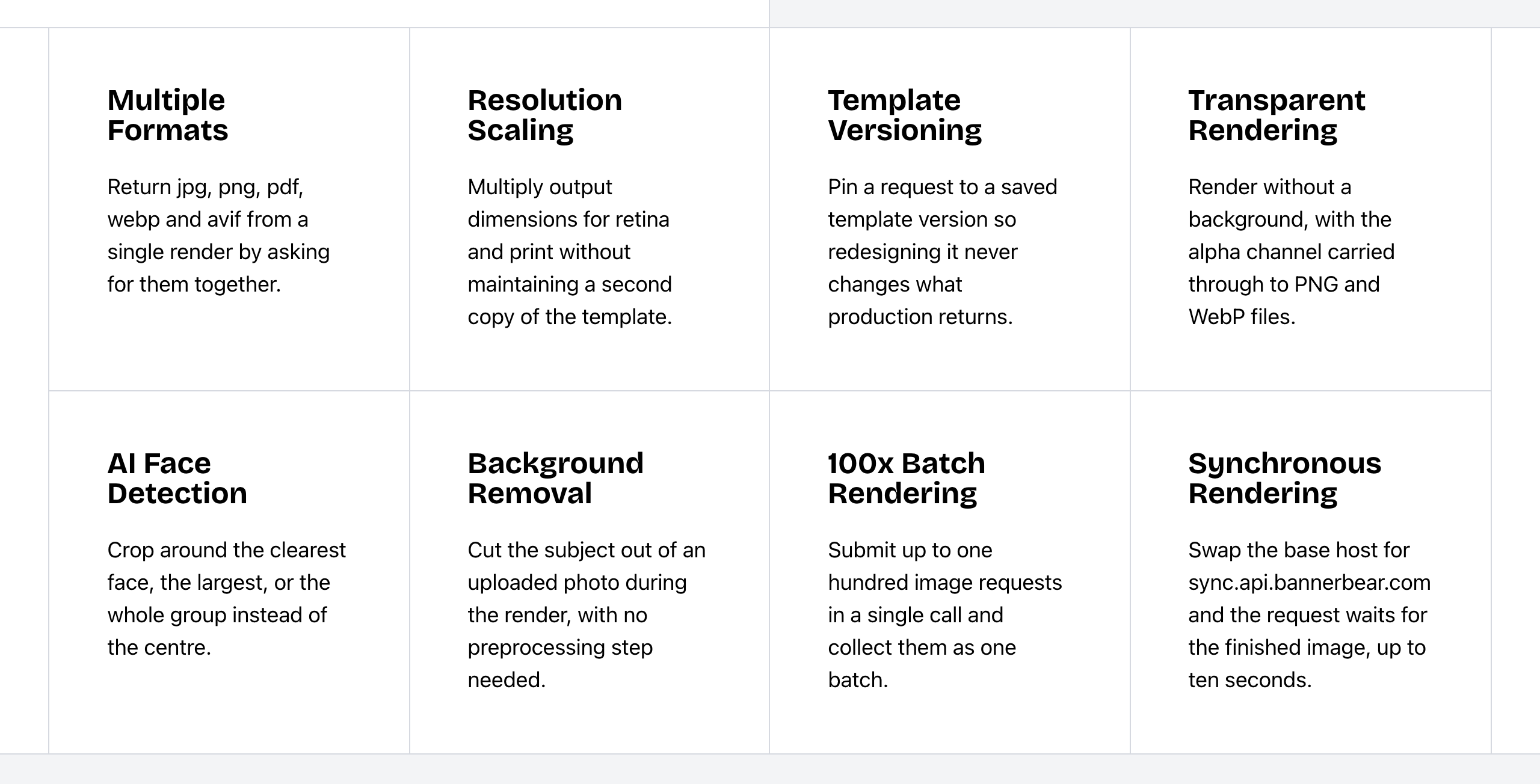 Bannerbear Image API features. Source: bannerbear.com/v5/products/image-api, captured 25 October 2026.
Robolly is template-based. Its image API page contrasts it with generative AI tools such as DALL·E, Flux and Gemini. Its editor has an "Auto image from text" feature that picks a stock photo from Pexels or Unsplash based on text in the template, an in-editor image search, and a library of 5 million+ royalty-free images in Datasets. AI background removal, AI background generation, face detection, and AI image or video generation are not listed on Robolly's website as of October 2026.
What this means: if your source images are product photos, user uploads or team headshots, Bannerbear can clean and crop them in the same request that renders the final image. With Robolly, you would prepare those images first in another tool. If you only need a fitting stock photo, Robolly's auto image feature may be enough.
Bottom line: choose Bannerbear for e-commerce catalogs, marketplace listings, profile images, and any pipeline where the input photos are not ready to use or where you need new imagery.
Video and motion
Both products make video from templates. Both can build slideshows, place video inside a template and add audio.
Robolly sells video as monthly add-ons on top of a plan: Animation ($14/mo, videos up to 10 seconds), Movie ($39/mo, up to 20 seconds, multi-clip and background music) and Advanced Movie ($79/mo, up to 60 seconds). Its render-credit rules mark video credits as beta. Each element can have an animation type, a duration preset (fast, medium or slow) and a delay. Robolly also has two video features that are not listed on Bannerbear's website: timed modifications, which set when each element appears and disappears in a clip, and a built-in library of 100,000+ royalty-free videos. Both come with the Advanced Movie add-on.
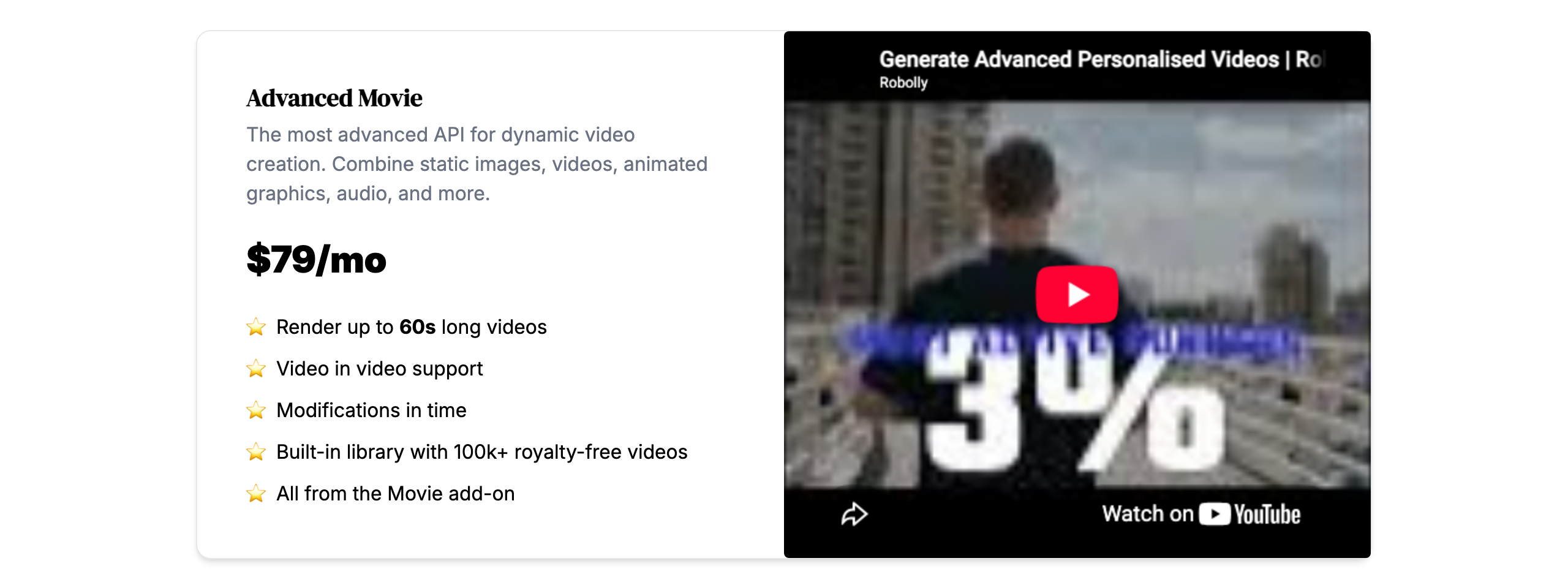 Robolly's Advanced Movie video add-on. Source: robolly.com/pricing, captured 25 October 2026.
Bannerbear includes animation on all plans and has a broader toolset around the video:
- Keyframe timeline with easing, delay and hold controls, grouped presets and animatable blur, at 24, 30 or 60 fps
- Automatic subtitles with style presets, 1 to 10 words per segment, and support for non-English audio
- AI voiceover from text
- Lottie layers, per-word text effects, animated backgrounds and transparent animations to overlay on other video
- Conversion of an image template into an animation template, and an endpoint that applies animation presets
- Video tools: trim, crop, resize, join and colour filters, plus GIF previews, thumbnails and cover art
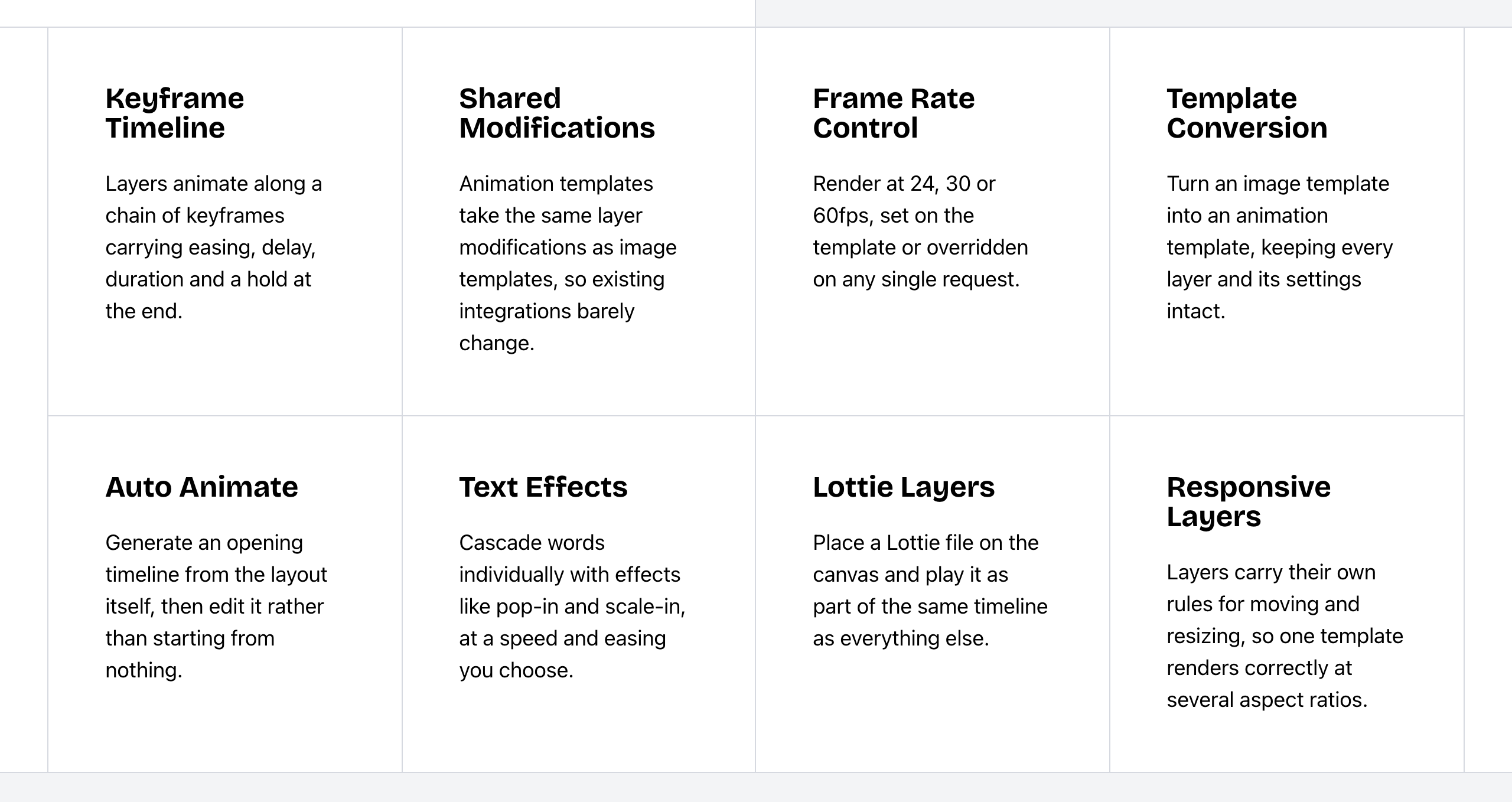 Bannerbear Animation API features. Source: bannerbear.com/v5/products/animation-api, captured 25 October 2026.
Automatic subtitles, AI voiceover, Lottie layers, transparent animation and post-render video tools are not listed on Robolly's website as of October 2026. Robolly's video docs say per-element start times are useful for subtitles, which means timed text that you supply yourself.
Bottom line: both work for templated social clips. Robolly is a good fit if you want timed elements and stock footage in multi-clip videos. Choose Bannerbear if your videos need subtitles, narration, motion graphics or editing steps after the render.
Workflows and bulk generation
Bannerbear Workflows chain image, animation and media-tool steps behind one API endpoint. For example: render a template, add subtitles, add a voiceover, overlay an animation, then export. You build them in a visual builder, see each step's inputs and outputs in the run history, and can publish a workflow together with its templates.
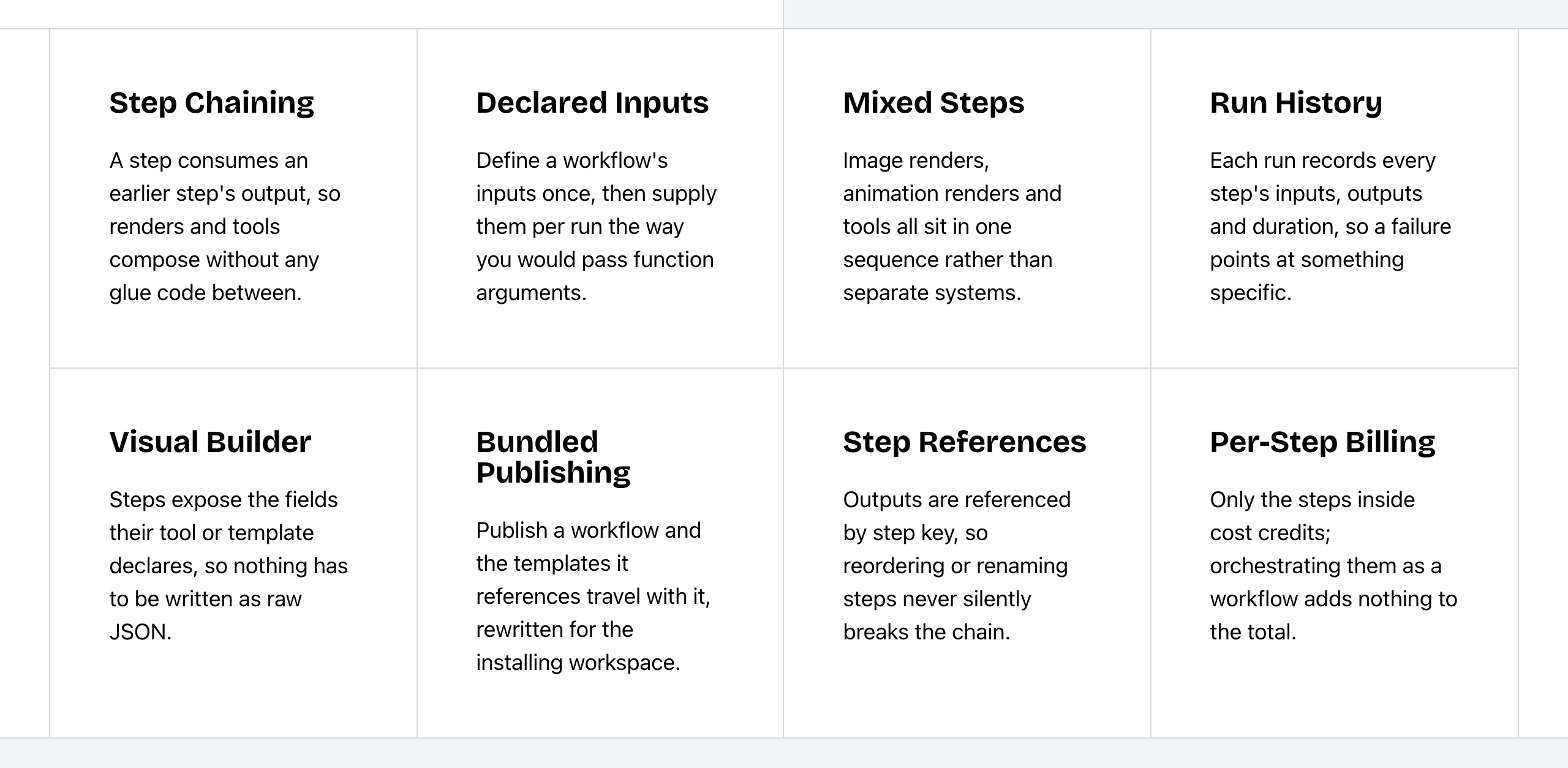 Bannerbear Workflows features. Source: bannerbear.com/v5/products/workflow-api, captured 25 October 2026.
A built-in multi-step workflow builder is not listed on Robolly's website as of October 2026. Robolly connects to Zapier, Make, Pabbly Connect, Albato and viaSocket, so you can build multi-step automations in those tools.
For high volume from code, Bannerbear has a batch endpoint that creates up to 100 images in one request, with a status for each item. A batch API endpoint is not listed in Robolly's API reference.
Robolly does bulk generation through its Datasets. A Dataset is a spreadsheet-style grid: you import a CSV, then render the rows you select, with several templates and output formats from the same data. Its Google Sheets add-on renders from a sheet and saves the files to Google Drive or writes the image URLs back to the sheet. A spreadsheet grid with CSV import and a Google Sheets add-on are not listed on Bannerbear's website.
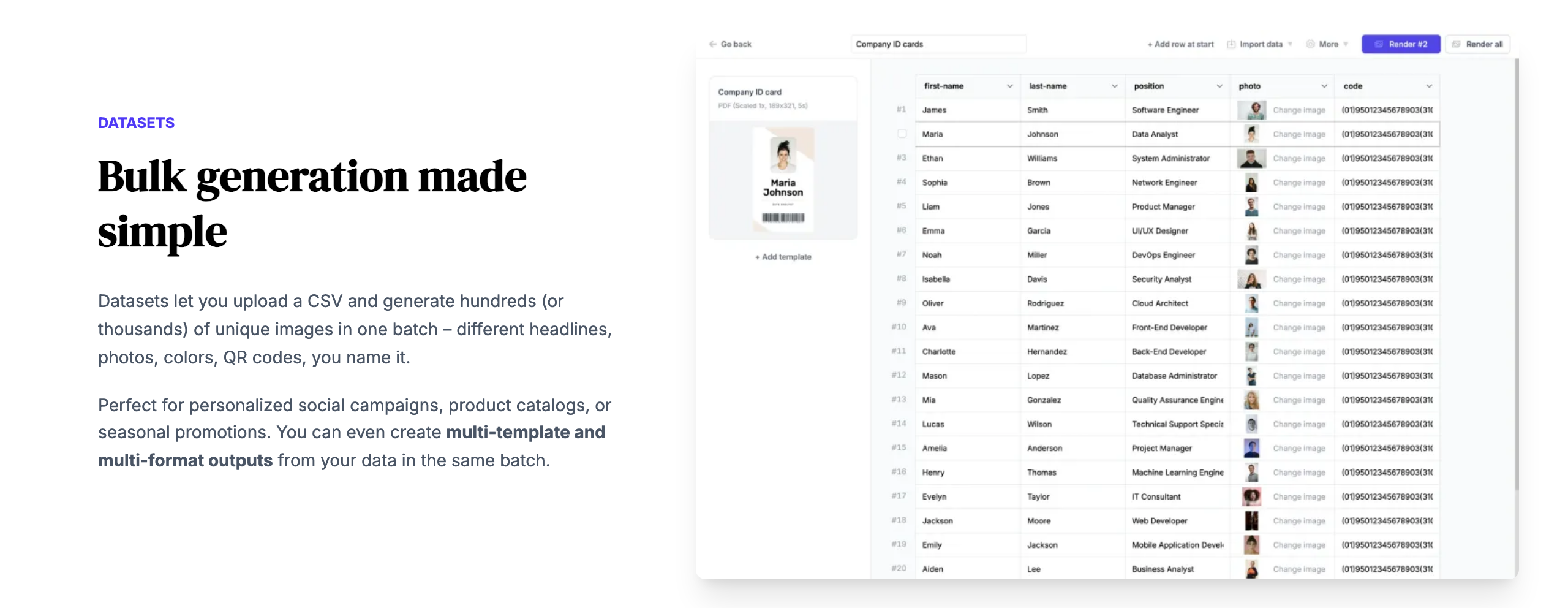 Robolly Datasets for bulk generation. Source: robolly.com/image-generation-api, captured 25 October 2026.
Bottom line: if your team works from spreadsheets and wants to render rows with a click, Robolly's Datasets and Google Sheets add-on are built for that. If producing one asset takes several processing steps, or you send large jobs from code, Bannerbear's workflows and batch endpoint do that in one call.
Where Robolly leads
Robolly leads in these areas. Unless a line says otherwise, the feature is not listed on Bannerbear's website as of October 2026.
- Smart caching: Robolly charges credits only for the first render of a unique file, so repeat renders with the same modifications are free.
- Render links on every plan, including Individual at $39/mo. Bannerbear's Instant URLs start on the Scale plan ($149/mo). Robolly also offers hidden render links that look like static file URLs. Bannerbear's API has an encoded mode for Instant URLs, which we found only in its API specification.
- Editor and file conveniences: curved text, template folders and custom output file names.
- Stock images: an in-editor image search, a library of 5 million+ royalty-free images in Datasets, and the "Auto image from text" feature. Bannerbear has no stock image library or image search.
- Clickable buttons in PDFs.
- White-label render forms: remove the Robolly badge, add your logo and cap the credits each form can use.
- Support channels on the pricing page: Robolly lists email, priority and chat support as plan features. Bannerbear offers email and chat support from two full-time human support staff, who answer at almost any hour, plus priority support on Enterprise.
- Render listing API with cursor pagination and filters by template and cache hash. Bannerbear's API lists images newest first with page-number pagination; filters were not found.
Bottom line: if you re-render the same files often, want render links on an entry plan, or give clients a branded form, Robolly has the edge.
Integrations
Both connect to Zapier, Make and Airtable, both have render forms and URL-based rendering, and both have an MCP server for AI assistants.
- Bannerbear lists 50+ native data-source integrations with field mapping and write-back, plus a Figma plugin that converts Figma frames into templates. It also creates WordPress Open Graph images and Pinterest pins, pulls data from Webflow with optional write-back of image URLs, and pulls data from Ghost.
- Robolly lists about eight integrations in its docs: its MCP server, Google Sheets, Zapier, Airtable, Make, Pabbly Connect, Albato and viaSocket. Its image API page also lists n8n.
Pabbly Connect, Albato and viaSocket are not listed on Bannerbear's website. Both products work with n8n. A Figma plugin is not listed on Robolly's website. All as of October 2026.
Bannerbear's hosted MCP server supports OAuth sign-in as well as a local package. Robolly's remote MCP server uses API key authentication.
Developer experience
| Bannerbear | Robolly | |
|---|---|---|
| API specification | OpenAPI 3.1 file for the V5 REST API | Not listed (docs pages and llms.txt) |
| Official SDKs | Ruby, Node, Python, PHP, plus an MCP package | Not listed |
| API keys | Scoped keys (22+ scopes), browser-origin allowlists, workspace-scoped keys | Bearer API key; per-template render link authentication with an HMAC-SHA256 signed link or API key |
| Rate limits (as each company states them) | 60 POST requests per 10 seconds | 3 renders per second on on-demand rendering |
| Webhooks | Signed callbacks for all or specific templates | On video renders |
| Template versions | Version history with revert; render a named version | Not listed |
| Responsive templates (one design, many sizes) | Yes | Not listed |
| Transparent rendering | Yes | Not listed |
| CJK and right-to-left text | Yes | Not listed |
| Custom S3 storage | Scale plan and up | Not listed |
| Render metadata and API console logs | Yes | Not listed |
| Template discovery | Template API | Template API and an endpoint that lists a template's accepted modifications |
| Status page | Yes | Yes |
The two rate limits measure different things (all POST requests against on-demand renders), so they are not a speed comparison. Robolly has a REST API, render links, webhooks for video renders and an endpoint that tells you which fields a template accepts. Bannerbear's OpenAPI file, SDKs and scoped keys help when you generate client code, run several environments, or give limited keys to front-end apps. Its image URL proxy and custom S3 storage help when you need control over where source images come from and where outputs go.
Bottom line: for an engineering team that builds media generation into its own product, Bannerbear gives more control over templates, keys and output storage.
Security and enterprise
| Bannerbear | Robolly | |
|---|---|---|
| Single sign-on (SSO) | Enterprise plan | Not listed |
| Audit logs | Enterprise plan | Not listed |
| Zero data retention | Enterprise plan | Not listed (saved renders kept 45 days) |
| Two-factor authentication | Scale plan and up | Not listed on public pages |
| Restrict team sign-up to your email domain | Yes | Not listed |
| GDPR and DPA | Standard DPA, signable through HelloSign | "Made in EU"; no DPA page found |
Robolly states that it is made in the EU, which some buyers value. We did not open Robolly's app, so security settings inside the app were not checked.
Bottom line: if your security review asks for SSO, audit logs or a signed DPA, Bannerbear's plans list them. Ask Robolly directly before you rule it out.
Pricing
| Bannerbear | Robolly | |
|---|---|---|
| Free trial | 30 API credits and 50 AI credits, no card | 7 days, no card |
| Entry plan | Automate: $49/mo, 1,000 credits | Individual: $39/mo for 250 credits, $49/mo for 1,000 |
| Mid plans | Scale: $149–$296/mo, 10,000–40,000 credits | Business: $129/mo for 10,000, $279/mo for 40,000, $449/mo for 100,000 |
| High volume | Enterprise: from $299/mo for 50,000 credits | Business up to $1,020/mo for 1,000,000 credits; custom quotes above that |
| Templates | No limit | 50 on Individual; unlimited on Business and up |
| Render links | Scale plan and up | All plans |
| Free repeat renders (smart caching) | Not listed | Yes |
| AI features | Separate AI credit pool (200/mo on Automate, 600–1,250 on Scale) | Not listed |
| Video | Included on all plans | Add-on: $14, $39 or $79 per month |
| Annual pricing | Not shown | Not shown |
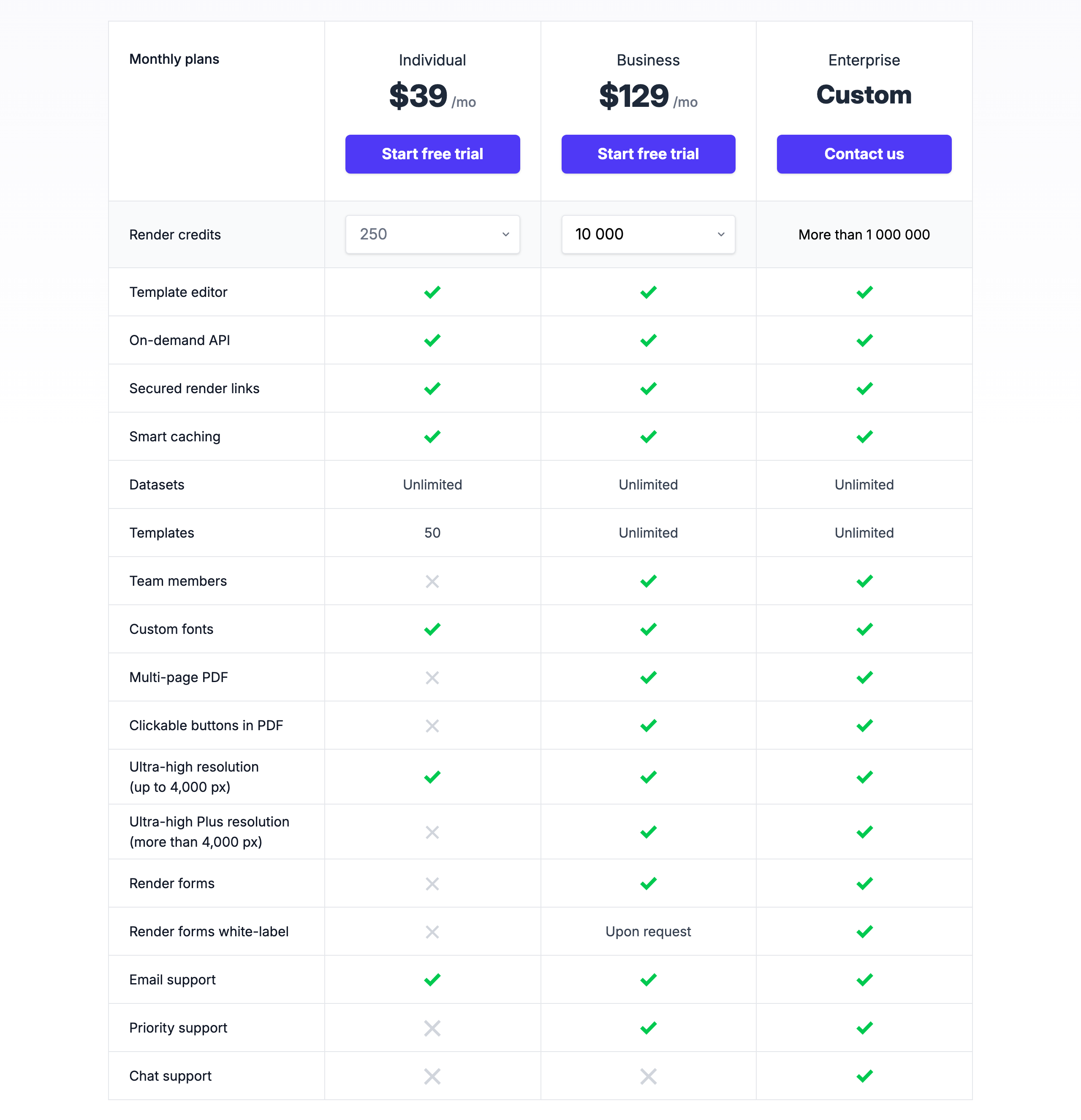 Robolly pricing. Source: robolly.com/pricing, captured 25 October 2026.
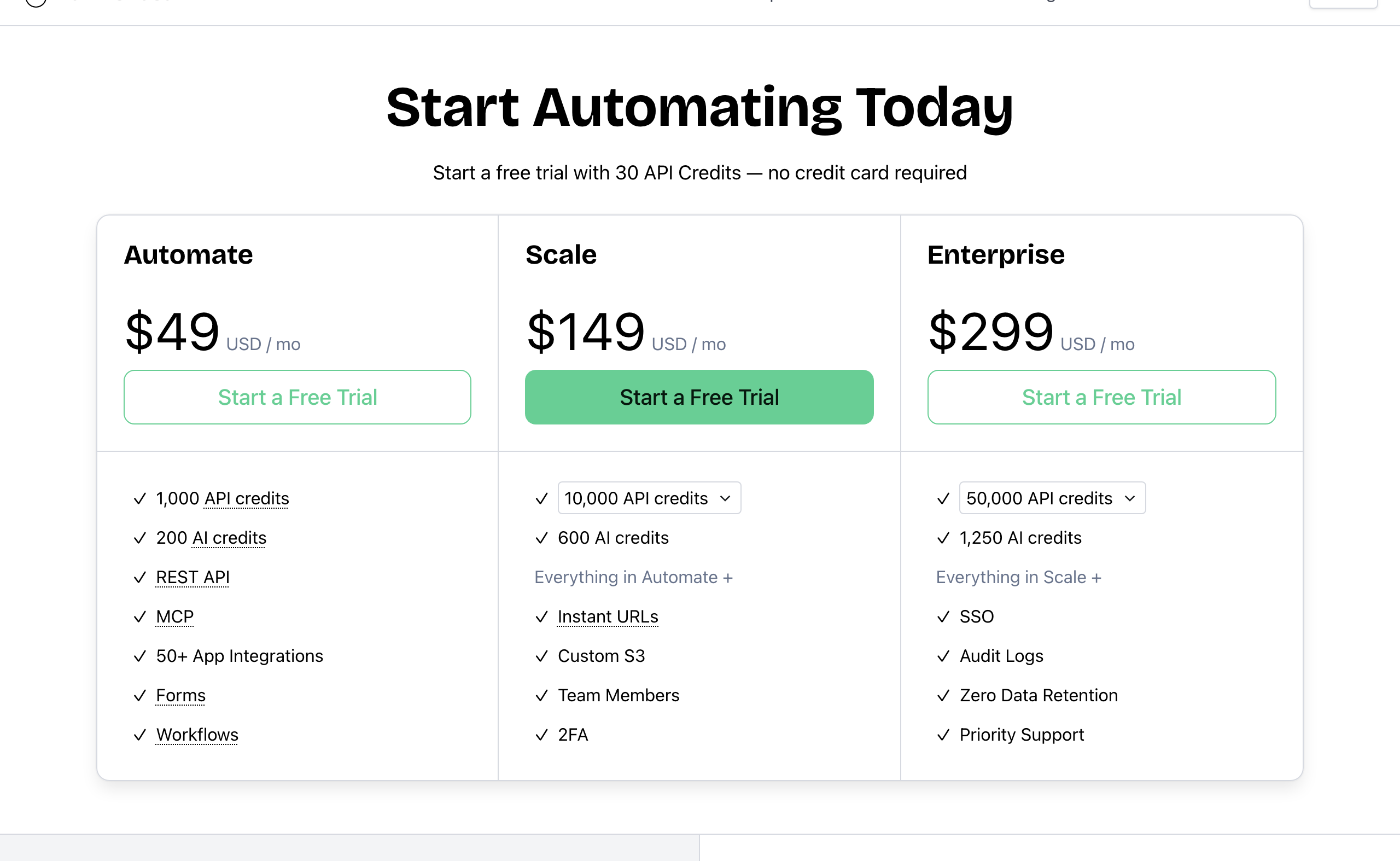 Bannerbear pricing. Source: bannerbear.com/pricing, captured 25 October 2026.
Cost for the same job
Assumptions: one image per render, JPG, one output format, up to 2,000 px, no AI features, and every render unique. On these terms, 1 Bannerbear API credit and 1 Robolly render credit each buy one image. Prices are monthly, on the cheapest plan that fits.
| Images per month | Bannerbear | Robolly | Lower price |
|---|---|---|---|
| 250 | $49 (Automate) | $39 (Individual 250) | Robolly |
| 500 | $49 (Automate) | $49 (Individual 1,000) | Same |
| 1,000 | $49 (Automate) | $49 (Individual 1,000) | Same |
| 2,500 | $149 (Scale 10k) | $129 (Business 10k) | Robolly |
| 10,000 | $149 (Scale 10k) | $129 (Business 10k) | Robolly |
| 20,000 | $198 (Scale 20k) | $279 (Business 40k) | Bannerbear |
| 25,000 | $247 (Scale 30k) | $279 (Business 40k) | Bannerbear |
| 40,000 | $296 (Scale 40k) | $279 (Business 40k) | Robolly |
| 50,000 | $299 (Enterprise 50k) | $449 (Business 100k) | Bannerbear |
Robolly costs less for plain JPG images at 250 per month and from 2,500 to 10,000 per month, and the same at 500 to 1,000. It also costs less at 40,000. Bannerbear's list price is lower at 20,000 to 30,000 and at 50,000 images per month. We do not compare above 50,000, because Bannerbear's Enterprise prices for higher tiers were not in the data we collected.
Three rules change the real cost:
- Image size and format. Robolly charges 1 credit per JPG or WebP up to 2,000 px, 2 credits from 2,000 to 4,000 px and 3 credits from 4,000 to 6,000 px. A PNG costs 3, 6 or 12 credits for the same sizes, and a PDF costs 5 credits per page. Bannerbear charges 1 credit per image per output format at scale 1, whatever the pixel size. For PNG output, Bannerbear's list price is lower at most volumes: for example, 10,000 PNG images need Robolly's 40,000-credit plan ($279) against Bannerbear's Scale 10k ($149).
- Repeat renders. Robolly's smart caching makes renders of an identical file free. If your job renders the same file many times, your Robolly cost will be lower than the table shows.
- AI features. Bannerbear's AI editing and generation use a separate AI credit pool included with each plan. Robolly does not list AI features, so there is no direct price to compare.
We do not compare video prices, because the two products charge for video differently. Bannerbear charges 1 credit plus 2 credits per second of animation (60 fps doubles this), on all plans. Robolly charges a monthly video add-on ($14, $39 or $79) plus per-second credits, from 8 per second for MP4 at 24 fps to 20 at 60 fps; it marks video credits as beta.
Who should choose Robolly
Robolly is the right choice if:
- You generate plain JPG images at up to about 10,000 per month and price is the main factor
- You render the same files again and again and want those repeats to be free
- Your data lives in spreadsheets, and you want to import a CSV or render from Google Sheets
- You use Pabbly Connect, Albato or viaSocket
- You want render links on an entry plan, or render links that look like static file URLs
- You need curved text, clickable buttons in PDFs, template folders, custom file names or built-in stock photos
- You give clients a white-label render form
- You want timed elements and stock footage in multi-clip videos
Who should choose Bannerbear
Bannerbear is built for teams who:
- Start from photos that need cleanup or new backgrounds: product images, user uploads, headshots
- Want AI image or video generation in the same API as their templates
- Produce video with subtitles, narration, motion graphics, Lottie animation or post-render editing
- Want one API call to run a multi-step pipeline, or send 100 images in one request
- Build media generation into their own product and need an OpenAPI file, SDKs, scoped keys, template version pinning or their own S3 storage
- Need SSO, audit logs, zero data retention or a signed DPA for a security review
- Design in Figma and want to turn frames into templates
- Want answers from real people: email and chat support from two full-time human support staff, who answer at almost any hour, plus priority support on Enterprise
- Want a provider with a track record: Bannerbear launched in January 2020, publishes a 99.9% uptime figure with a public status page, and runs Enterprise plans of up to 2,000,000 credits per month
FAQ
Is Robolly cheaper than Bannerbear? For plain JPG images, yes at low and mid volume: $39 against $49 for 250 images a month, and $129 against $149 for 2,500 to 10,000. The price is the same at 500 to 1,000 images. Bannerbear's list price is lower at 20,000 to 30,000 and 50,000 JPG images a month, and at most volumes for PNG. Robolly's smart caching also makes repeat renders free.
Does Robolly have AI features? AI background removal, AI image generation, AI video generation, automatic subtitles and AI voiceover are not listed on Robolly's website as of October 2026. Robolly describes itself as template-based. Its "Auto image from text" feature picks a stock photo from Pexels or Unsplash.
Can Robolly make videos? Yes. Robolly makes videos from templates through monthly add-ons ($14, $39 or $79), with multi-clip videos, background music, video inside a template, timed elements and a stock video library on the higher add-ons.
What is the best Robolly alternative for video? If you need automatic subtitles, AI voiceover, a keyframe timeline with easing, Lottie layers or video editing after the render, Bannerbear lists all of these, and animation is included on all its plans.
Can I generate images in bulk with both? Yes, in different ways. Robolly uses Datasets (a spreadsheet grid with CSV import) and a Google Sheets add-on. Bannerbear uses a batch API endpoint that takes up to 100 images per request, plus workflows and 50+ data-source integrations.
Do both work with AI assistants like Claude? Yes. Both have an MCP server that can list templates and render images.
How we compared
- Sources: each company's marketing website and pricing page, API documentation and help center. For Bannerbear, the API comparison used its published OpenAPI file. Robolly's documentation also serves as its help center; we found no public changelog.
- Date: all facts were checked on 25 October 2026. Products change; check the current pages before you decide.
- "Not listed" means we searched the company's own sites for the feature and found no mention. For the main claims on this page, we searched 92 pages from Robolly's sitemap, its llms.txt file and its pricing page. It is not proof that the feature does not exist.
- Screenshots show public pages as they appeared on the capture date in each caption.
- Pricing comes from the public pricing pages. Robolly's prices are rendered by JavaScript on its pricing page, and we read them from the page's script and the live page.
- What we did not measure: support response times, ease of use, rendering speed, output quality and reliability. We did not include third-party reviews.
- Disclosure: this page is published by Bannerbear.