Facts on this page come from each company's public website, documentation, help center and changelog, checked on 25 October 2026. See How we compared for the method and sources.
TL;DR: The names are similar, but the two products do different jobs. Bannerflow is a platform where ad teams design, localize, publish and optimize display, social and digital out-of-home ad campaigns. Bannerbear is an API and automation platform where your code, your no-code tools or your AI agent generate images, videos and PDFs from templates, with public prices and a free trial. If you run display and social ad campaigns across many markets and need publishing, approvals and performance optimization in one place, Bannerflow is built for that job. If you need media generated inside your own app, data pipeline or automation, Bannerbear is built for that job.
Which one is for you?
- Developers, product teams and marketing operations teams that want images, videos or PDFs made automatically from data, through an API, Zapier or Make, or an AI agent: start with Bannerbear.
- In-house ad teams at large brands that build HTML5 and social ad campaigns for many markets, and need approvals, ad-network publishing and performance testing: Bannerflow is often the better fit.
At a glance
| Bannerbear | Bannerflow | |
|---|---|---|
| Main job | Generate images, video and PDFs from templates through an API and automations | Design, publish and optimize ad campaigns |
| Public REST API documentation | ✅ Yes (V5, OpenAPI 3.1 file) | No public API documentation found |
| Official SDKs | ✅ Ruby, Node, Python, PHP | Not listed |
| Webhooks on render completion | ✅ Yes, signed | Not listed |
| MCP server for AI agents | ✅ Yes | Not listed |
| Multi-step media workflows | ✅ Yes, with a visual builder | Review-and-publish workflow for campaigns |
| Render from a URL (Instant URLs) | ✅ Yes, open or HMAC-signed (Scale and up) | Not listed |
| Zapier and Make | ✅ Yes | Not listed |
| AI voiceover and auto subtitles | ✅ Yes | Not listed |
| PDF output | ✅ Yes, including multi-page PDFs | Not listed |
| HTML5 display ads | Not listed | ✅ Yes |
| Publishing to ad networks | Not listed | ✅ Yes, 20+ networks, with scheduling |
| A/B testing and DCO for ads | Not listed | ✅ Yes |
| Feed-driven dynamic ads | Not listed | ✅ Yes |
| Comments, review links and approvals | Not listed | ✅ Yes |
| Built-in AI translation | Not listed | ✅ Yes |
| Public prices and free trial | ✅ Yes, from $49/mo; trial with no card | Prices not public; demo request |
"Not listed" means we searched the company's website, docs and help center and found no mention, as of October 2026. It does not prove the feature is absent.
What both products do well
Both products start from a template you design once and then vary.
- Drag-and-drop template editor. Bannerflow calls its editor Creative Studio.
- One design, many sizes. Bannerbear uses per-layer position and size rules. Bannerflow scales a master creative into many sizes and placements.
- Version history for templates and creatives
- Figma import, so you can start from existing designs
- AI image tools: both list background removal and text-to-image generation
- Video trimming
- Team roles and a log of changes. Bannerflow logs every comment, change and approval. Bannerbear lists audit logs on its Enterprise plan.
- Native integrations, but of different kinds (see Integrations)
The overlap ends at the template. What happens after it, and who uses the output, is where the two products separate.
API and developer access
Bannerbear is API-first. Its V5 REST API has 15 resources with Bearer-token authentication, and it publishes a full OpenAPI 3.1 file. There are official libraries for Ruby, Node, Python and PHP. You can render synchronously, or queue a job and get the result by polling or through a signed webhook. One batch request creates up to 100 images. Templates themselves can be created and updated through the API. API keys can be limited to 22+ permission scopes and to allowed browser origins. An MCP server, hosted or local, lets AI agents such as Claude, Cursor and ChatGPT generate media. On Scale and up, Instant URLs render an image from URL parameters with no API call, open or HMAC-signed.
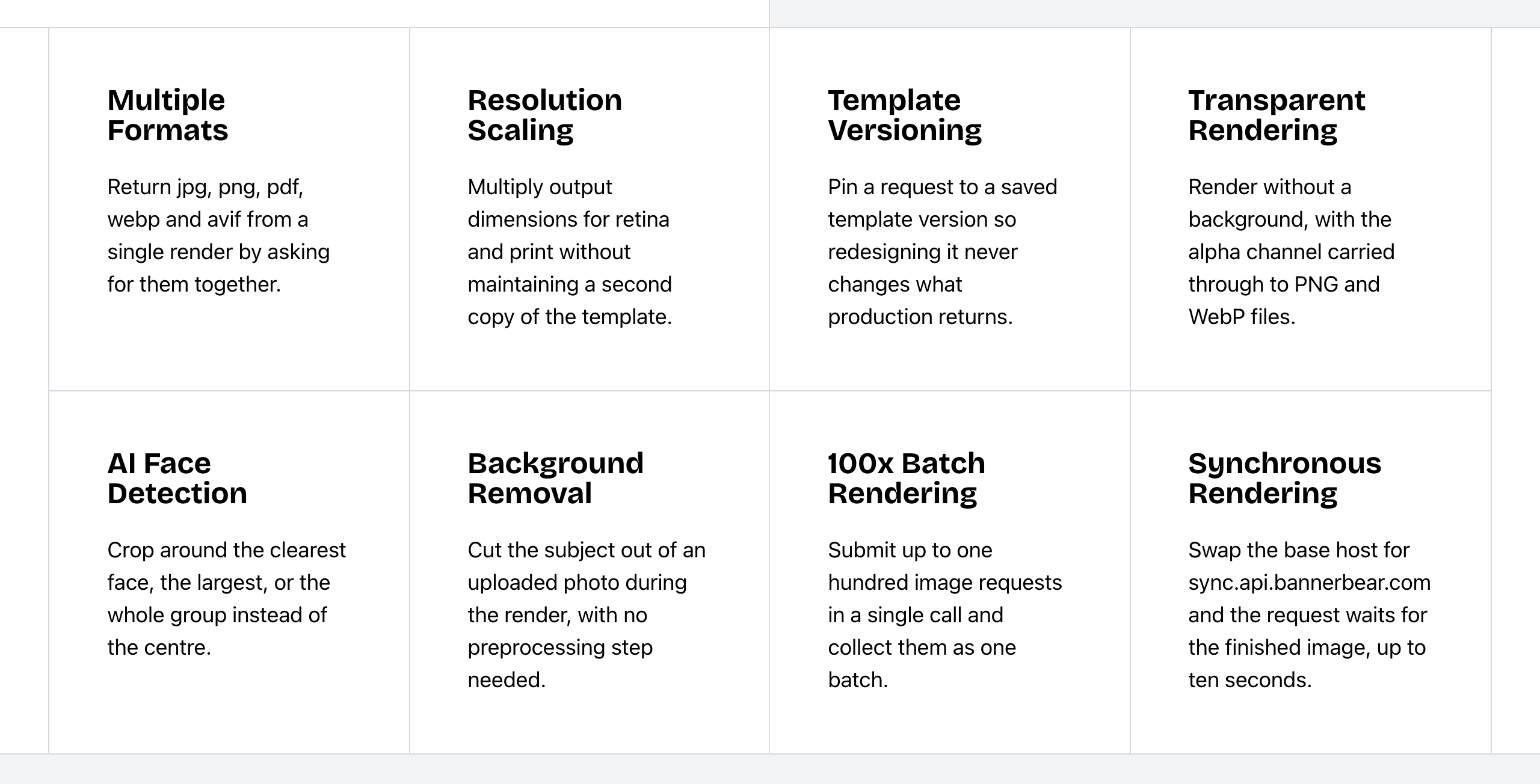 Bannerbear Image API features. Source: bannerbear.com/v5/products/image-api, captured 25 October 2026.
Bannerflow automates through its own platform. Ads update from data feeds, and live campaigns can change copy, prices and CTAs without a rebuild. Its help center uses "API" for direct publishing links to ad networks. We found no public API documentation on bannerflow.com or support.bannerflow.com (as of October 2026): no API reference, OpenAPI file, SDK or developer page. Webhooks, an MCP server and a batch render request are not listed on Bannerflow's website. Parts of Bannerflow's help center need a customer login, so customer-only documentation may exist.
What this means: if media generation must happen inside your own product or backend, you need documented endpoints you can build against today. Bannerbear publishes them. With Bannerflow, ask its sales team what access is available.
Bottom line: choose Bannerbear if a developer or an AI agent will call the service directly.
Workflows and automation
Bannerbear Workflows chain image, animation and media-tool steps into one API endpoint. For example: new row in Airtable, render an animation, add subtitles, send the result to your CMS. You build workflows in a visual builder, see each step's inputs and outputs in the run history, and can publish a workflow with its templates. Workflows start on the Automate plan. Hosted forms let non-technical users fill in fields to start a render or a workflow run. Bannerbear also connects to Zapier and Make.
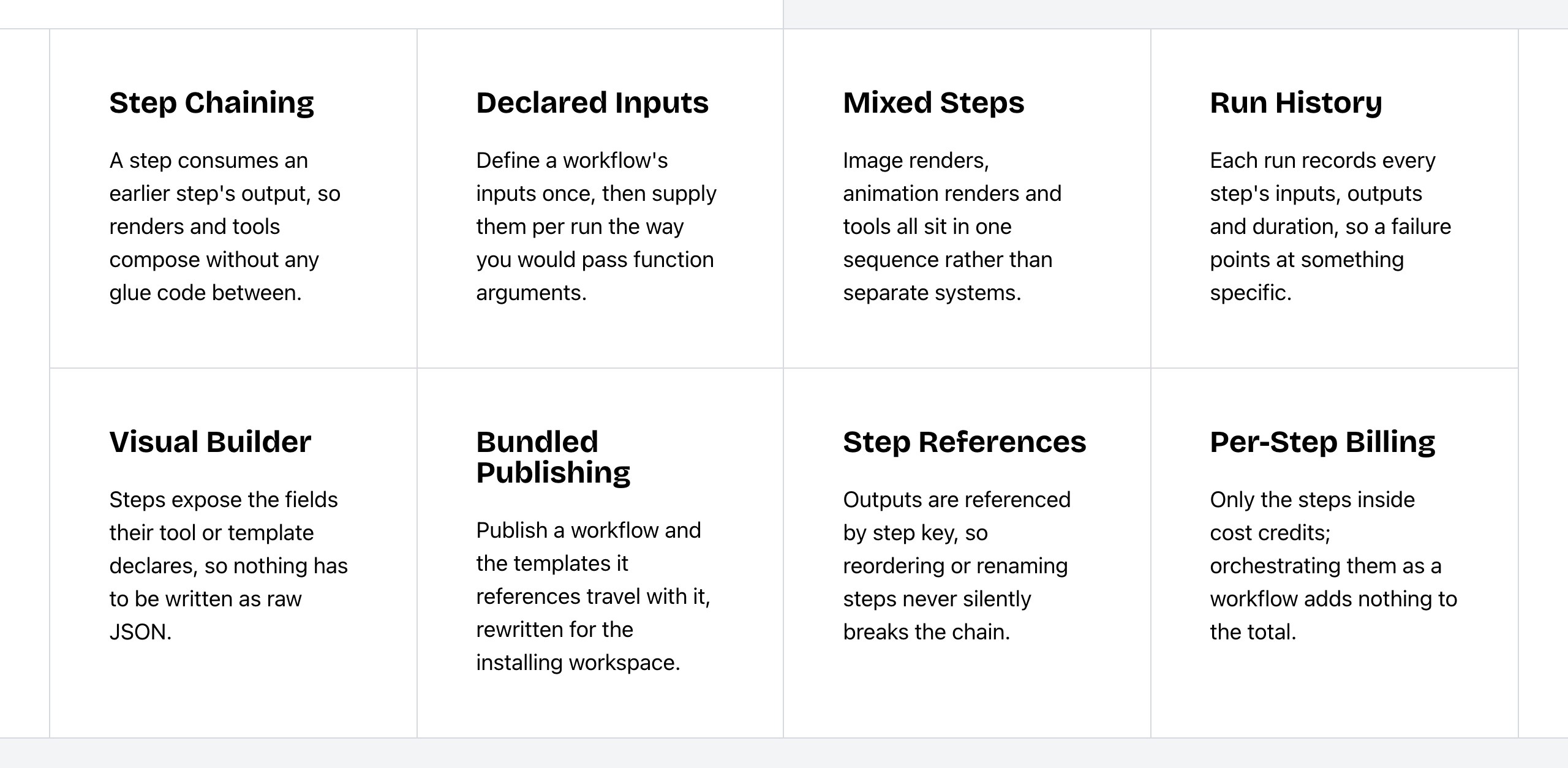 Bannerbear Workflows features. Source: bannerbear.com/v5/products/workflow-api, captured 25 October 2026.
Bannerflow's workflow is a campaign workflow. Building, approving, scheduling and publishing ads happen in one place, with one-click approvals and project tracking. A configurable multi-step media workflow builder, run history and workflow publishing are not listed on Bannerflow's website (as of October 2026). Zapier, Make and hosted forms are also not listed.
Bottom line: choose Bannerflow if your "workflow" is getting ads approved and live. Choose Bannerbear if producing one asset takes several processing steps, or if the trigger lives in another app.
Video and motion
Both products make animated and video creatives.
Bannerflow's Creative Studio adds animation, embedded video and interactive layers to ads, with a timeline that has easing options and an Animated Text widget with row and letter animations. You can edit, split and trim video in the studio, and Bannerflow adapts video quality to the viewer's device and network. Bannerflow's blog mentions AI video generation; its product and help pages list AI image tools and video editing, not an AI video generator.
Bannerbear renders animations to MP4 or MOV through the API, and adds a set of tools around the render:
- Keyframe timeline with easing, delay, hold and presets, and per-word text effects
- Auto Animate, which generates an opening animation from the template layout
- Lottie layers, animated backgrounds and transparent animations for overlays
- AI voiceover and automatic subtitles
- AI video generation with Seedance, Kling and Veo models
- Video tools: join, overlay, audio, colour filters, slideshows, GIF previews, thumbnails and cover art
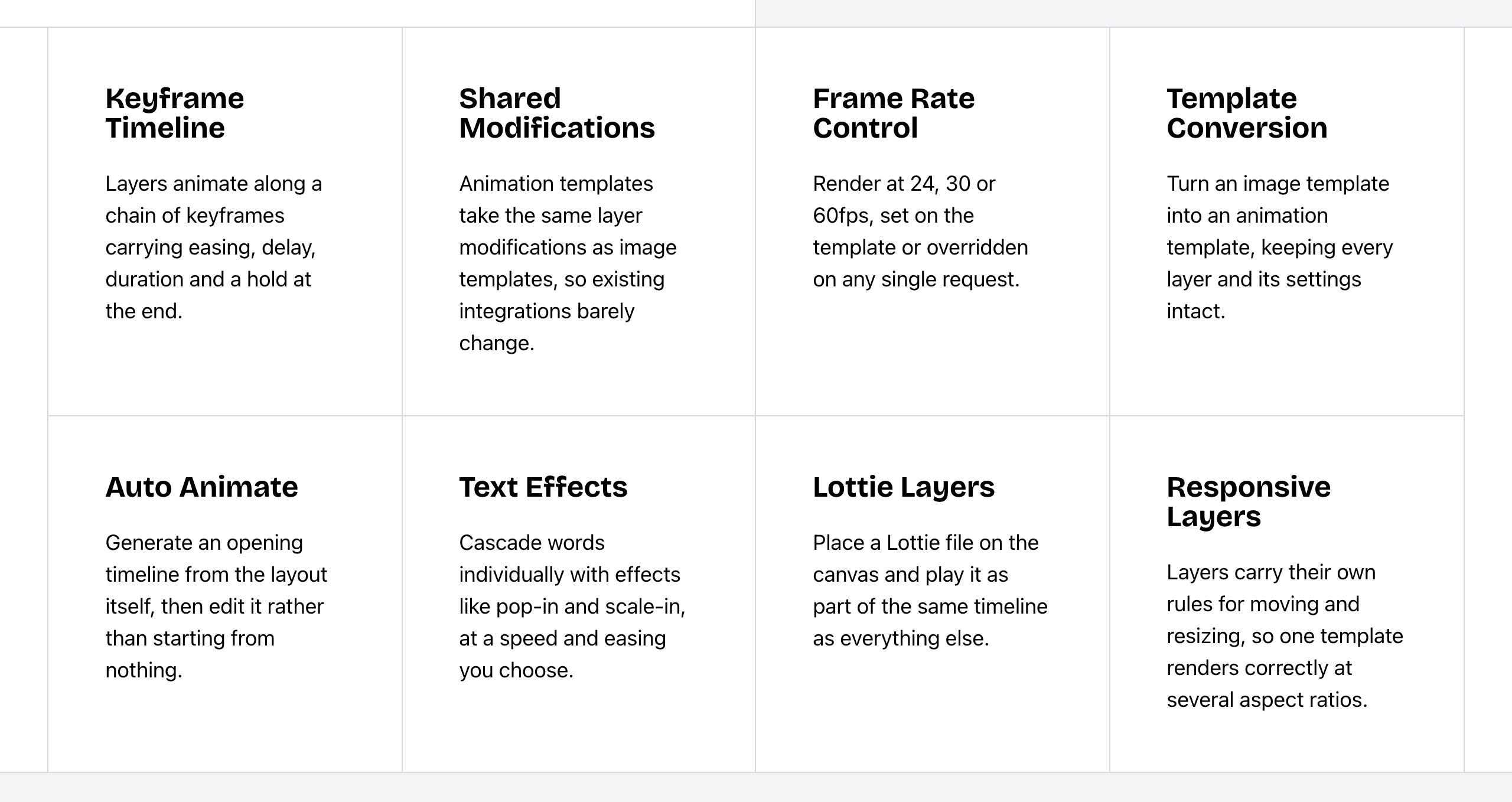 Bannerbear Animation API features. Source: bannerbear.com/v5/products/animation-api, captured 25 October 2026.
AI voiceover, automatic subtitles, Lottie layers and video joining are not listed on Bannerflow's website as of October 2026.
Bottom line: for animated HTML5 display ads, Bannerflow is built for the job (see Ad campaigns below). For social clips with narration and captions, or video made from data at volume, choose Bannerbear.
PDF, print and output formats
The two products produce different output types.
Bannerbear returns JPG, PNG, PDF, WebP or AVIF, and one request can return several formats. Any image template can produce a print-ready PDF, and you can merge files into a multi-page PDF, flatten PDFs for print, set DPI and convert PDFs to CMYK. Text layers support Chinese, Japanese and right-to-left scripts such as Arabic and Hebrew. AI face and subject detection crops photos around a face or subject automatically.
Bannerflow exports HTML5 ads, which are not listed on Bannerbear's website. Its own guide lists HTML5, MP4, JPG, PNG and GIF as export formats. PDF export is not listed on Bannerflow's website, and a Bannerflow 2026 post says it does not cover print output. Bannerflow has AI translation; a page that confirms Chinese, Japanese or right-to-left text rendering is not listed.
Bottom line: choose Bannerbear for certificates, menus, print flyers, documents and images for websites and apps. Choose Bannerflow when the output is an ad that runs in an ad network.
Ad campaigns: where Bannerflow leads
This is Bannerflow's home ground, and for ad teams it is the most important section on this page. None of the features below are listed on Bannerbear's website as of October 2026, except where noted.
HTML5 and interactive ads. Bannerflow produces HTML5 display, video and interactive ads, with a widget library that includes a dropdown list, a spinning wheel and pause and play controls. Bannerbear's animation output is rendered video or GIF, not HTML5 ads.
Publishing and campaign management. Bannerflow publishes and schedules ads across 20+ networks by time zone, region, audience or channel, with rules, rotations, weighting and fallback creatives. Its Campaign Manager groups ads into campaigns and lets you swap creatives without republishing. It also lists a Social Campaign Manager for Meta, TikTok and LinkedIn.
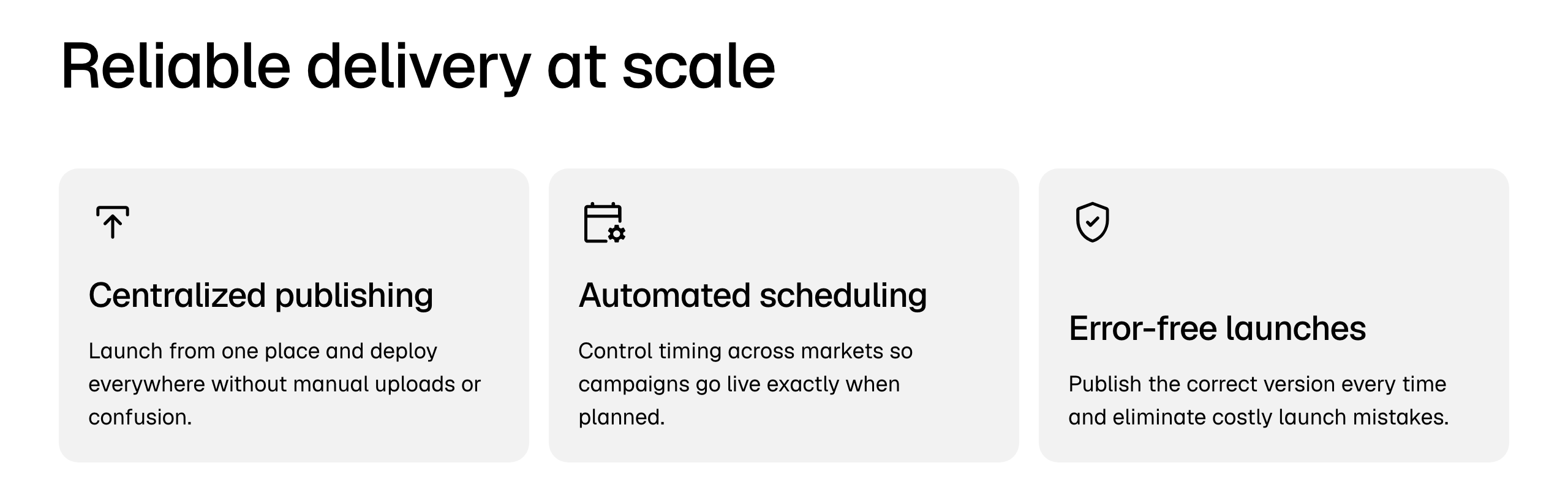 Bannerflow campaign publishing features. Source: bannerflow.com/features/campaign-publishing-platform, captured 25 October 2026.
Ad performance tools. Bannerflow lists real-time creative analytics (CTR, CPM, conversions), A/B and multivariate testing, dynamic creative optimization, automated optimization that pauses weak creatives and scales strong ones, and conversion pixels. Creative Insights, a dashboard of which creative elements perform, is in beta for select accounts.
Feed-driven dynamic ads. Bannerflow builds ads from data feeds with JMESPath expressions and custom functions, and an AI assistant turns plain-language rules into feed mappings. Social Dynamic Ads catalogs for Meta, TikTok, Snapchat, Pinterest and X are an add-on. Live campaigns update without republishing, and on-site tags place creatives on your own website. Video quality adapts to the viewer's device and network.
Brand control and review for large teams. Bannerflow has in-context comments, shareable review links, task tracking and one-click approvals, locked brand-safe templates, folder-level access control, and bulk editing of copy, brand or price across existing creatives. Bannerbear has per-template locking and project roles, with no brand kits listed, and sets permissions per template and per role; folder-level access control is not listed.
AI editing and design import. Bannerflow lists AI translation and localization, AI image expansion and upscaling, and generative fill and erase. It also imports Photoshop (PSD) files. (Both products import Figma designs.) Bannerbear's scale setting changes render resolution, and its AI Object Remover is a separate free tool; generative fill in templates or the API is not listed.
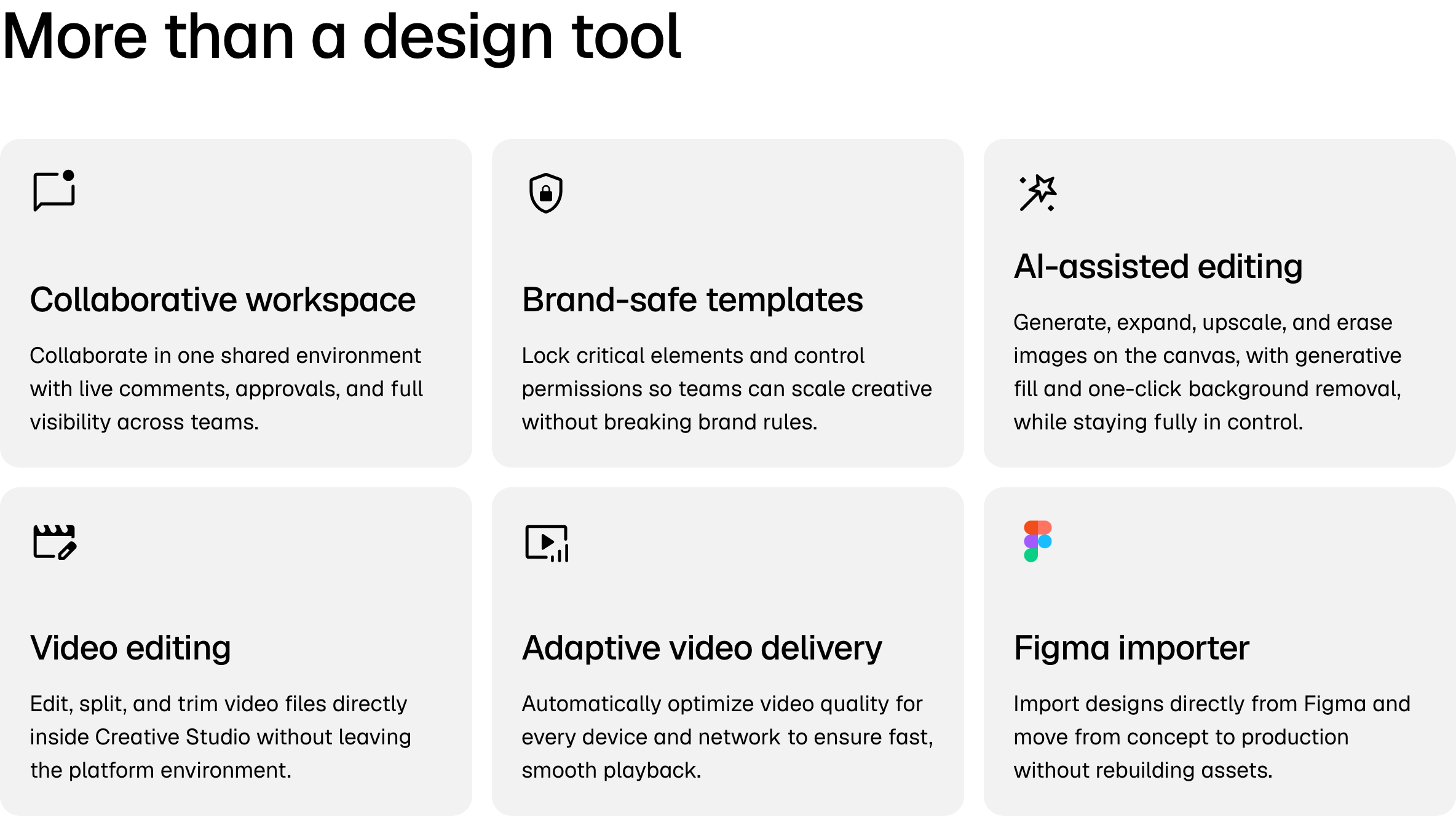 Bannerflow Creative Studio features. Source: bannerflow.com/features/creative-studio, captured 25 October 2026.
Email. Bannerflow lists a Salesforce Marketing Cloud email image workflow.
Bottom line: if you run display and social ad campaigns across many markets and need publishing, approvals and performance optimization in one place, Bannerflow is built for that job.
Integrations
Both products have native integrations, but they connect to different systems.
- Bannerflow connects to where ads run: ad servers and DSPs such as Google Marketing Platform, Google Ad Manager, The Trade Desk, Amazon Ads and Adform; social platforms such as Meta, TikTok, LinkedIn and YouTube; and digital out-of-home networks.
- Bannerbear connects to where data lives: 50+ data-source integrations with field mapping and write-back, plus Zapier, Make, Airtable, WordPress, Webflow and Ghost.
Zapier, Make, Airtable, WordPress, Webflow and Ghost integrations are not listed on Bannerflow's website, and ad-network publishing is not listed on Bannerbear's, as of October 2026.
Developer experience
These are what each company states, not measured quality.
| Bannerbear | Bannerflow | |
|---|---|---|
| API specification | Full OpenAPI 3.1 file | No public API documentation found |
| Official libraries | Ruby, Node, Python, PHP (plus an MCP package) | Not listed |
| API key control | Scoped keys (22+ scopes), origin allowlists, workspace keys | Not listed |
| Rate limits | 60 POST requests per 10 seconds | None published |
| Uptime | 99.9% trailing 12-month claim; public status page | Not listed |
| Support | Priority support on Enterprise | Help articles refer customers to a Customer Success Manager |
| Release notes | Public changelog | No public changelog found |
| Team access | Members and roles on Scale and up; sign-up limited to your email domain | Custom roles from 9 standard templates, external contributor roles, folder access control |
Bannerflow's named Customer Success Manager model suits large accounts that want one contact. Bannerbear's published API details suit teams that want to build and test without a sales call.
Security and enterprise
Bannerflow sells to enterprises through a demo, and its security details may be shared during that process. This table shows only what each website publishes.
| Bannerbear | Bannerflow | |
|---|---|---|
| Single sign-on (SSO) | Enterprise plan | Not listed on the website; its login app handles SSO sign-in |
| Two-factor authentication | Scale plan and up | Not listed |
| Audit or change logs | Enterprise plan | Yes: comments, changes and approvals logged |
| Zero data retention | Enterprise plan | Not listed |
| Restrict team sign-up to your email domain | Yes | Not listed |
| GDPR | Standard DPA, signed through HelloSign | GDPR page states its processor role, with a contact address |
Bottom line: both products sell to enterprises. Bannerbear publishes its controls and the plan each one is on. For Bannerflow, ask its sales team.
Pricing
Bannerflow does not publish its prices. You must request a demo. An earlier 2026 version of its site listed three packages, Grow, Pro and Enterprise, with no prices, and said it would give a tailored estimate. No free trial is listed on Bannerflow's current pages (old blog posts mention a 14-day trial).
Bannerbear publishes its prices and offers a free trial with 30 API credits and 50 AI credits, with no credit card.
| Bannerbear | Bannerflow | |
|---|---|---|
| Free trial | 30 API credits and 50 AI credits, no card | None on current pages; old blog posts mention a 14-day trial |
| Entry plan | Automate: $49/mo, 1,000 API credits | Not public |
| Mid plans | Scale: $149–$296/mo, 10,000–40,000 credits | Not public |
| High volume | Enterprise: from $299/mo, 50,000 credits | Not public |
| How you buy | Self-serve sign-up | Demo request, then a quote |
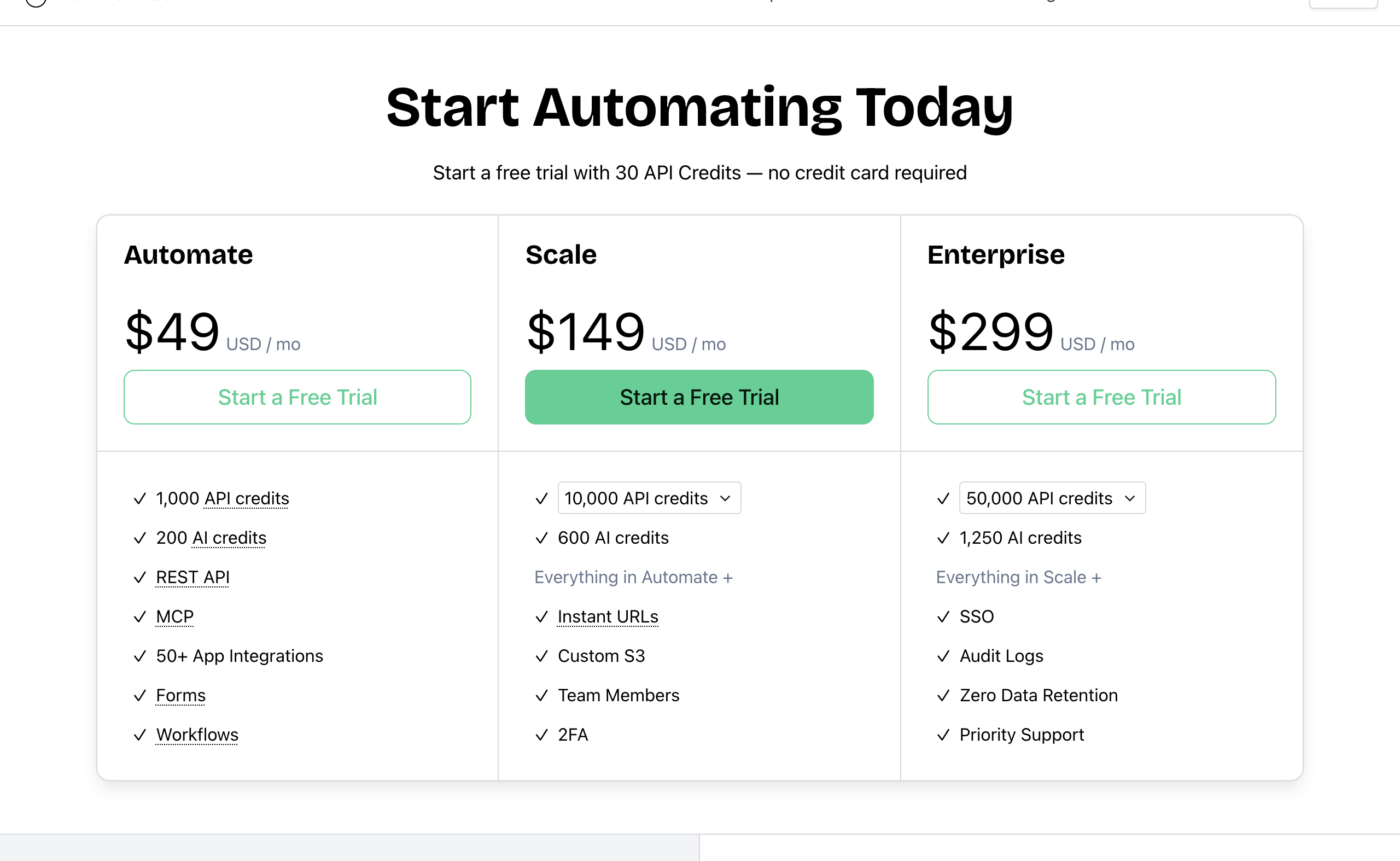 Bannerbear pricing. Source: bannerbear.com/pricing, captured 25 October 2026.
Cost for the same job
Standard-size images, one output format, scale 1 (1 API credit each), on the cheapest Bannerbear plan that fits:
| Images per month | Bannerbear | Bannerflow |
|---|---|---|
| 500 | $49 (Automate, 1,000 credits) | Not public |
| 1,000 | $49 (Automate) | Not public |
| 2,500 | $149 (Scale, 10,000 credits) | Not public |
| 10,000 | $149 (Scale) | Not public |
| 25,000 | $247 (Scale, 30,000 credits) | Not public |
| 40,000 | $296 (Scale, 40,000 credits) | Not public |
| 50,000 | From $299 (Enterprise, 50,000 credits) | Not public |
We cannot say which product costs less. Bannerflow does not publish prices or a render unit, so there is no fair comparison.
Two Bannerbear details you should know: AI features use a separate AI credit pool (200 per month on Automate), and AI credit top-ups do not expire. API credits reset on the 1st of each month and do not roll over.
We do not compare video costs, because Bannerflow publishes no unit for video.
Who should choose Bannerflow
Bannerflow is the right choice if:
- You are an in-house ad team running display, social or digital out-of-home campaigns in many markets
- You need HTML5 and interactive ads, not only images and video files
- You want to publish and schedule ads to ad servers, DSPs and social networks from one place
- You need A/B testing, dynamic creative optimization and creative analytics
- Your ads update from product or price feeds, and live campaigns must change without republishing
- Many people review and approve creatives, and you need comments, review links and locked brand templates
- You want built-in AI translation and Photoshop import
Who should choose Bannerbear
Bannerbear is built for teams who:
- Generate images, video or PDFs from their own app, backend or data pipeline through a documented API
- Want AI agents such as Claude or ChatGPT to create media through an MCP server
- Run multi-step media pipelines, or trigger renders from Zapier, Make, Airtable or a CMS
- Produce social video with AI voiceover, automatic subtitles and motion graphics
- Need PDFs and print output, such as certificates, menus and flyers
- Want to see the price and start a free trial today, without a sales call
- Want answers from real people: email and chat support from two full-time human support staff, who answer at almost any hour, plus priority support on Enterprise
- Want a provider with a track record: Bannerbear launched in January 2020, publishes a 99.9% uptime figure with a public status page, and runs Enterprise plans of up to 2,000,000 credits per month
FAQ
Does Bannerflow have an API? We found no public API documentation on bannerflow.com or support.bannerflow.com as of October 2026. Bannerflow's help center uses "API" for direct publishing links to ad networks, and parts of the help center need a customer login, so ask Bannerflow what access your plan includes. Bannerbear publishes a REST API with an OpenAPI 3.1 file and official SDKs.
How much does Bannerflow cost? Bannerflow does not publish its prices. You must request a demo and get a quote. An earlier 2026 version of its site listed Grow, Pro and Enterprise packages, with no prices. Bannerbear's plans start at $49 per month.
Is Bannerbear a Bannerflow alternative? For ad campaign management, usually not: Bannerflow's HTML5 ads, ad-network publishing, testing and optimization tools are not listed on Bannerbear's website. For generating images, video and PDFs from data through an API or automation, Bannerbear is built for that job.
Can Bannerbear make ad creatives? Yes, as images, GIFs and MP4 or MOV video rendered from templates, in many sizes. It does not list HTML5 ad output or publishing to ad networks.
Which is better for video? Both make animated and video creatives. Bannerflow focuses on animated HTML5 and video ads. Bannerbear adds AI voiceover, automatic subtitles, Lottie layers and video tools such as join and overlay, which are not listed on Bannerflow's website.
Does Bannerflow have a free trial? No free trial is listed on Bannerflow's current pages; old blog posts mention a 14-day trial. Bannerbear's trial gives 30 API credits and 50 AI credits with no card.
How we compared
- Sources: each company's marketing website and pricing page, API documentation, help center and changelog. For Bannerflow, we searched all 457 pages in the bannerflow.com sitemap, including the blog, and 60 help center articles. Some Bannerflow help articles need a customer login, and we could not read those. For Bannerbear, the API comparison used its published OpenAPI file.
- Date: all facts were checked on 25 October 2026. Products change; check the current pages before you decide.
- "Not listed" means we searched the company's own sites for the feature and found no mention. It is not proof that the feature does not exist.
- Screenshots show public pages as they appeared on the capture date in each caption.
- Pricing comes from Bannerbear's public pricing page. Bannerflow's pricing pages return "page not found", and we did not use third-party price estimates.
- What we did not measure: support response times, ease of use, rendering speed, output quality and reliability. We did not include third-party reviews.
- Disclosure: this page is published by Bannerbear.