Facts on this page come from each company's public website, documentation, help center and pricing page, checked on 25 October 2026. See How we compared for the method and sources.
TL;DR: Bannerbear and Creatomate both turn templates into images and video through an API, an online editor, forms and no-code tools. Creatomate is built around video composition. You can describe a whole video as JSON without a saved template, nest timelines, add transitions between clips and let the length follow the media. It also has an embeddable editor SDK and in-app spreadsheet feeds, and it costs less for plain image generation between 2,000 and 40,000 images a month. Bannerbear covers more kinds of output and does more inside the render: AI background removal, face detection and AI video, PDF and print output, multi-step workflows in one API call, and enterprise controls such as SSO and audit logs. Choose Creatomate if your work is mostly templated video or you want an editor inside your own app. Choose Bannerbear if one pipeline has to produce images, PDFs and video and clean up the source photos on the way.
At a glance
| Bannerbear | Creatomate | |
|---|---|---|
| Images and video from templates | ✅ Yes | ✅ Yes |
| PDF output | ✅ Yes, from any image template | Not listed |
| AI background removal | ✅ Yes, in the render | Not listed (chroma key for a chosen colour) |
| AI face and subject detection (auto-crop) | ✅ Yes | Not listed (experimental edge-based smart crop) |
| AI video generation | ✅ Built in (Seedance, Kling, Veo) | Not listed |
| AI image generation and AI voiceover | ✅ Built in, paid from an included AI credit pool | With your own Stability AI, OpenAI or ElevenLabs key, billed by the provider |
| Multi-step workflows in one API call | ✅ Yes, with a visual builder | Not listed (chain steps in Zapier, Make or n8n) |
| Render from a URL (Instant URLs) | ✅ Yes, open or HMAC-signed (Scale and up) | Not listed |
| SSO and audit logs | ✅ Yes (Enterprise) | Not listed |
| API description | ✅ Full OpenAPI 3.1 file | No public OpenAPI file found |
| Official SDKs | ✅ Ruby, Node, Python, PHP | ✅ Node.js and PHP, plus a browser Preview SDK |
| Embeddable editor for your own app | Older V3 platform only | ✅ Yes (JavaScript Preview SDK) |
| Render a video from JSON with no saved template | Templates can be defined as layer JSON, but a render needs a saved template | ✅ Yes |
| In-app spreadsheet feed with CSV import | Not listed (API batch and Airtable instead) | ✅ Yes |
| Auto layout (row and column containers) | Not listed | ✅ Yes |
| Chroma key (green screen) | Not listed | ✅ Yes |
| Dry run with no credits used | Not listed | ✅ Yes |
| MCP server for AI assistants | ✅ Yes | ✅ Yes |
| Starting price (monthly billing) | $49/mo, 1,000 credits | $54/mo, 2,000 credits |
| Launched | January 2020 | 2022 |
"Not listed" means we searched the company's website, docs, help center and LLM docs and found no mention, as of October 2026. It does not prove the feature is absent.
What both products do well
Both products cover the core job.
- Template editor in the browser, with responsive layers, text fitting, custom fonts, version history and a template library
- Image and video API with webhooks when a render finishes, and API endpoints to manage templates
- Video from templates, with a keyframe timeline and automatic subtitles. Bannerbear has separate image and animation templates. Creatomate uses one template model for both.
- AI image generation and AI voiceover, supplied in different ways (see the next section)
- Batch rendering: Bannerbear takes up to 100 images in one request. Creatomate renders every template that carries the tags you send.
- Forms, so people without technical skills can fill in a template
- Integrations with Zapier, Make and Airtable
- MCP server, so AI assistants such as Claude can create assets
- Free trial with no credit card
If your need is "fill a template with data and get an image or a short video back", either product will do it. The differences are in what kind of output you need and what happens around the render.
AI image editing and AI video
Bannerbear applies AI inside the render. It can remove a photo's background, generate a new background from a text prompt, and crop around the clearest face, the largest face, the whole group or the main subject. It can also generate video clips with Seedance, Kling and Veo models, and Auto Animate builds an opening animation from a template's layout. Text-to-image (Flux, Nano Banana, GPT Image 2) and voiceover are built in. All of these use a separate AI credit pool that comes with every plan: 200 AI credits a month on Automate and 600 to 1,250 on Scale.
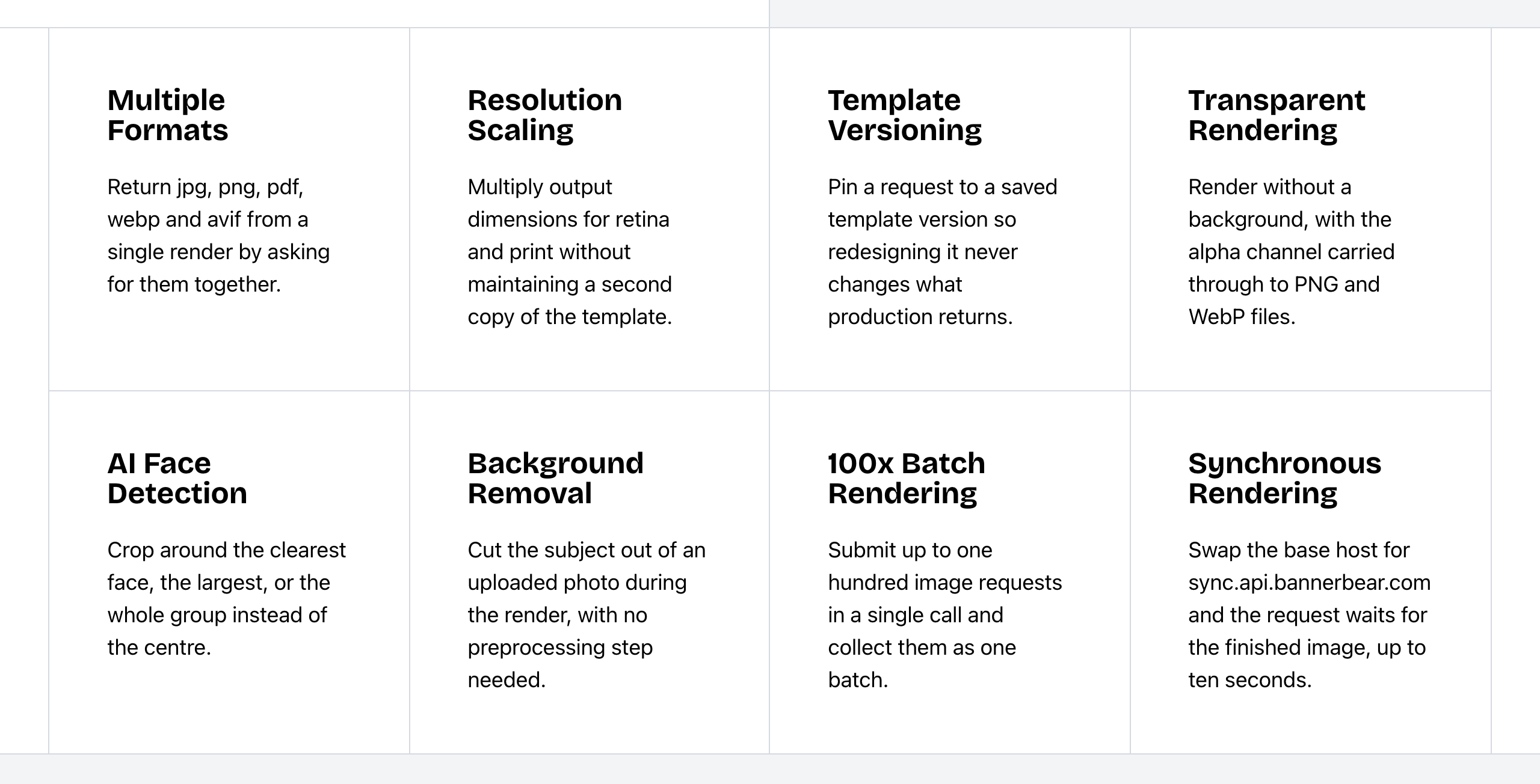 Bannerbear Image API features. Source: bannerbear.com/v5/products/image-api, captured 25 October 2026.
Creatomate connects to outside AI providers. Image elements can be generated from a prompt with Stability AI or OpenAI, and voiceovers come from ElevenLabs or OpenAI. You add your own provider API key in the project settings, and the provider bills you for that use. A generated image can be used as a background layer. For cropping, Creatomate has an experimental smart crop that works from edges, saturation and detail. Creatomate also has chroma key, which makes a chosen colour transparent, for green-screen footage.
AI background removal, face and subject detection, built-in AI video generation and an AI-generated opening animation are not listed on Creatomate's website as of October 2026. Creatomate's blog suggests using external AI video tools in a workflow, so you can still bring in clips made elsewhere.
What this means: if your source images are product photos, user uploads or team headshots, Bannerbear can cut them out and crop them in the same request that renders the final image. With Creatomate, you would prepare those images in a separate tool first, unless the footage was shot on a green screen.
Bottom line: choose Bannerbear for e-commerce catalogs, profile and team images, and pipelines that need AI-generated clips. If you already pay for Stability AI, OpenAI or ElevenLabs and want to use those accounts, Creatomate's bring-your-own-key setup fits.
Video and motion
Both products cover the standard video jobs: a keyframe timeline, per-word text animation, automatic subtitles, video overlays, joining clips, trimming, audio, slideshows, GIF output and thumbnails.
Creatomate has the deeper composition model. Its compositions nest timelines inside each other, transitions sit between elements on the same track, and an element without a fixed start time begins when the previous one ends, so a template's length follows its media. See where Creatomate leads for the full list.
Bannerbear adds motion extras around the template:
- Lottie layers that play on the same timeline as everything else
- Animated backgrounds
- Transparent animations to overlay on other video (output is MOV)
- Template conversion from an image template into an animation template, keeping every layer
- Auto Animate, which generates an opening timeline from the layout
- AI video generation with Seedance, Kling and Veo models
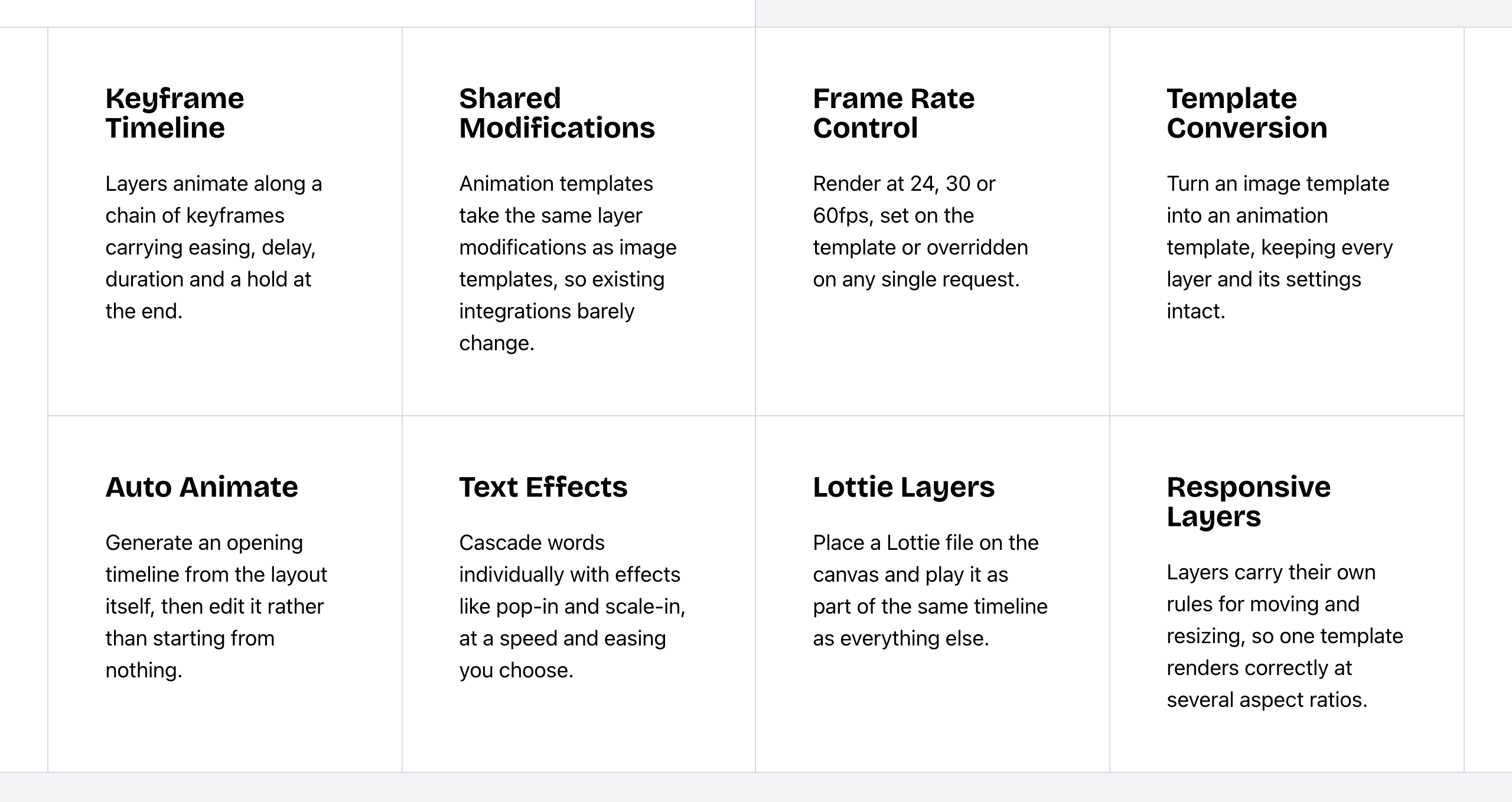 Bannerbear Animation API features. Source: bannerbear.com/v5/products/animation-api, captured 25 October 2026.
Lottie layers, animated backgrounds, transparent video output and image-to-animation conversion are not listed on Creatomate's website as of October 2026. Creatomate lists mp4 and gif as its video outputs.
Bottom line: choose Creatomate if your videos are assembled from clips of different lengths and need transitions and nested scenes. Choose Bannerbear if your videos need Lottie motion graphics, transparent overlays or AI-generated footage.
Video composition, embedding and feeds: where Creatomate leads
These are the areas where Creatomate offers more, according to the two companies' own pages.
Video defined as JSON. Creatomate's RenderScript can describe a whole video or image as JSON, and the API renders it without a saved template. In Bannerbear, templates can be defined as layer JSON through the API, but a render needs a saved template, and there is no video composition JSON.
Nested timelines and transitions. Creatomate compositions group elements and nest timelines, and transitions run between elements on a track. Bannerbear has group layers for images, and its transitions are part of the slideshow and video-join tools.
Automatic duration. In Creatomate, the template length adapts to the media you send, such as a user's video or a voiceover. This is not listed for Bannerbear, where an animation's length comes from the template's keyframes.
Auto layout. Creatomate compositions can flow their children in a row or column, with gap, justify and Hug or Fill sizing. Bannerbear positions layers with anchors, and auto layout is not listed.
Chroma key. Creatomate can make a chosen colour transparent for green-screen footage. This is not listed for Bannerbear.
An editor inside your own app. Creatomate's JavaScript Preview SDK loads a template in your web app, shows a live preview as users change it, and then sends it to the API for rendering. The JS Preview SDK is on its Growth and Beyond plans (according to their pricing page). Bannerbear has an embeddable editor on its older V3 platform, and it still works there. The current V5 platform does not include one.
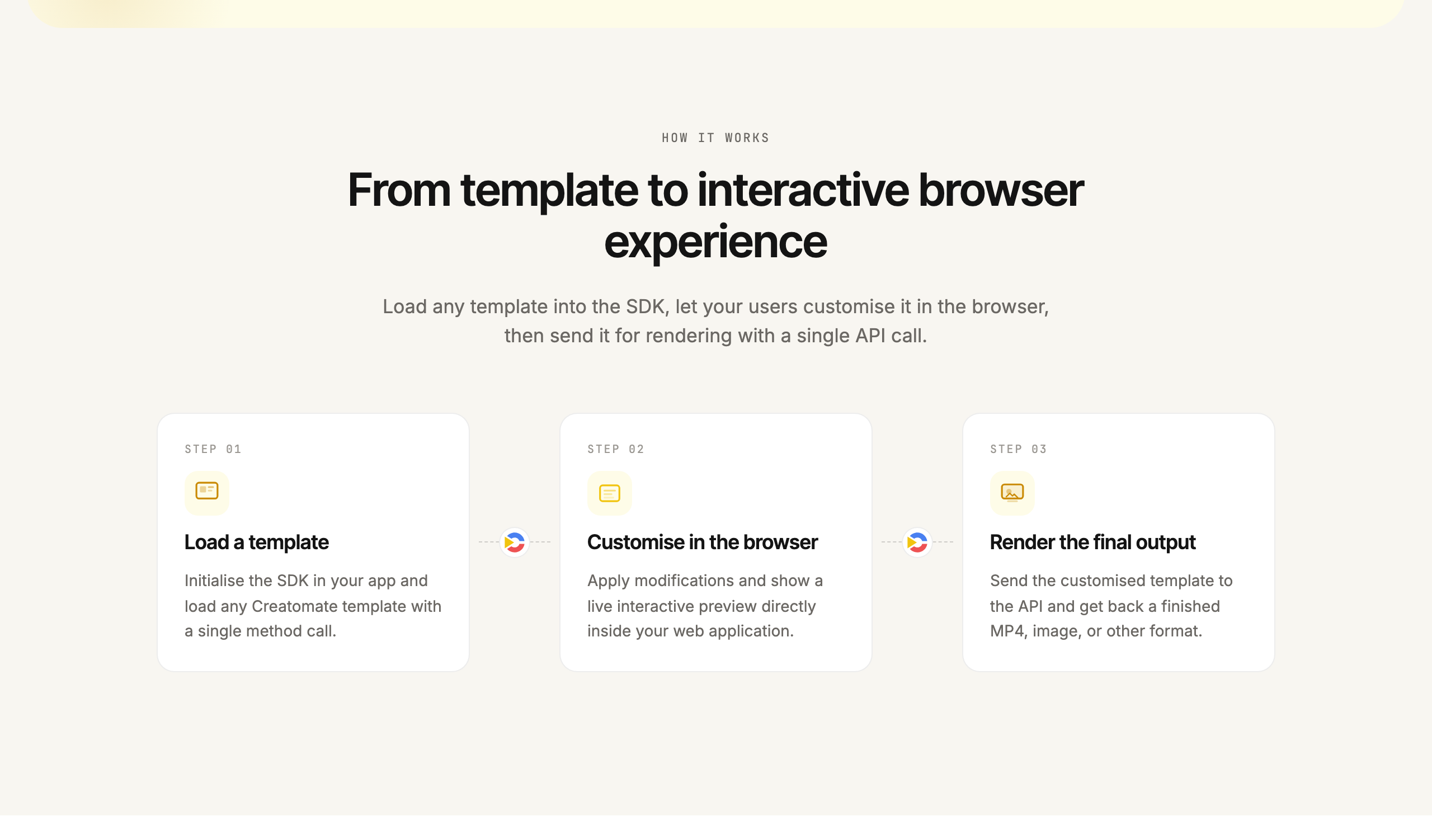 Creatomate JavaScript Preview SDK. Source: creatomate.com/javascript-video-sdk, captured 25 October 2026.
Spreadsheet feeds. A Creatomate feed is an in-app spreadsheet where each row renders one video or image. You can import a CSV and download the results as a ZIP. An in-app feed is not listed for Bannerbear. Bannerbear's bulk options are its batch API and its Airtable integration, which work differently.
Cost controls. Creatomate's dry run checks a render request and returns errors and warnings without using credits, and a per-project budget caps the credits a project can spend in a month. Neither is listed for Bannerbear.
Bottom line: if your users will customise videos inside your product, if you generate video from code without saving templates, or if your team works from spreadsheets, Creatomate is the better fit.
Images, PDF and print
Creatomate lists jpg, png, gif and mp4 as its output formats. Bannerbear returns jpg, png, pdf, webp and avif, and you can ask for several formats from one render.
Bannerbear adds print and document output:
- PDF from any image template, and merging of up to 50 JPG, PNG and PDF files into one PDF
- Print tools: flatten a PDF and convert a PDF to an image
- DPI from 72 to 600 on images and PDFs, and CMYK conversion for PDFs
- Transparent PNG and WebP, with the alpha channel kept
- Quality setting from 1 to 100 for JPG and WebP
- Image URL proxy
- Special objects: star ratings, barcodes and QR codes
- Text in Chinese, Japanese and right-to-left scripts such as Arabic and Hebrew
- No limit on the number of templates on paid plans (the free trial allows 3)
PDF output, PDF tools, DPI settings and an image quality setting for JPG are not listed on Creatomate's website as of October 2026. Creatomate's pages do not say whether png output keeps transparency. Creatomate has text image masks and barcode fonts, and built-in Arabic and Hebrew fonts. Its plans state storage limits rather than a template count.
Bottom line: choose Bannerbear for certificates, invoices, print collateral and transparent product images. For social images and video thumbnails, both cover the job.
Workflows and automation
Bannerbear Workflows chain image renders, animation renders and media tools into one API endpoint. For example: render a template, add subtitles, add a voiceover, overlay an animation, then export. You build workflows in a visual builder, each run records every step's inputs, outputs and duration, and you can publish a workflow together with its templates.
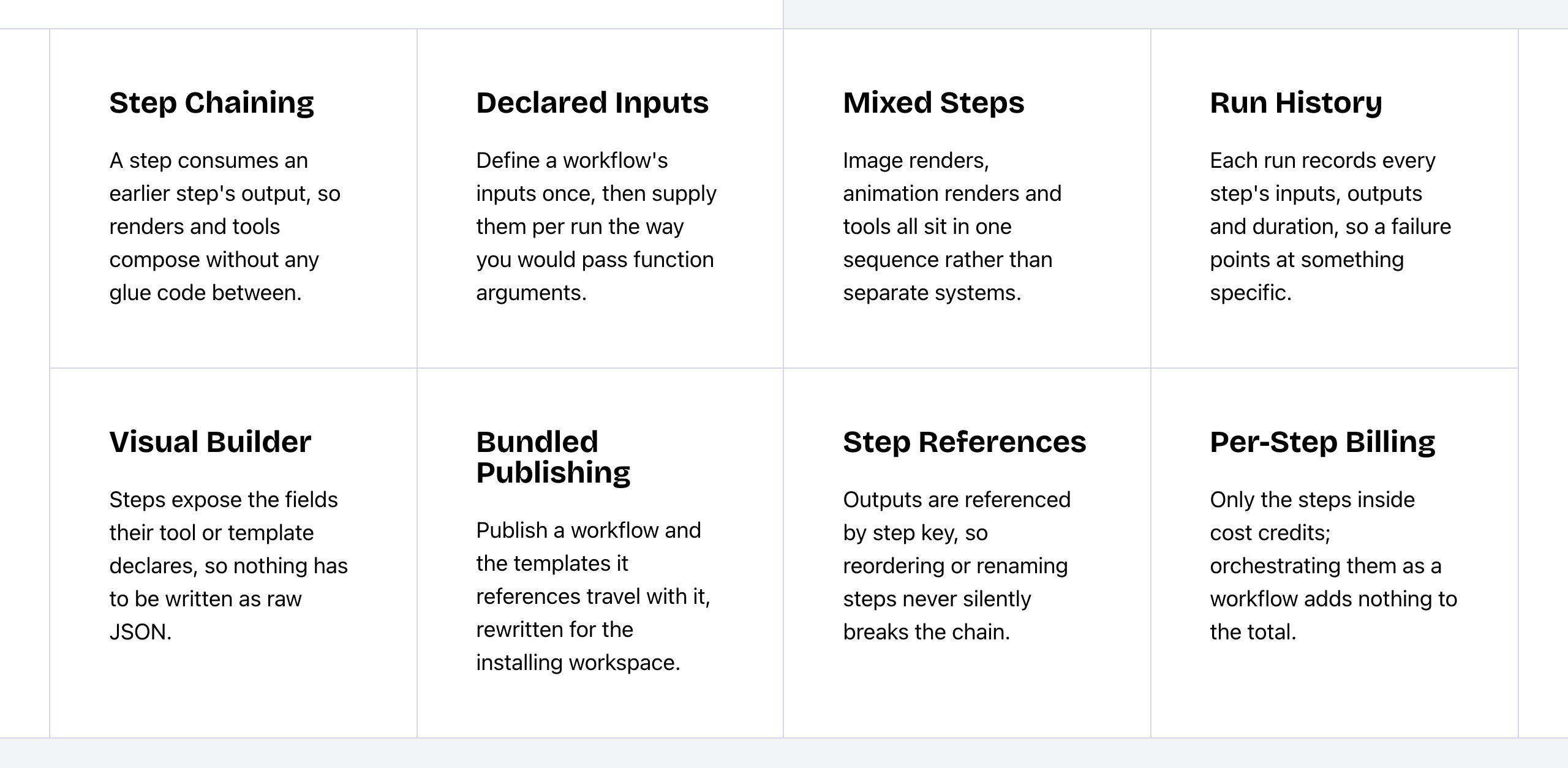 Bannerbear Workflows features. Source: bannerbear.com/v5/products/workflow-api, captured 25 October 2026.
Bannerbear can also return an image in the same request through a synchronous host (up to 10 seconds), and its Instant URLs render an image from URL parameters, open or HMAC-signed, on Scale and up.
Creatomate chains steps through Zapier, Make and n8n, and it has an official n8n node. Its API queues renders and reports back through polling or a webhook. Creatomate says renders can start from webhooks, scheduled jobs or events. A built-in workflow builder, a synchronous render endpoint and image rendering from URL parameters are not listed on Creatomate's website as of October 2026.
Bottom line: choose Bannerbear if producing one asset takes several processing steps and you want them behind one endpoint. Choose Creatomate if you already run your automation in n8n, Make or Zapier and prefer to keep the chaining there. Bannerbear also works with all three.
Integrations
Both connect to Zapier, Make and Airtable, and both have an MCP server.
- Bannerbear lists 50+ native data-source integrations with field mapping and write-back. These include a WordPress integration that generates Open Graph images and Pinterest pins, a Webflow integration that pulls CMS items and can write image URLs back, and a Ghost integration that pulls posts and pages. It also has a Figma plugin that turns frames into templates.
- Creatomate lists Zapier, Make, n8n and Pabbly Connect, plus CSV import into its feeds.
A Figma plugin and WordPress, Webflow and Ghost integrations are not listed on Creatomate's website. Pabbly is not listed on Bannerbear's. Both as of October 2026. Both products have a node in n8n.
Developer experience
| Bannerbear | Creatomate | |
|---|---|---|
| API description | Full OpenAPI 3.1 file | No public OpenAPI file found; hand-written docs and llms.txt topic pages |
| Official SDKs | Ruby, Node, Python, PHP | Node.js and PHP; browser Preview SDK; other languages use the REST API |
| API keys | Scoped keys (22+ scopes), browser-origin allowlists, workspace keys | One API key per project |
| Pin a render to a template version | Yes | Not listed (version history and draft mode) |
| Rate limits | 60 POST requests per 10 seconds; 429 when exceeded | 30 requests per 10 seconds per account; X-RateLimit headers and Retry-After; plan-based concurrency; about 20% of the monthly quota in 24 hours |
| Test a request before rendering | Not listed | Dry run with no credits used |
| Spending cap per project | Not listed | Monthly credit budget per project |
| AI agent access | Hosted and local MCP server; llms.txt on the main site | Hosted MCP server; llms.txt and llms-full.txt |
| Team access | Team members and roles on Scale and up | Project sharing on Growth and Beyond; members can be kept out of feeds or templates |
Creatomate documents more about its rate limits, and its dry run and project budget help you test and control spend. Bannerbear's stated base limit is higher (60 POST requests per 10 seconds, against 30 requests). Its OpenAPI file, four SDKs and scoped keys help when you generate client code or give limited keys to front-end apps.
Security and enterprise
| Bannerbear | Creatomate | |
|---|---|---|
| Single sign-on (SSO) | Enterprise plan | Not listed |
| Account audit logs | Enterprise plan | Not listed (a dashboard API log of renders exists) |
| Zero data retention | Enterprise plan | Not listed |
| Two-factor authentication | Scale plan and up | Not listed |
| Restrict team sign-up to your email domain | Yes | Not listed |
| Signable DPA | Yes | Not listed (privacy policy names Creatomate as data controller) |
| Store output in your own S3 bucket | Scale plan and up | Not listed (docs suggest copying files to S3 with an automation step) |
| Uptime claim and public status page | 99.9% trailing 12 months; public status page | Not listed |
| How long renders are kept | Kept while your subscription is active | 30 days, then deleted |
Bottom line: if your company's security review asks for SSO, audit logs or a signed DPA, Bannerbear lists all three. Ask Creatomate directly before you rule it out.
Pricing
| Bannerbear | Creatomate | |
|---|---|---|
| Free trial | 30 API credits and 50 AI credits, no card, not renewable | 50 credits, no card; docs say free renders are capped at 480 px per side |
| Entry plan | Automate: $49/mo, 1,000 credits | Essential: $54/mo, 2,000 credits |
| Mid plans | Scale: $149–$296/mo, 10,000–40,000 credits | Growth: $129–$279/mo, 10,000–40,000 credits |
| High volume | Enterprise: from $299/mo for 50,000 credits, up to 2,000,000 credits | Beyond: $329–$1,209/mo, 50,000–200,000 credits; larger plans on request |
| Yearly billing | Not shown on the pricing page | 10 times the monthly price (2 months free) |
| Cost of one image | 1 credit per output format, multiplied by the scale value | 1 credit at any resolution up to 3,840 px per side |
| AI features | Separate AI credit pool included (200/mo on Automate, 600–1,250 on Scale) | Your own provider key; the provider bills you |
| Auto subtitles | 0.3 AI credits per minute | Free at 720p and above; below that, 10 credits per minute, charged only when above the render cost |
| Unused credits | Reset each month | Do not roll over |
| Other plan limits | — | Storage 5 / 50 / 500 GB; feed rows 1,000 / 10,000 / 100,000 |
| Priority support | Enterprise | Beyond |
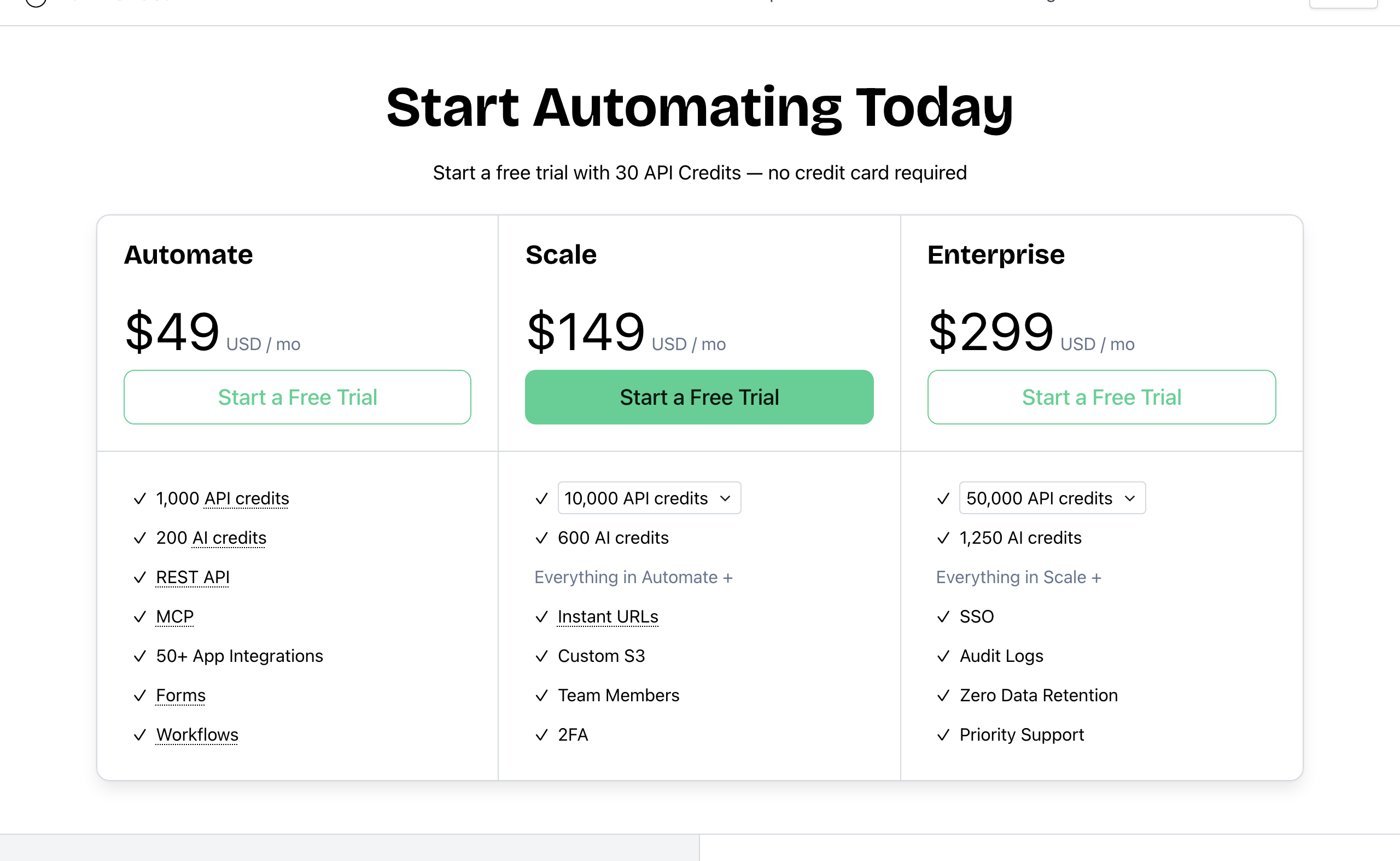 Bannerbear pricing. Source: bannerbear.com/pricing, captured 25 October 2026.
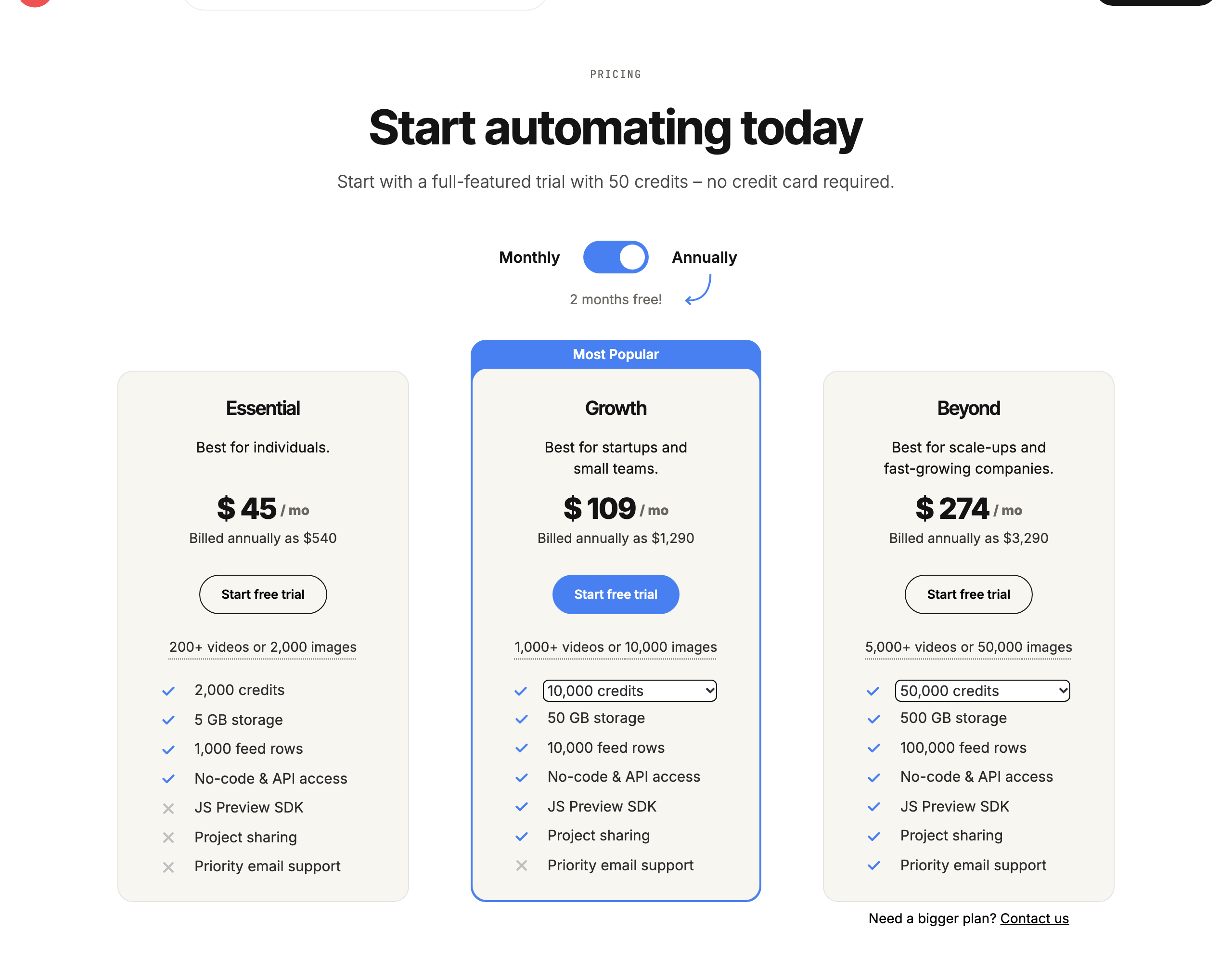 Creatomate pricing, yearly billing shown. Source: creatomate.com/pricing, captured 25 October 2026.
Cost for the same job
Standard images, one format, scale 1, so one image is one credit on both products. Cheapest plan whose monthly credits cover the volume. Paid plans only.
| Images per month | Bannerbear (monthly) | Creatomate (monthly) | Creatomate (billed yearly) | Cheaper on monthly billing |
|---|---|---|---|---|
| 500 | $49 (Automate) | $54 (Essential) | $540/yr | Bannerbear, by $5 |
| 1,000 | $49 (Automate) | $54 (Essential) | $540/yr | Bannerbear, by $5 |
| 2,000 | $149 (Scale) | $54 (Essential) | $540/yr | Creatomate, by $95 |
| 5,000 | $149 (Scale) | $129 (Growth) | $1,290/yr | Creatomate, by $20 |
| 10,000 | $149 (Scale) | $129 (Growth) | $1,290/yr | Creatomate, by $20 |
| 25,000 | $247 (Scale) | $229 (Growth) | $2,290/yr | Creatomate, by $18 |
| 40,000 | $296 (Scale) | $279 (Growth) | $2,790/yr | Creatomate, by $17 |
| 50,000 | $299 (Enterprise) | $329 (Beyond) | $3,290/yr | Bannerbear, by $30 |
| 100,000 | $458 (Enterprise) | $639 (Beyond) | $6,390/yr | Bannerbear |
For plain image generation, Creatomate costs less from 2,000 to 40,000 images a month. On yearly billing, Creatomate also costs less than Bannerbear's monthly price at every volume up to 50,000. Bannerbear costs less at 500 and 1,000 images a month on monthly billing, and at 50,000.
Creatomate also limits how much of the monthly quota you can use in 24 hours (about 20%), and it keeps rendered files for 30 days.
The comparison changes when your pipeline needs the features in the AI, PDF, workflow and security sections. Background removal, face detection, built-in AI video, PDF output, built-in workflows and SSO are not listed on Creatomate's website at any price, so you would add another tool for them, at its own cost. Bannerbear's plans include an AI credit pool for its AI features. Creatomate's AI image and voice features use your own provider account, which the provider bills separately. We do not compare those AI costs, because the provider prices are not in our data.
Video costs are measured differently, so we leave video out of the table. Bannerbear's cost depends on what the video does. A template that is animated for the whole clip uses 1 credit plus 2 credits per second, at any resolution, and 60 fps doubles it: a 10-second clip uses 21 credits. A static overlay on an existing 10-second video uses 4 credits. Creatomate charges width × height × fps × seconds ÷ 100,000,000 credits, rounded up, so a 10-second 1080×1920 video at 30 fps uses 7 credits. For fully animated HD clips, Creatomate's formula uses fewer credits. For overlays on existing video, Bannerbear uses fewer.
Who should choose Creatomate
Creatomate is the right choice if:
- You make mostly templated video from clips, voiceovers and images of varying length
- You want to define videos as JSON in code, without saving templates first
- You want users to customise and preview videos inside your own web app
- Your team prepares content in spreadsheets or CSV files
- You need green-screen (chroma key) footage or row and column auto layout
- You want a dry run and per-project spending caps while you build
- You generate between 2,000 and 40,000 plain images a month and price is the main factor
- You already pay for Stability AI, OpenAI or ElevenLabs and want to use those accounts
Who should choose Bannerbear
Bannerbear is built for teams who:
- Start from photos that need cleanup: product images, user uploads, headshots
- Need PDFs, print-ready files or transparent images alongside video
- Want AI-generated video clips, Lottie motion graphics or transparent overlays
- Want one API call to run a multi-step pipeline, with run history for each step
- Need SSO, audit logs, a signed DPA or their own S3 storage for a security review
- Generate client code from an OpenAPI file, or need scoped API keys
- Design in Figma and want to turn frames into templates
- Want answers from real people: email and chat support from two full-time human support staff, who answer at almost any hour, plus priority support on Enterprise
- Want a provider with a track record: Bannerbear launched in January 2020, two years before Creatomate. It publishes a 99.9% uptime figure with a public status page and runs Enterprise plans of up to 2,000,000 credits per month
FAQ
Is Creatomate cheaper than Bannerbear? For plain image generation, yes, between 2,000 and 40,000 images a month. For example, 10,000 images cost $129 a month on Creatomate's Growth plan and $149 on Bannerbear's Scale plan. Bannerbear costs less at 1,000 images ($49 against $54) and at 50,000 ($299 against $329). Bannerbear's plans include AI image editing, PDF output and built-in workflows, which are not listed on Creatomate's website.
Can Creatomate make PDFs? PDF output is not listed on Creatomate's website or docs as of October 2026. Its stated output formats are jpg, png, gif and mp4. Bannerbear can return a PDF from any image template and merge up to 50 files into one PDF.
Which one removes image backgrounds? Bannerbear removes backgrounds with AI during the render, for 1 AI credit. AI background removal is not listed on Creatomate's website. Creatomate has chroma key, which removes a chosen colour such as a green screen.
Which is better for video? It depends on the video. Creatomate has nested timelines, transitions between clips, automatic duration and JSON-defined videos. Bannerbear has Lottie layers, transparent animations, Auto Animate and AI video generation. Both have keyframes, text animation and automatic subtitles.
Can I embed the editor in my own app? Creatomate offers a JavaScript Preview SDK with live preview, on its Growth and Beyond plans (according to their pricing page). Bannerbear has an embeddable editor on its older V3 platform, and it still works there. The current V5 platform does not include one.
Do both work with AI assistants like Claude and ChatGPT? Yes. Both have an MCP server.
How we compared
- Sources: each company's marketing website and pricing page, API documentation and help center. For Creatomate, we also read its llms.txt and llms-full.txt files. For Bannerbear, the API comparison used its published OpenAPI file.
- Date: all facts were checked on 25 October 2026. Products change; check the current pages before you decide.
- "Not listed" means we searched the company's own sites for the feature and found no mention. For the main claims on this page, that search covered all 444 pages in Creatomate's sitemap and its LLM docs. It is not proof that the feature does not exist.
- Screenshots show public pages as they appeared on the capture date in each caption.
- Pricing comes from the public pricing pages. Creatomate's prices are rendered by JavaScript, and we read the monthly prices from the page's script. Creatomate's page shows Growth as $109/mo on yearly billing; the yearly total it states is $1,290.
- What we did not measure: support response times, ease of use, render speed, output quality and reliability. We did not include third-party reviews.
- Disclosure: this page is published by Bannerbear.
- Launch years come from Product Hunt, the companies' own pages and web archives.