Facts on this page come from each company's public website, documentation, help center and changelog, checked on 25 October 2026. See How we compared for the method and sources.
TL;DR: Bannerbear and Templated both render images, PDFs and MP4 video from templates through one REST API, and both connect to no-code tools and AI assistants. Templated costs less for plain image generation at most volumes, and it has more ways to bring designs and data in: Canva and Photoshop import, spreadsheet and catalog generation, and an embeddable white-label editor. Bannerbear does more of the media work after the template render: AI image and video generation, face detection, auto subtitles, AI voiceover, a keyframe animation timeline, and multi-step workflows that run in one API call. Choose Templated if price per image, design import or an in-app editor matters most. Choose Bannerbear if your pipeline needs AI-made media, produced video or enterprise security controls.
At a glance
| Bannerbear | Templated | |
|---|---|---|
| Images, PDFs and MP4 video from templates | ✅ Yes | ✅ Yes |
| AI background removal | ✅ Yes | ✅ Yes |
| Text-to-image generation | ✅ Built in (Flux, Nano Banana, GPT Image 2) | Not listed |
| AI video generation | ✅ Built in (Seedance, Kling, Veo) | Not listed |
| AI face and subject detection (auto-crop) | ✅ Yes | Not listed |
| Auto subtitles | ✅ Yes | Not listed |
| AI voiceover | ✅ Yes | Not listed |
| Keyframe animation timeline | ✅ Yes, with easing, delay and hold | Not listed (preset entrance, loop and exit animations) |
| Multi-step workflows in one API call | ✅ Yes, with a visual builder | Not listed |
| Render from a URL (Instant URLs) | ✅ Yes (Scale and up) | Not listed |
| SSO and audit logs | ✅ Yes (Enterprise) | Not listed |
| Scoped API keys | ✅ Yes | Not listed |
| Embeddable editor for your own app | Older V3 platform only | ✅ Yes, white-label (Scale and up) |
| Canva, Photoshop and PDF import | Not listed | ✅ Yes |
| Spreadsheet (CSV/XLSX) generation | Not listed | ✅ Yes |
| Starting price | $49/mo | $39/mo ($29/mo billed annually) |
| Launched | January 2020 | 2024 |
"Not listed" means we searched the company's website, docs, help center and changelog and found no mention, as of October 2026. It does not prove the feature is absent.
What both products do
Both products cover the core job, and they share a lot.
- Template editor with text fitting, custom fonts, image effects, layer anchoring and version history
- Image API with synchronous and asynchronous rendering, batch rendering, several output formats, resolution scaling and transparent output
- PDF output, including multi-page PDF merge, print tools and CMYK colour
- MP4 video from animated templates, with per-layer animations
- AI background removal
- REST API with an OpenAPI file and webhooks on completion
- MCP server, so AI assistants such as Claude can create assets
- Integrations with Zapier, Make and Airtable
- Custom S3 storage (Templated also lists Cloudflare R2 and S3-compatible buckets), team members with roles, two-factor authentication and a published DPA
- Free trial with no credit card
If your need is "fill a template with data and get an image, PDF or MP4 back", either product will do the job. The differences are in how designs and data get in, and in what happens to the media after the render.
AI generation and AI editing
Both products remove image backgrounds with AI.
Bannerbear applies AI to the media that goes into a render. It has a built-in text-to-image tool with a choice of models (Flux Schnell, Flux 1.1 Pro, Nano Banana, GPT Image 2). It generates video clips with Seedance, Kling and Veo models. It can generate a new background from a prompt in image and animation templates, and crop automatically around a face, a group or the main subject. Auto Animate builds an opening animation from an existing layout, which you can then edit. These features use a separate AI credit pool, included with each plan (200 AI credits per month on Automate, from 600 on Scale).
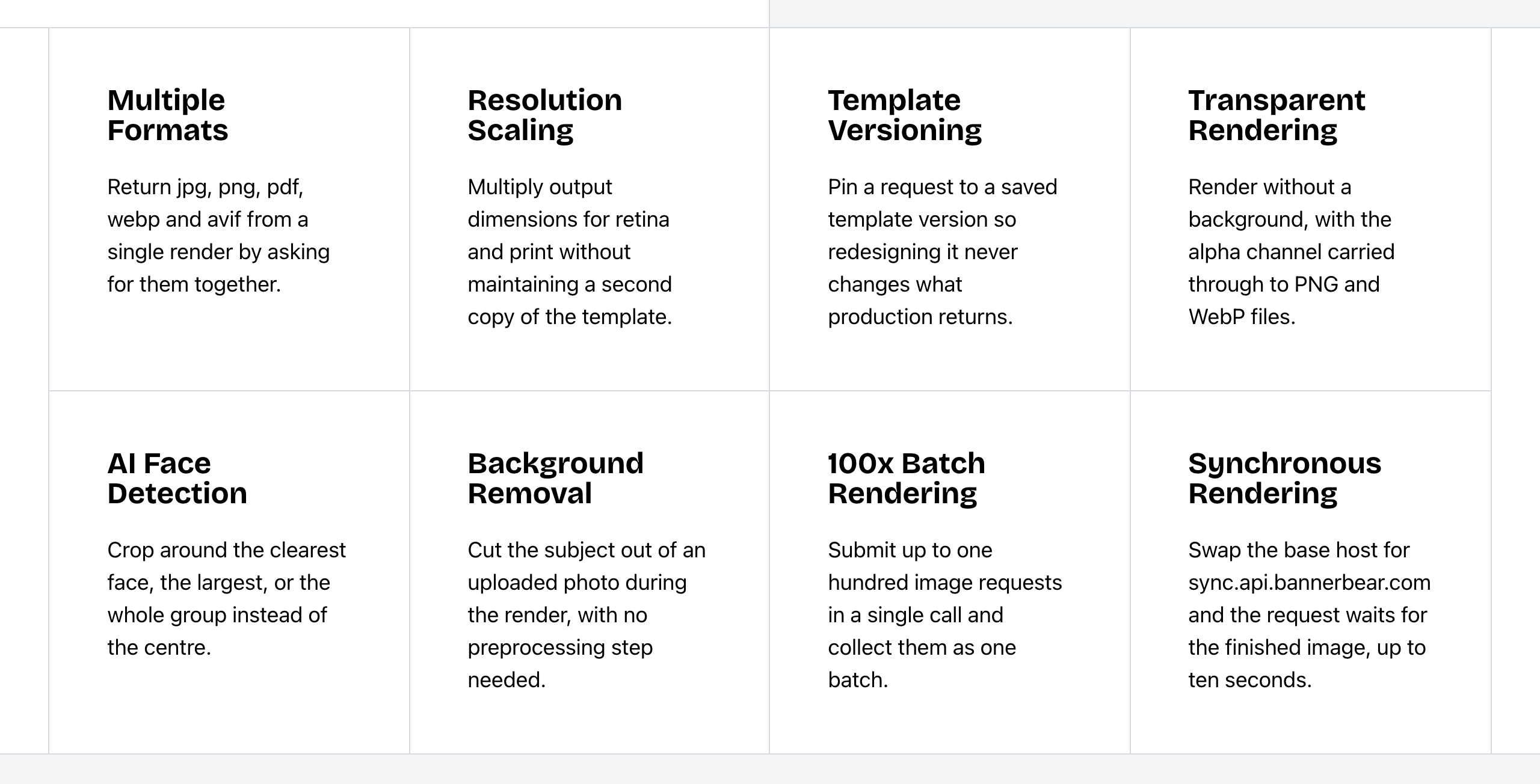 Bannerbear Image API features. Source: bannerbear.com/v5/products/image-api, captured 25 October 2026.
Templated uses AI to build and edit templates. Its AI Template Generator creates a template from a text prompt, and its editor AI assistant, launched on 14 October 2026, edits a template when you ask in chat. Templated's own FAQ says it is not an AI image generator. AI image generation, AI video generation, AI background generation and face or subject detection are not listed on Templated's website as of October 2026. For cropping, Templated has a manual image crop. Templated's AI can generate a new animated template from a prompt, which is a different job from Bannerbear's Auto Animate on an existing layout.
What this means: with Templated, the AI helps you make the template. With Bannerbear, the AI also works on the photos, backgrounds and clips that go into a render, so you may not need a separate AI tool to prepare them.
Bottom line: choose Bannerbear for product and marketplace images, profile photos at scale, and any pipeline that needs generated visuals or video clips. Choose Templated if you mainly want help designing templates quickly.
Video and motion
Both products render MP4 video from animated templates, with animations set per layer.
Templated has preset Slide, Fade, Zoom, Rotate, Spin and Pulse animations for entrance, loop and exit, with a timeline bar per layer that sets when each animation starts and ends. Text can enter word by word with slide and fade effects. Templated also has video layers inside templates, so you can swap the video in each render, and the video carries its own audio. For trimming and GIFs, Templated offers free standalone web tools, outside the product and API; GIF is not a render format.
Bannerbear has a broader toolset around the video:
- Keyframe timeline with easing, delay, hold and animatable blur, plus an endpoint that applies animation presets across layers
- Per-word text effects such as pop-in and scale-in
- Lottie layers, animated backgrounds and transparent animations to overlay on other video
- Image to animation conversion, which turns an image template into an animation template
- Auto subtitles with style presets and non-English audio, and AI voiceover from text
- Video tools in the API: trim, crop, resize, join, overlay, colour filters, audio, slideshows, GIF previews, thumbnails and cover art
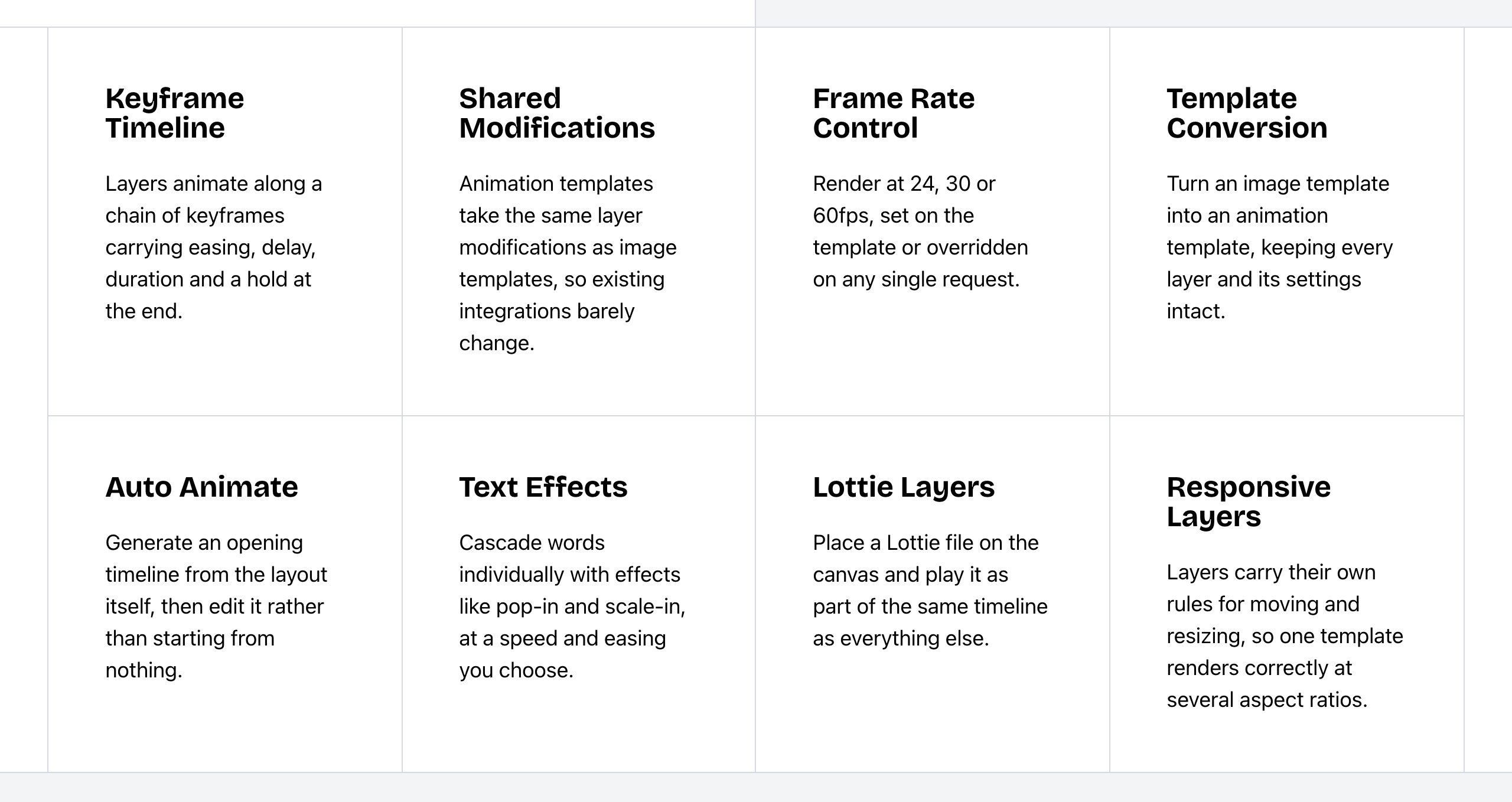 Bannerbear Animation API features. Source: bannerbear.com/v5/products/animation-api, captured 25 October 2026.
Auto subtitles, AI voiceover, a keyframe timeline, Lottie layers, animated backgrounds, transparent animation, and video join, overlay, colour filter, slideshow and thumbnail tools are not listed on Templated's website as of October 2026. A separate audio tool is not listed either; Templated's audio comes from video layers.
Bannerbear does not list a video layer type for templates. It handles video with its tools and workflows instead.
Bottom line: both work for animated social clips built from a template. Choose Templated if you want to drop a different video into a template on each render. Choose Bannerbear if your videos need subtitles, narration, motion graphics or editing steps after the render.
Workflows and no-code generation
Bannerbear Workflows chain image, animation and media-tool steps into one API endpoint. For example: render a template, add subtitles, add a voiceover, overlay an animation, then export. You build them in a visual builder, see each step's inputs and outputs in the run history, and can publish a workflow with its templates.
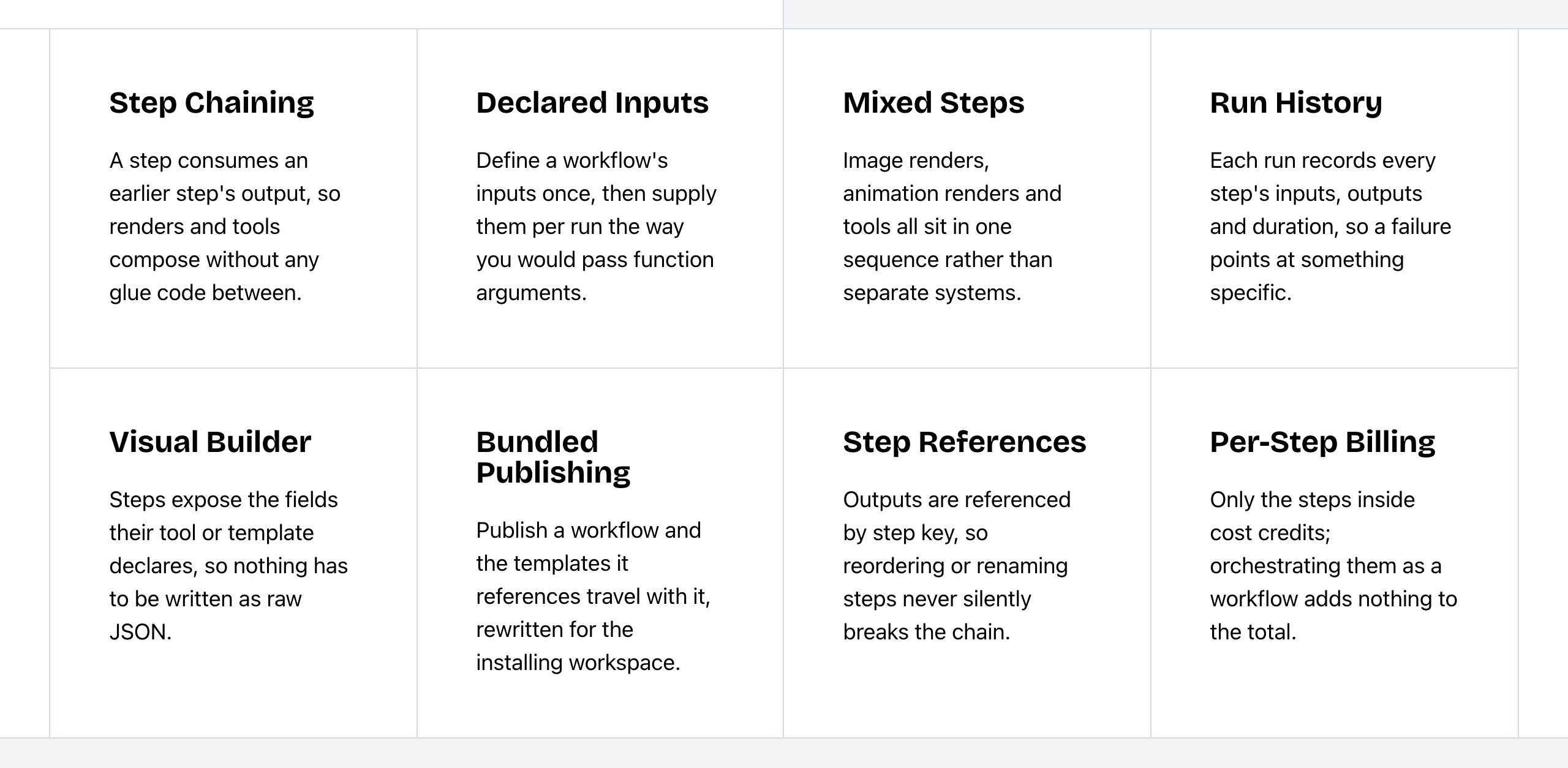 Bannerbear Workflows features. Source: bannerbear.com/v5/products/workflow-api, captured 25 October 2026.
For people who do not write code, Bannerbear has hosted Forms that you can share or embed, and Instant URLs (Scale and up) that render an image from a URL, either open or signed with HMAC.
Templated starts renders from many places. It connects to Zapier, Make, n8n (with a native node), Airtable, Bubble and Activepieces. You can upload a CSV or Excel file to create one render per row, turn a product spreadsheet into a paginated PDF catalog, and trigger renders through inbound webhooks from Google Forms, Tally and Typeform. Its embedded editor has a Form Mode on the Scale plan and up, which shows the canvas with an auto-generated form and a render button inside your own app. A hosted public form link is not listed.
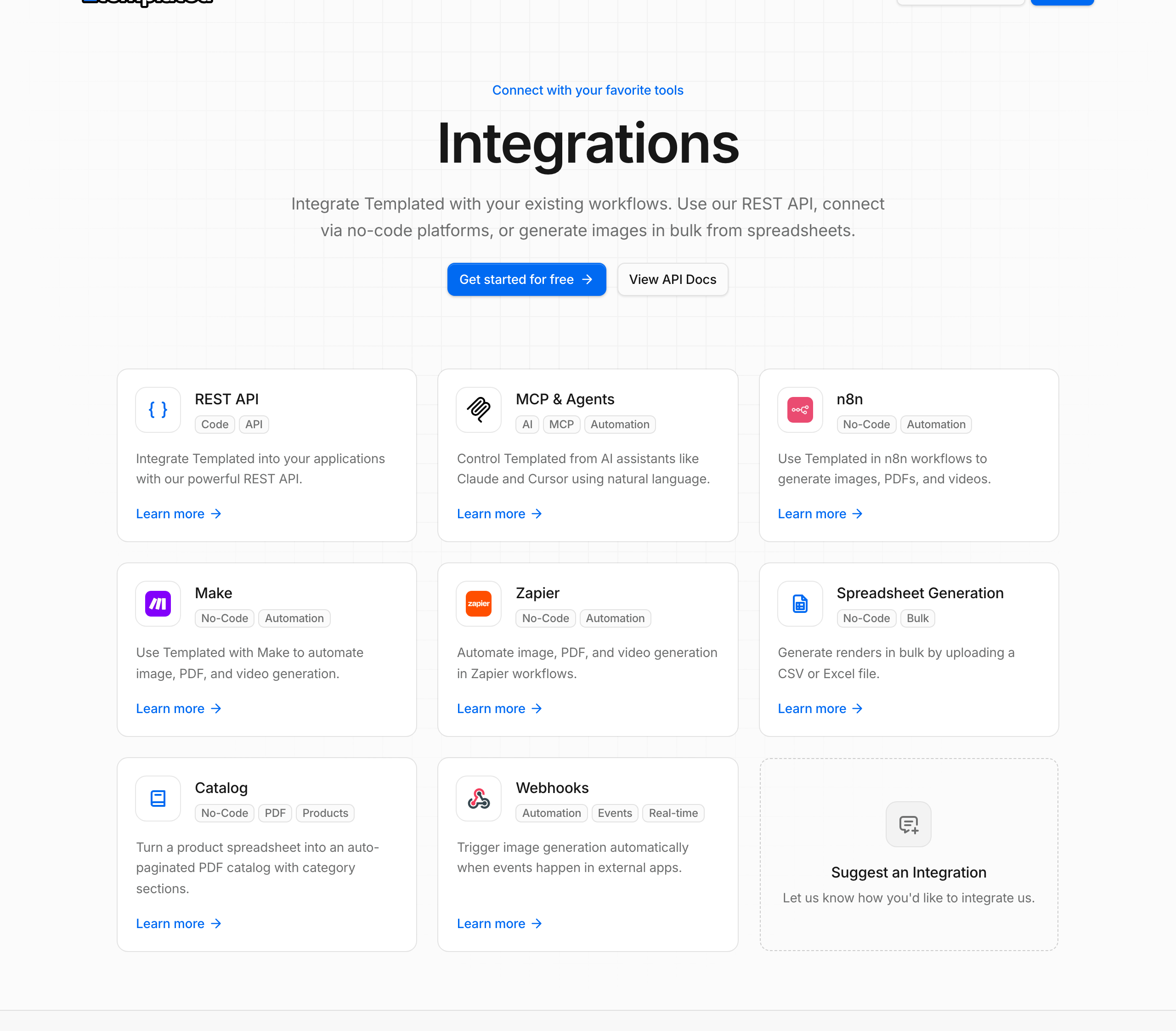 Templated integrations. Source: templated.io/integrations, captured 25 October 2026.
These Templated features start a render. A native workflow builder or an endpoint that chains generation steps is not listed on Templated's website, and neither is a render-from-URL feature like Instant URLs, as of October 2026. Spreadsheet upload, ZIP download and multi-page PDF merge do exist in Templated.
Spreadsheet upload, catalog generation and inbound webhook triggers are not listed on Bannerbear's website. Bannerbear has a batch API, hosted forms and Airtable, which work in a different way.
Bottom line: choose Templated if your data lives in spreadsheets or form tools and you want each row or submission to become a render. Choose Bannerbear if producing one asset takes several processing steps, or if non-technical people need a shareable form or a render URL.
Templates, design import and embedding: where Templated leads
Bring your designs in. Templated imports Canva designs (from the Starter plan) and PDF, Photoshop, Illustrator, PowerPoint and HTML files. Bannerbear lists only its own V3-to-V5 template import.
Multi-page and HTML documents. Templated templates can have several pages, each with its own layers, and can contain HTML layers with inline CSS. HTML output is on the Enterprise plan. These are not listed on Bannerbear's website. Bannerbear can stitch separate files into one PDF, which is a different mechanism.
Embed a white-label editor. Templated's embedded editor puts its template editor inside your own product, with a domain allowlist, many UI toggles and custom branding, on the Scale plan and up. Bannerbear has an embeddable editor on its older V3 platform, and it still works there. The current V5 platform does not include one. Custom branding is not listed for Bannerbear.
AI help with templates. Templated's AI Template Generator (from Starter) builds a template from a description, and its editor AI assistant edits a template by chat. Neither is listed inside Bannerbear's product. Bannerbear templates can be built by external AI clients through its MCP server, which is a different mechanism.
Stock images and organization. Templated has a built-in stock image library, and it organizes templates in folders and tags, with a tag filter on its list endpoint. A stock image library is not listed for Bannerbear. Bannerbear templates have tags; folders and a tag filter are not listed.
Where Bannerbear differs. Bannerbear has responsive templates, with per-layer rules for position, size and aspect ratio, so one template renders at several sizes. Its render call can pin a template version, so later design changes do not alter production output. It also has a Figma plugin that turns frames into templates. On Templated, the render call accepts width, height and scale, and per-layer responsive rules are not listed. Templated has version history, but a version field on the render call is not listed. A Figma plugin is not listed on Templated's website.
Bottom line: if your designs start in Canva or Photoshop, if you build multi-page or HTML documents, or if your users will design inside your product, Templated is the better fit. If you need one template to serve many sizes and pinned versions in production, Bannerbear covers that.
Integrations
Both connect to Zapier, Make and Airtable, and both have an MCP server that works with AI assistants, including ChatGPT.
- Bannerbear lists 50+ native integrations, a WordPress plugin, Webflow and Ghost, plus a Figma plugin.
- Templated lists a native n8n node, Bubble, Activepieces, Google Sheets, and form tools (Google Forms, Tally, Typeform) through inbound webhooks.
WordPress, Webflow and Ghost integrations are not listed on Templated's website, as of October 2026. Both products have a node in n8n.
Developer experience
Both have a REST API with bearer-token keys, synchronous and asynchronous rendering, custom metadata on renders, and an MCP server.
| Bannerbear | Templated | |
|---|---|---|
| API specification | Public OpenAPI 3.1 file for the V5 REST API | Auto-generated OpenAPI file, Postman collection and llms-full.txt docs |
| Official libraries | Ruby, Node, Python, PHP | Sources disagree; check its docs |
| API keys | Scoped keys (22+ scopes), browser-origin allowlists, workspace-scoped keys | One API key per account; a Designer role hides it |
| Rate limits | 60 POST requests per 10 seconds | 60, 150 or 300 requests per minute, by plan |
| Webhooks | Signed callbacks for completed or failed jobs | Callback on render; no retries, endpoint must answer within 3 seconds, signing not described |
| Sync rendering | Separate sync host (10-second timeout) | Sync by default |
| MCP server | Hosted (OAuth) and local, from Automate | Remote (OAuth) and local, 25 tools, from Starter |
| Image quality setting | 1 to 100, for JPG and WebP | Not listed |
| Request logs | Yes | Usage, quota and render history |
| Errors on failed renders | error_message on failed jobs | FAILED status; error text on bulk render jobs |
Templated publishes its rate limits per plan, which helps when you size a high-volume integration. Bannerbear's scoped keys and origin allowlists help when you give limited keys to front-end apps or contractors.
Bottom line: both fit a production pipeline. Choose Bannerbear if you need fine-grained key control, quality settings and pinned template versions. Choose Templated if you want published per-plan rate limits and a Postman collection to plan and test an integration.
Security and enterprise
Both products have two-factor authentication, team members with roles, and a published DPA.
| Bannerbear | Templated | |
|---|---|---|
| Single sign-on (SSO) | Enterprise plan | Not listed (email login and Google sign-in) |
| Audit logs | Enterprise plan | Not listed |
| Zero data retention | Enterprise plan | Not listed (DPA published) |
| Scoped API keys | 22+ scopes, origin allowlists | Not listed (team roles; Designer role hides the key) |
| Restrict team sign-up to your email domain | Yes | Not listed (invites by email) |
| Team roles | Yes | Owner, Admin, Developer, Designer |
Bottom line: if your company's security review asks for SSO, audit logs or zero data retention, Bannerbear's Enterprise plan lists all three. Templated has 2FA and team roles; ask Templated directly about the rest before you rule it out.
Pricing
| Bannerbear | Templated | |
|---|---|---|
| Free trial | 30 API credits and 50 AI credits, no card | 50 credits, no card |
| Entry plan | Automate: $49/mo, 1,000 credits | Starter: $39/mo ($29 annual), 1,000 credits, 15 templates, 2 team members |
| Mid plan | Scale: from $149/mo, 10,000 credits and up, team members | Scale: $99/mo ($79 annual), 5,000 credits, 100 templates, 5 team members |
| High volume | Enterprise: from $299/mo, 50,000 credits and up | Enterprise: $229/mo ($179 annual), 25,000 credits, unlimited templates, 20 team members |
| Custom plan | — | Custom (contact sales) |
| Annual pricing | Not shown on the pricing page | Yes: $29, $79 and $179 per month billed annually (its page says "save up to 20%") |
| Templates | Unlimited on paid plans | 15, 100 or unlimited, by plan |
| AI features | Separate AI credit pool included (200 on Automate, from 600 on Scale) | One credit pool for all renders |
| Unused credits | Reset each month | Reset on the 1st of the month |
| Priority support | Enterprise | Scale and up |
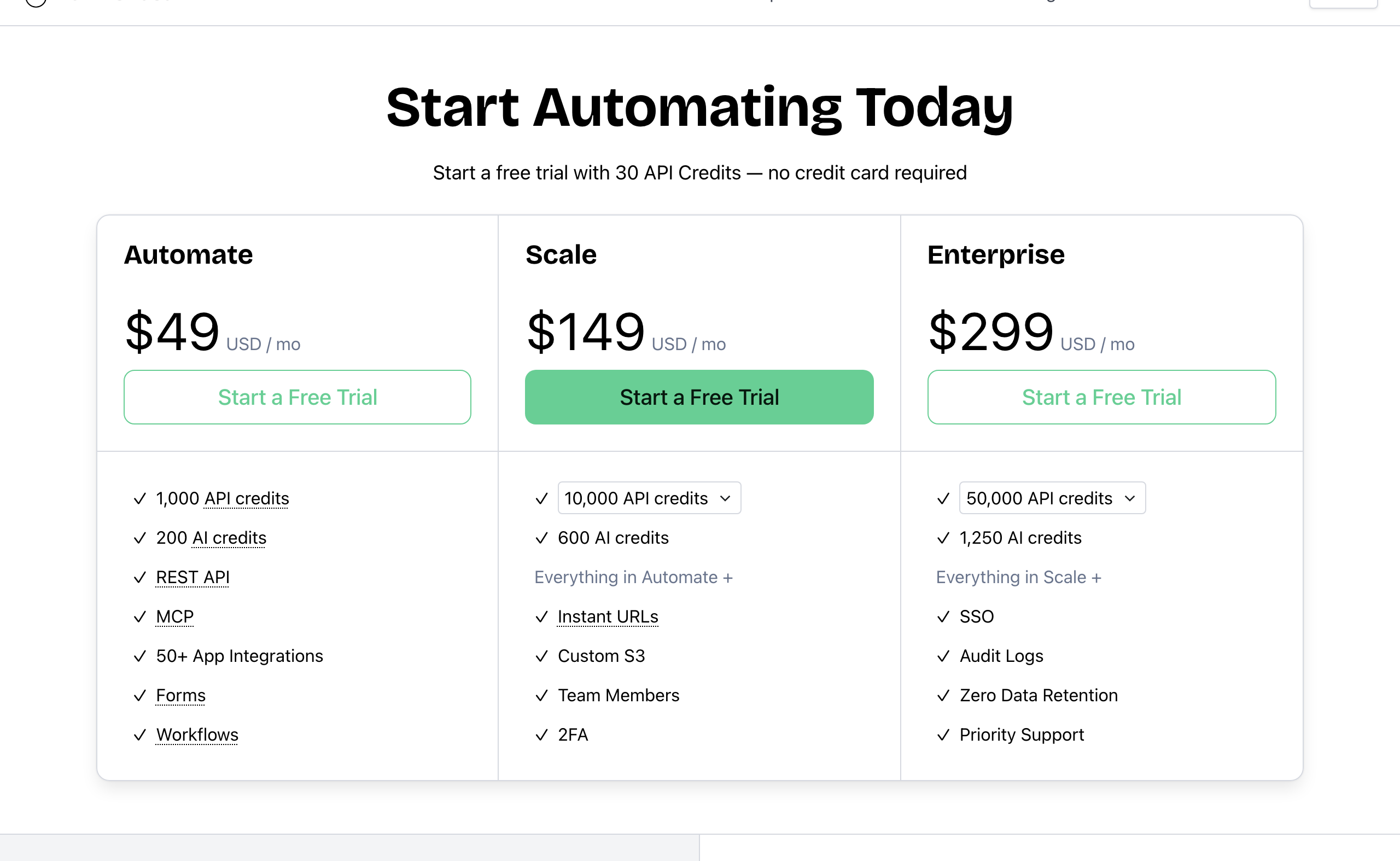 Bannerbear pricing. Source: bannerbear.com/pricing, captured 25 October 2026.
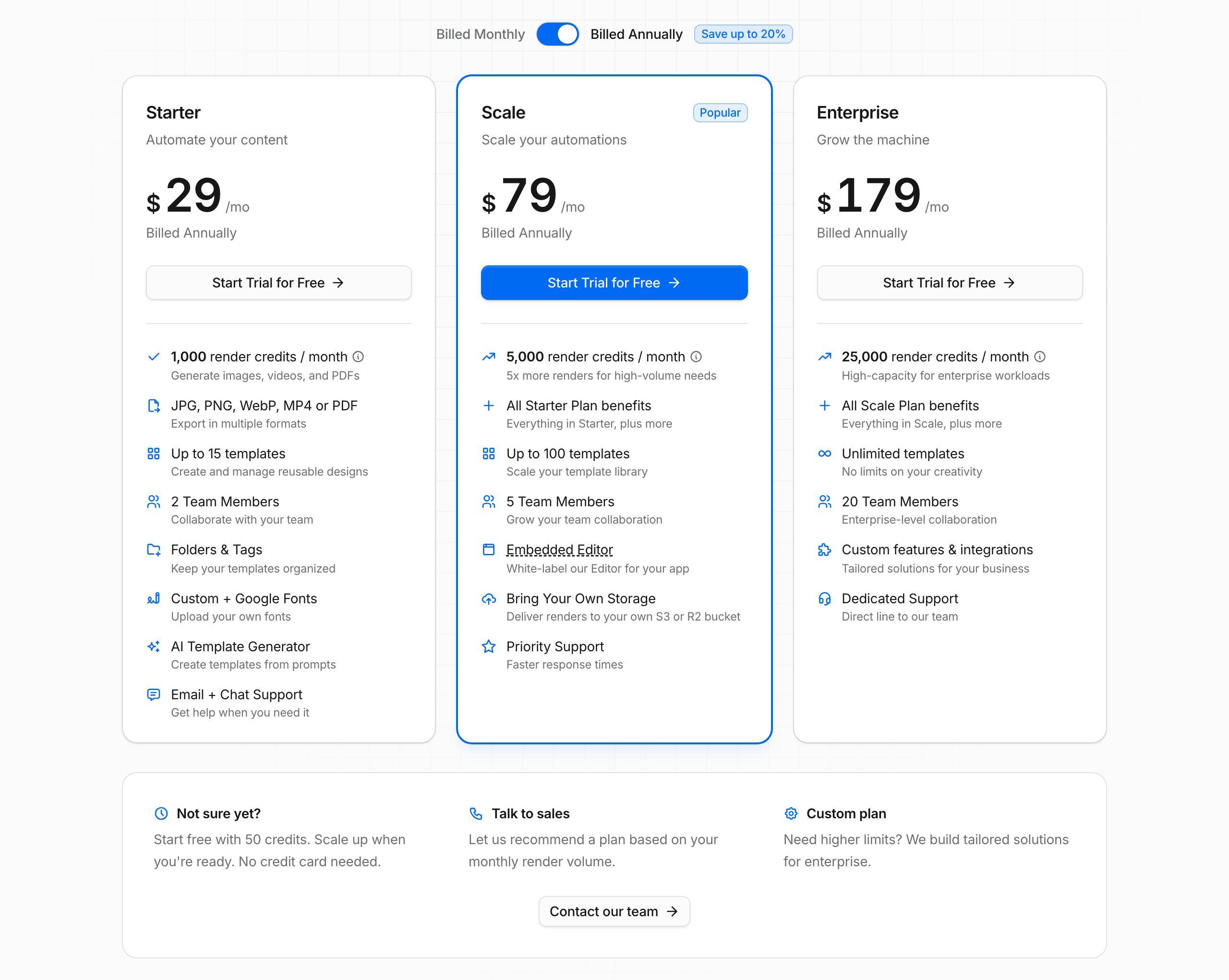 Templated pricing, shown with annual billing selected (monthly prices are $39, $99 and $229). Source: templated.io/pricing, captured 25 October 2026.
Cost for the same job
One standard image per render, one output format, scale 1, no AI features, monthly list price, on the cheapest plan with enough credits. Templated has no top-ups or overage, so its plan must cover the full volume. Neither product rolls credits over.
| Images per month | Bannerbear | Templated | Lower price |
|---|---|---|---|
| 500 | $49 (Automate) | $39 (Starter) | Templated, $10 less |
| 1,000 | $49 (Automate) | $39 (Starter) | Templated, $10 less |
| 2,500 | $149 (Scale, 10k tier) | $99 (Scale) | Templated, $50 less |
| 5,000 | $149 (Scale, 10k tier) | $99 (Scale) | Templated, $50 less |
| 10,000 | $149 (Scale, 10k tier) | $229 (Enterprise) | Bannerbear, $80 less |
| 25,000 | $247 (Scale, 30k tier) | $229 (Enterprise) | Templated, $18 less |
| 50,000 | From $299 (Enterprise) | Custom (contact sales) | Bannerbear on list price; Templated's terms are not public |
For plain image generation, Templated costs less at 500, 1,000, 2,500, 5,000 and 25,000 images per month, and it publishes an annual discount. With annual billing, Templated costs less at 25,000 images ($179 against $247). Bannerbear costs less at 10,000 images ($149 against $229 monthly, or $179 annual), and at 50,000 on list price.
Template caps can change the result. A team with more than 15 templates cannot use Templated Starter, and a team with more than 100 templates needs Templated Enterprise ($229). Imported and AI-generated templates count toward the cap. Bannerbear's paid plans list unlimited templates.
What the price covers. Bannerbear's AI features use a separate AI credit pool that is included with each plan. Templated uses one credit pool for everything, which some teams will find simpler. The features in the AI and video sections above, such as AI image and video generation, auto subtitles and AI voiceover, are not listed on Templated's website at any price.
Video costs are measured differently. Bannerbear charges 1 credit plus 2 credits per second (60 fps doubles the total). Templated charges by width × height × frames per second × seconds, divided by 50,000,000 and rounded up. For a 10-second 1080p clip at 30 fps, Bannerbear uses 21 credits and Templated uses 13 (Templated's own example), so Templated uses fewer credits for that clip. We do not compare video prices in a table, because the video tools around the render differ. We do not compare PDF prices either: Templated charges per page, and Bannerbear does not list multi-page templates.
Who should choose Templated
Templated is the right choice if:
- You generate standard images at 500 to 5,000 or around 25,000 per month and price is the main factor, or you want an annual discount
- You want to embed a white-label template editor in your own product
- Your designs start in Canva, Photoshop, Illustrator, PowerPoint or PDF
- Your data lives in spreadsheets or form tools, or you build PDF catalogs from product lists
- You build multi-page or HTML documents, or swap a video layer in each render
- You want AI help to create and edit templates, a built-in stock library, and folders for your templates
- You want published rate limits, team seats on every paid plan, and priority support from the $99 plan
Who should choose Bannerbear
Bannerbear fits teams who:
- Need AI-generated images, backgrounds or video clips, or automatic face and subject crops, inside the render
- Produce video with subtitles, voiceover, keyframe motion, Lottie animation or editing steps after the render
- Want one API call to run a multi-step pipeline, built in a visual builder
- Want non-technical people to create assets from a hosted form or a URL
- Need SSO, audit logs, zero data retention or scoped API keys for a security review
- Render one design at many sizes and pin template versions in production
- Have more templates than Templated's lower plans allow, or generate about 10,000 or 50,000 images per month
- Want answers from real people: email and chat support from two full-time human support staff, who answer at almost any hour, plus priority support on Enterprise
- Want a provider with a track record: Bannerbear launched in January 2020, four years before Templated. It publishes a 99.9% uptime figure with a public status page and runs Enterprise plans of up to 2,000,000 credits per month
FAQ
Is Templated cheaper than Bannerbear? For plain image generation, yes, at most volumes. Templated costs $39 per month for 1,000 images against $49 on Bannerbear, and $99 for 5,000 images against $149. It also publishes annual prices. Bannerbear costs less at 10,000 images ($149 against $229) and at 50,000 on list price. Templated's template caps (15 on Starter, 100 on Scale) can push larger teams to a higher plan.
Does Templated do AI image generation? Templated's AI builds and edits templates, and it removes backgrounds. Its own FAQ says it is not an AI image generator. Text-to-image and AI video generation are not listed on Templated's website as of October 2026. Bannerbear includes both.
Which is better for video? Both render MP4 from animated templates. Templated adds video layers that you can swap per render. Bannerbear adds auto subtitles, AI voiceover, a keyframe timeline, Lottie layers and video editing tools, which are not listed on Templated's website.
Can I embed an editor in my own app? Templated offers a white-label embedded editor on its Scale plan and up. Bannerbear has an embeddable editor on its older V3 platform, and it still works there. The current V5 platform does not include one.
Is Bannerbear a good Templated alternative? It is if your pipeline needs more than the template render: AI-generated media, produced video, multi-step workflows or enterprise security controls. If you mainly need low-cost images, Canva import or spreadsheet generation, Templated fits those jobs.
Do both work with AI assistants like Claude and ChatGPT? Yes. Both have an MCP server with a remote (OAuth) option and a local option.
How we compared
- Sources: each company's marketing website and pricing page, API documentation, help center and changelog. For Templated, this included its llms-full.txt file and OpenAPI spec. For Bannerbear, the API comparison used its published OpenAPI file.
- Date: all facts were checked on 25 October 2026. Products change; check the current pages before you decide.
- "Not listed" means we searched the company's own sites for the feature and found no mention. For the main claims on this page, we searched all pages in the sitemaps of templated.io and help.templated.io, plus its changelog and blog. It is not proof that the feature does not exist.
- Screenshots show public pages as they appeared on the capture date in each caption.
- Pricing comes from the public pricing pages, in US dollars. Templated's prices switch between monthly and annual by JavaScript, and we read both from the page.
- What we did not measure: support response times, ease of use, rendering speed and reliability. We did not include third-party reviews.
- Disclosure: this page is published by Bannerbear.
- Launch years come from Product Hunt, the companies' own pages and web archives.