Facts on this page come from each company's public website, documentation, help center and changelog, checked on 25 October 2026. See How we compared for the method and sources.
TL;DR: Bannerbear and DynaPictures both fill your templates with data and return images, PDFs and video, through a REST API, forms, URL parameters, Zapier and Make. DynaPictures has a free plan and costs less up to 5,000 images per month (from 251 to 1,000 images, both cost $49). It also gives you more ways to fill a template without code: an online spreadsheet, embeddable widgets, and a React SDK that puts its editor inside your own product. Bannerbear does more with the media after the template is filled: a keyframe animation toolset, AI background removal, AI voiceover and automatic subtitles, multi-step workflows in one API call, and a fuller developer platform. Bannerbear also costs less at most volumes from 5,001 to 50,000 images per month.
At a glance
| Bannerbear | DynaPictures | |
|---|---|---|
| Images, PDFs and video from templates | ✅ Yes | ✅ Yes |
| Keyframe timeline and Lottie layers | ✅ Yes | Not listed |
| AI text-to-image | ✅ Yes, 4 models | ✅ Yes, 12 models |
| AI background removal | ✅ Yes, in the render | Not listed |
| AI voiceover and automatic transcription subtitles | ✅ Yes | Not listed |
| Multi-step workflows in one API call | ✅ Yes, with a visual builder | Not listed (automates through Zapier, Make, Pabbly and others) |
| Render from a URL (Instant URLs) | ✅ Yes, open or HMAC-signed (Scale and up) | ✅ Yes (all plans); URL signing announced as coming soon |
| Batch endpoint for separate images | ✅ Up to 100 images per request | Batch endpoint makes one multipage PDF; bulk runs from a spreadsheet in the app |
| Native data-source integrations | ✅ 50+ | ✅ About 7 |
| MCP server for AI assistants | ✅ Yes | Not listed |
| Official API client libraries | ✅ Ruby, Node, Python, PHP | Not listed (the only SDK is a React editor-embed SDK) |
| Two-factor authentication and audit logs | ✅ Yes (2FA from Scale; audit logs on Enterprise) | Not listed |
| Single sign-on (SSO) | ✅ Enterprise plan | ✅ Personalized plan |
| Embeddable editor for your own app | Older V3 platform only | ✅ Yes, React SDK |
| Spreadsheet bulk generation in the app | Not listed | ✅ Yes |
| Charts, gauges and email countdown timers | Not listed | ✅ Yes |
| Free plan | Trial only: 30 API credits, once | ✅ Yes: 30 images per month, 3 templates |
| Starting price | $49/mo | $29/mo (excl. VAT) |
"Not listed" means we searched the company's website, docs, help center and changelog and found no mention, as of October 2026. It does not prove the feature is absent.
What both products do well
Before the differences, the common ground.
- Template editor with text auto-fitting, custom fonts, multilingual text, a template library and a media library
- Image API with synchronous rendering, webhooks, a template management API and an API console
- Output in common image formats, plus PDFs with multiple pages
- Video from templates, including video overlays
- AI text-to-image and AI face detection for automatic cropping
- No-code generation: both let people create images from a form, and both generate images from a URL with query parameters
- Integrations with Zapier, Make and Airtable
- Workspaces, SSO on the top plan, and a stated GDPR position
- 99.9% uptime statements and public status or monitoring pages
If your need is "fill a template with data and get an image back", either product will do the job. The differences are in how the template gets filled, and in what happens to the media after that.
Video and motion
Both products generate video from templates, and both can place one video over another.
DynaPictures describes "dynamic video generation" on its video page. The page lists rotation, blur, overlays and combining clips. It also mentions merging videos, making a video from photos and animated GIFs, with no further detail found.
Bannerbear lists a broader toolset around the video:
- Keyframe timeline with easing, delay and hold controls, rendered as MP4 or MOV at 24, 30 or 60 fps
- Animation presets, per-word text effects and animated backgrounds
- Lottie layers, and transparent animations to place over other video
- Conversion of an image template into an animation template
- Video tools: trim, crop, resize, join, colour filters, slideshows, GIF previews, thumbnails and cover art
- Audio tools that add, replace or extract a video's audio
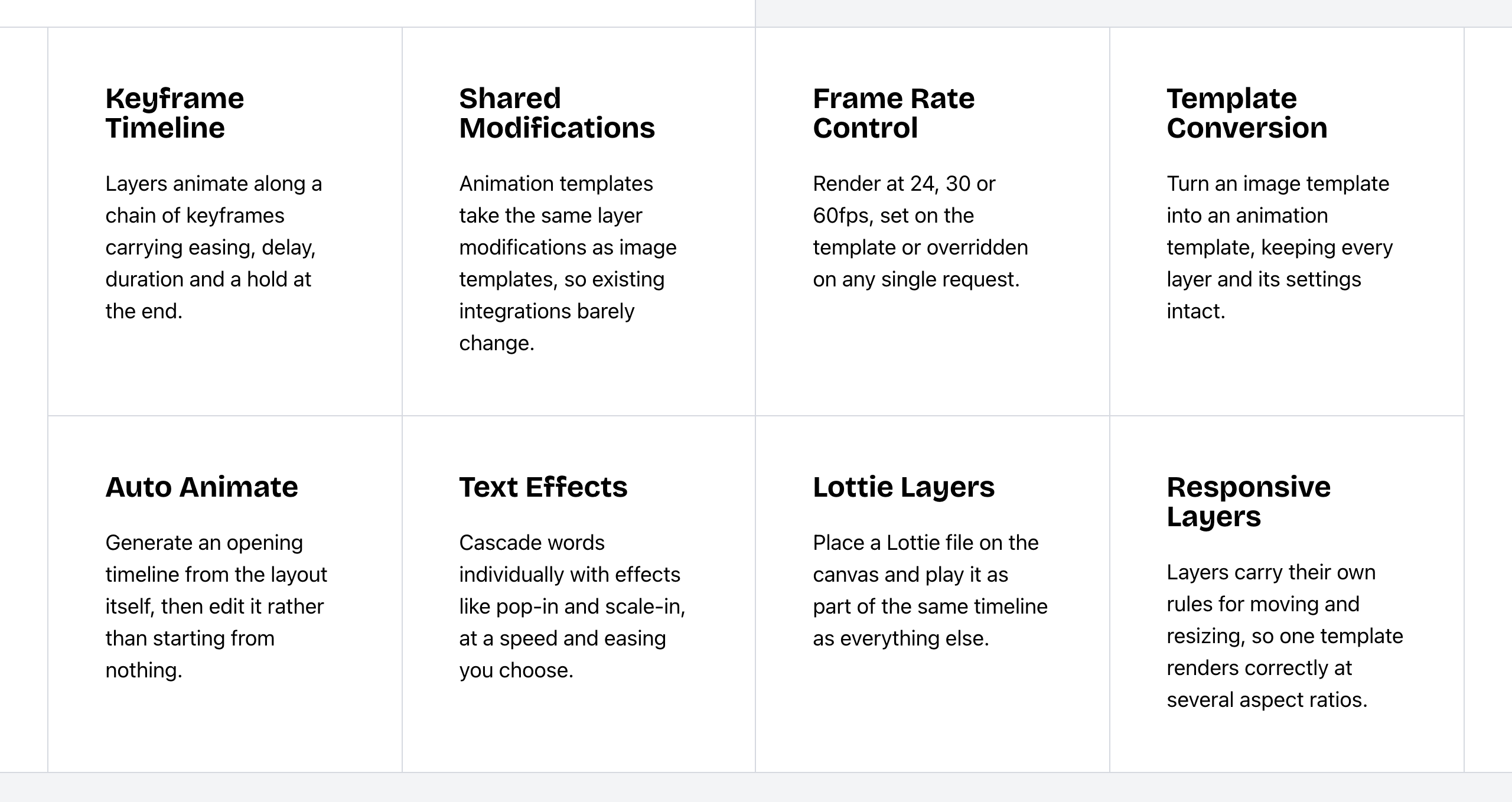 Bannerbear Animation API features. Source: bannerbear.com/v5/products/animation-api, captured 25 October 2026.
A keyframe timeline, Lottie layers, transparent animation and video trim or colour tools are not listed on DynaPictures's website (as of October 2026). For audio, DynaPictures names sound removal only.
What this means: both work for a templated clip with a text or image overlay. If you need to control motion frame by frame, or edit the video after it renders, Bannerbear lists the tools for that on its own pages.
Bottom line: choose Bannerbear for social video, ads and animated overlays that need motion design or post-render editing.
AI features
Both products have AI text-to-image and AI face detection.
DynaPictures lists more AI image models: 12, from gpt-image-1-mini to gpt-image-2-high, through an AI Image layer in templates and a standalone /ai/generate endpoint. Its AI Image layer can also generate or edit a background from a prompt. DynaPictures also has a separate AI background generator tool, whose FAQ says the result is not a transparent cutout. Its pricing page sells large AI credit packs "for AI video projects", with no models or options found.
Bannerbear lists 4 text-to-image models (Flux Schnell, Flux 1.1 Pro, Nano Banana, GPT Image 2), and adds AI tools that work on the media itself:
- AI background removal in the editor, during the render, and as a standalone tool
- AI background generation from a prompt
- AI voiceover from text
- Automatic subtitles that transcribe the audio and burn in the text, with style presets
- Auto Animate, which builds an opening animation from a static layout
- AI video generation with Seedance, Kling and Veo models
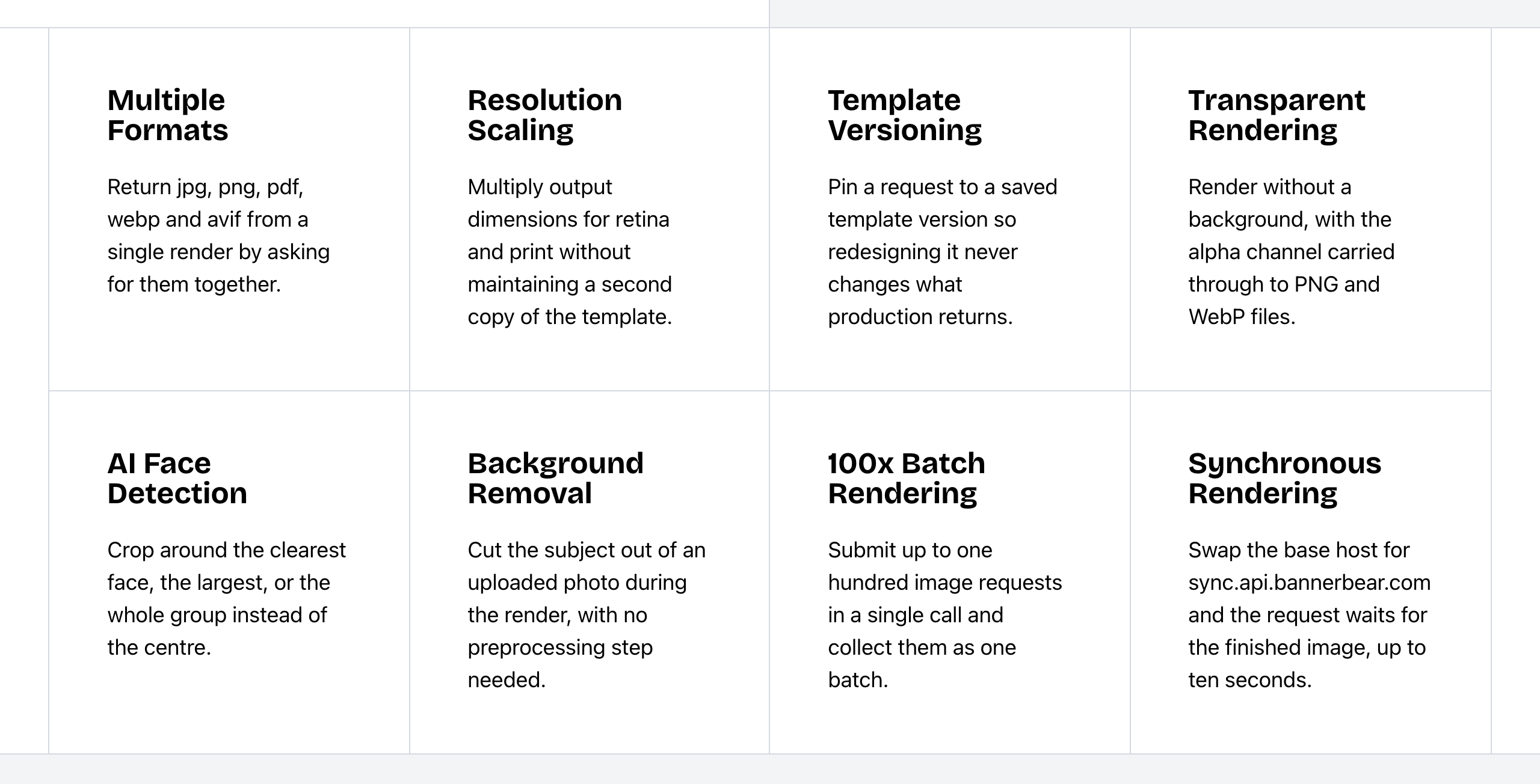 Bannerbear Image API features. Source: bannerbear.com/v5/products/image-api, captured 25 October 2026.
AI background removal, AI voiceover, Auto Animate and automatic transcription subtitles are not listed on DynaPictures's website (as of October 2026). Its video page has one general line about adding subtitles to videos.
What this means: if you only need AI to create an image, DynaPictures gives you a wider choice of models. If your input photos need a clean cutout, or your videos need a voice and captions, Bannerbear lists tools for those steps, and its Workflows can chain them into one API call.
Bottom line: choose Bannerbear for e-commerce product photos and for subtitled or voiced social video. Choose DynaPictures if model choice for text-to-image matters most.
Workflows, batches and automation
Bannerbear Workflows chain image, animation and media-tool steps into one API endpoint. For example: render a template, add subtitles, add a voiceover, overlay an animation, then export. You build them in a visual builder, see each step's inputs and outputs in the run history, and can publish a workflow with its templates.
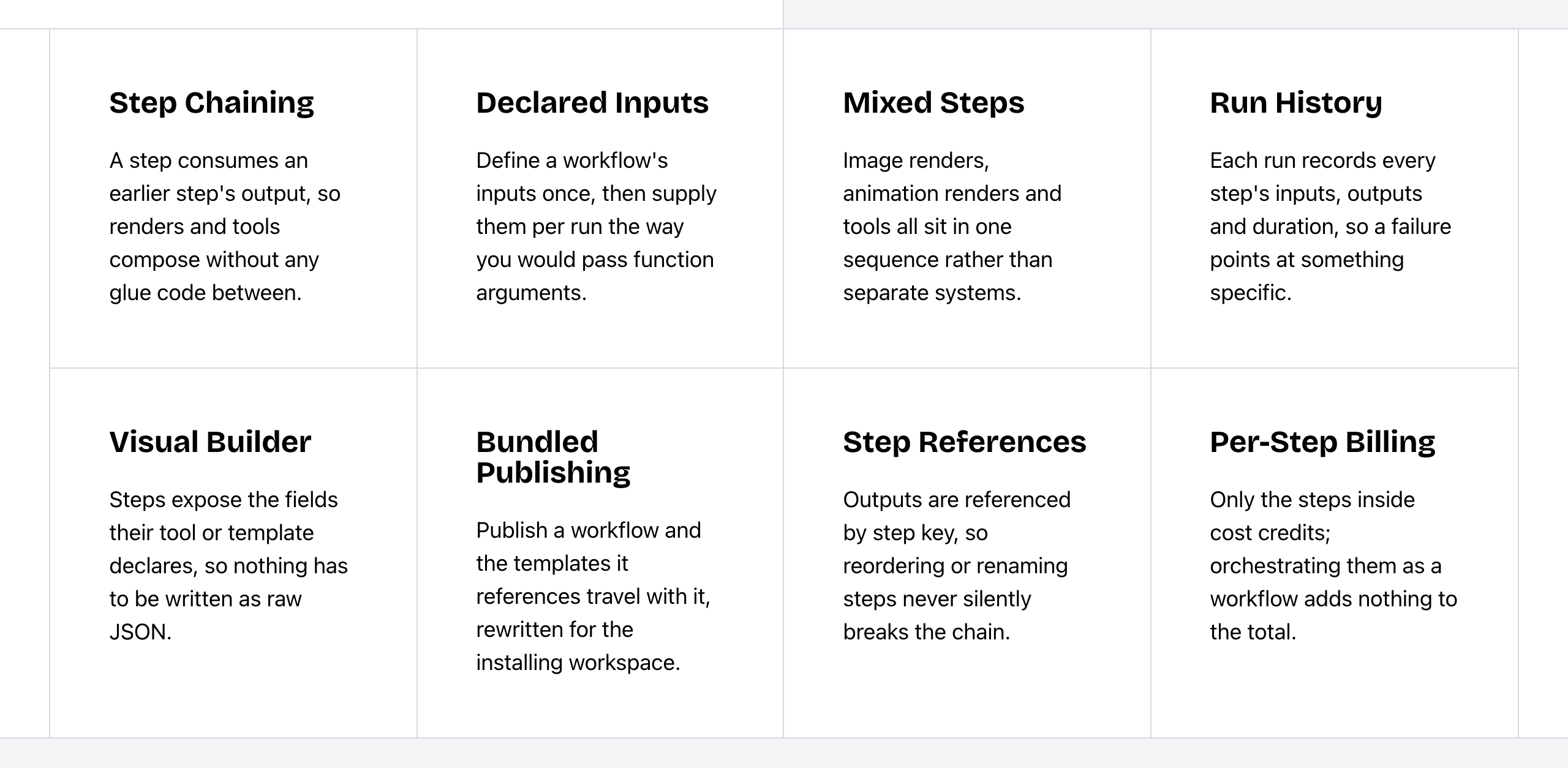 Bannerbear Workflows features. Source: bannerbear.com/v5/products/workflow-api, captured 25 October 2026.
DynaPictures automates through other tools: Zapier, Make (Integromat), Pabbly, Integrately, an Airtable guide, CSV and spreadsheet runs, and webhooks. A built-in workflow builder is not listed on DynaPictures's website (as of October 2026).
For bulk output, the two take different routes. Bannerbear has a batch endpoint that creates up to 100 images in one request, with a status for each item. DynaPictures has a batch endpoint that makes one multipage PDF, and its docs say other formats are not supported at the moment. For many separate images, DynaPictures runs bulk generation from a spreadsheet or CSV file in the app.
Bottom line: choose Bannerbear if producing one asset takes several processing steps, or if your code sends large batches through the API. Choose DynaPictures if your team works from a spreadsheet and runs bulk jobs by hand.
Embedding, spreadsheets and data layers: where DynaPictures leads
DynaPictures has several features that Bannerbear does not list. They are about how a template gets filled and shown.
Embedded editor and widgets. DynaPictures's React SDK puts its template editor, template selector and other tools inside your own website or app. Its generator widget embeds with a script and a div, shows a live preview, and can be updated from JavaScript with updateLayers().
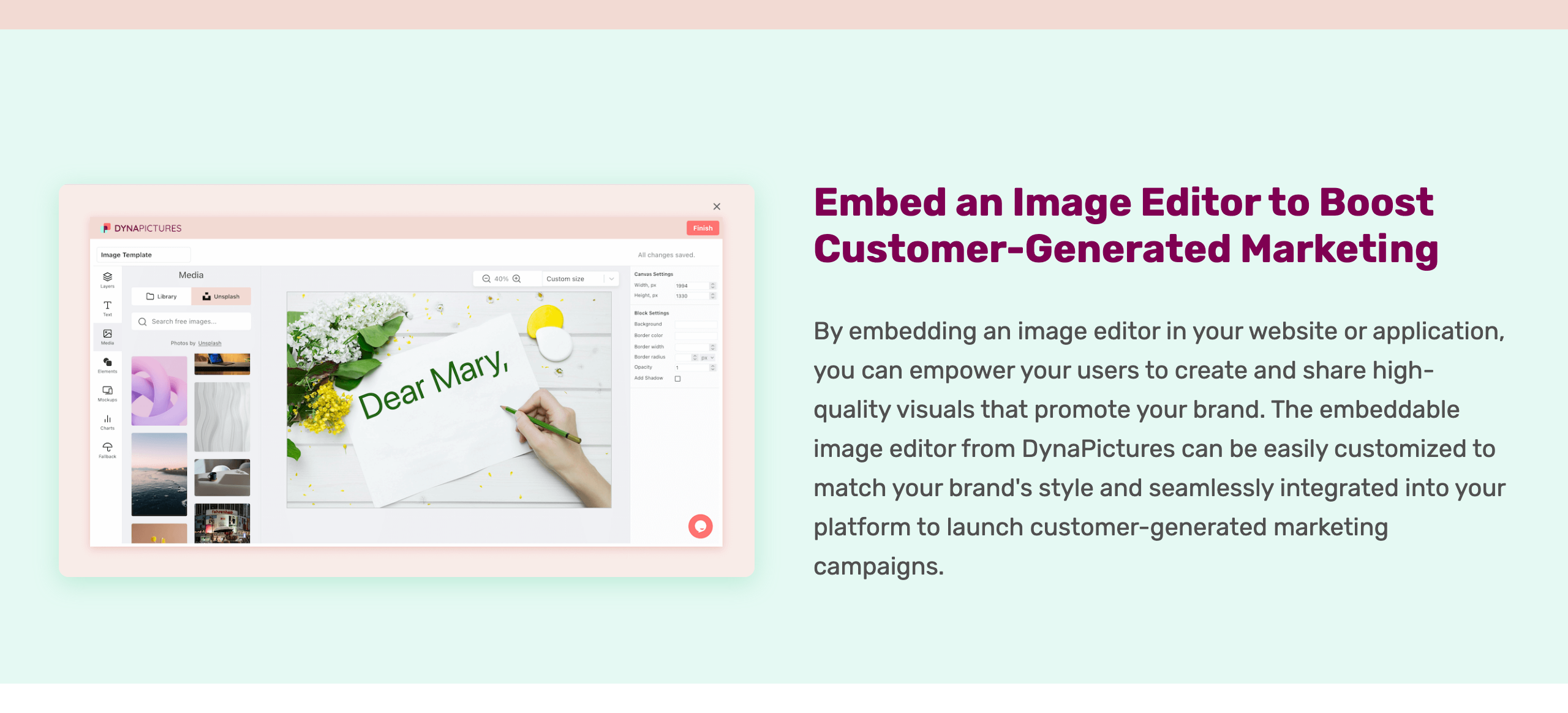 DynaPictures Image Generation SDK. Source: dynapictures.com/image-generation-sdk, captured 25 October 2026.
Bannerbear has an embeddable editor on its older V3 platform, and it still works there. The current V5 platform does not include one. Bannerbear's hosted forms embed in a page with an iframe.
Spreadsheet bulk generation. DynaPictures has an online spreadsheet editor with CSV and XLS import, one column per layer. Bannerbear pulls data from sources such as Airtable and sends batches through its API; a spreadsheet editor in the app is not listed.
Data-driven layers. DynaPictures lists chart layers, gauge and progress bar layers, and isometric and 3D projections. Charts and gauge layers are not listed for Bannerbear's V5 platform, and Bannerbear's 3D support is rotation and perspective on layers.
Email and event marketing. DynaPictures offers email countdown timers, rendered as an animated GIF on every open, and an event marketing product with speaker and attendee banners, tracked shares and a leaderboard, with imports from Eventbrite, Cvent and Luma. Neither is listed on Bannerbear's website.
API conveniences. DynaPictures can return raw image bytes instead of JSON, serve a fallback image when your quota runs out, and delete a generated image through the API. Binary responses and a quota fallback image are not listed for Bannerbear, and deleting images is not available in Bannerbear's V5 API.
Stated retention and hosting. DynaPictures states its image retention periods: 3 months on Lite, 6 months on Pro, custom on Personalized. It also states that it is made and hosted in Germany.
Bottom line: if your users will design or generate images inside your product, or you need charts, countdown timers or event banners, DynaPictures is the better fit.
Integrations
Both connect to Zapier, Make and Airtable.
- Bannerbear lists 50+ native data-source integrations with field mapping and write-back, plus WordPress, Webflow and Ghost, Figma and Sketch plugins, and an MCP server (hosted and local) so AI assistants can create assets.
- DynaPictures lists about 7 integrations: Zapier, Make (Integromat), Airtable, Pabbly, Integrately, CSV and spreadsheets. It also lists Unsplash stock images in the editor, an Inxmail add-on, and event imports from Eventbrite, Cvent and Luma.
WordPress, Webflow, Ghost, Figma and an MCP server are not listed on DynaPictures's website. Pabbly, Integrately, Unsplash and Inxmail are not listed on Bannerbear's. Both as of October 2026.
Developer experience
| Bannerbear | DynaPictures | |
|---|---|---|
| API specification | Full OpenAPI 3.1 file | Single-page API reference; OpenAPI file not listed |
| Official libraries | Ruby, Node, Python, PHP, plus an MCP package | React editor-embed SDK; code samples in Java, PHP, Python and JavaScript |
| API keys | Scoped keys (22+ scopes) with origin allowlists | Bearer API key from the account page; key scopes not listed |
| Rate limits | 60 POST requests per 10 seconds | Returns 429 when rate-limited; thresholds not documented |
| Webhooks | Images, batches, tool jobs, workflow runs, animations | New image event |
| Async jobs | Yes | AI generation jobs only; standard renders are synchronous |
| Template versions | Version history, and pinning a request to a version | Not listed |
| Custom S3 storage | Scale plan and up | Not listed |
| Support | Priority support on Enterprise | Live chat and email on all plans; founder-led onboarding and training on Personalized |
| Uptime statement | 99.9% over the trailing 12 months; public status page | 99.9% guaranteed uptime; public monitoring link |
These are what each company states. We did not test either API.
Bannerbear also lists output controls that are not listed on DynaPictures's website: resolution scaling, image quality, transparent rendering, print DPI, CMYK conversion for PDFs, PDF print tools, responsive templates and an image URL proxy (as of October 2026).
What this means: if your engineers will generate client code, give limited keys to front-end apps, or pin production to a template version, Bannerbear lists the tools for it. If they mainly need to call one endpoint and copy a code sample, DynaPictures covers that, and it states live chat support on every plan.
Security and team controls
| Bannerbear | DynaPictures | |
|---|---|---|
| Single sign-on (SSO) | Enterprise plan | Personalized plan |
| Two-factor authentication | Scale plan and up | Not listed |
| Audit logs | Enterprise plan | Not listed |
| Zero data retention | Enterprise plan | Not listed (states retention of 3 or 6 months, custom on Personalized) |
| Team members and roles | Invite, remove and set roles (Scale and up) | 1 user on Lite, unlimited users on Pro; no roles stated |
| Restrict team sign-up to your email domain | Yes | Not listed |
| GDPR | Standard DPA on request; data hosted in the USA | Made and hosted in Germany, with GDPR in mind |
Bottom line: both offer SSO on their top plan. If your security review also asks for 2FA, audit logs or member roles, Bannerbear lists them. Ask DynaPictures directly before you rule it out.
Pricing
| Bannerbear | DynaPictures | |
|---|---|---|
| Free option | Trial: 30 API credits and 50 AI credits, once, no card | Free plan: 30 images per month, 3 templates; 14-day trial on paid plans |
| Entry plan | Automate: $49/mo, 1,000 credits | Lite: $29/mo for 250 images, $49/mo for 1,000 |
| Mid plans | Scale: $149–$296/mo, 10,000–40,000 credits | Pro: $79/mo for 2,000 images, up to $699/mo for 200,000 |
| High volume | Enterprise: from $299/mo, 50,000 credits | Personalized (contact sales) |
| Users | Team members from Scale | 1 user on Lite, unlimited on Pro |
| Unused credits | Reset each month, no rollover | Not stated |
| AI features | AI credit pool included (200 on Automate, 600–1,250 on Scale, 1,250–5,200 on Enterprise) | AI credit packs sold separately, from $20 for 1,000 credits (about 250 images); packs do not expire |
| Other plan details | — | Data transfer 20 GB (Lite) or 100 GB (Pro) per month; image retention 3 months (Lite) or 6 months (Pro) |
DynaPictures prices exclude VAT. Bannerbear's pricing page does not say whether tax is included. Neither company shows annual prices.
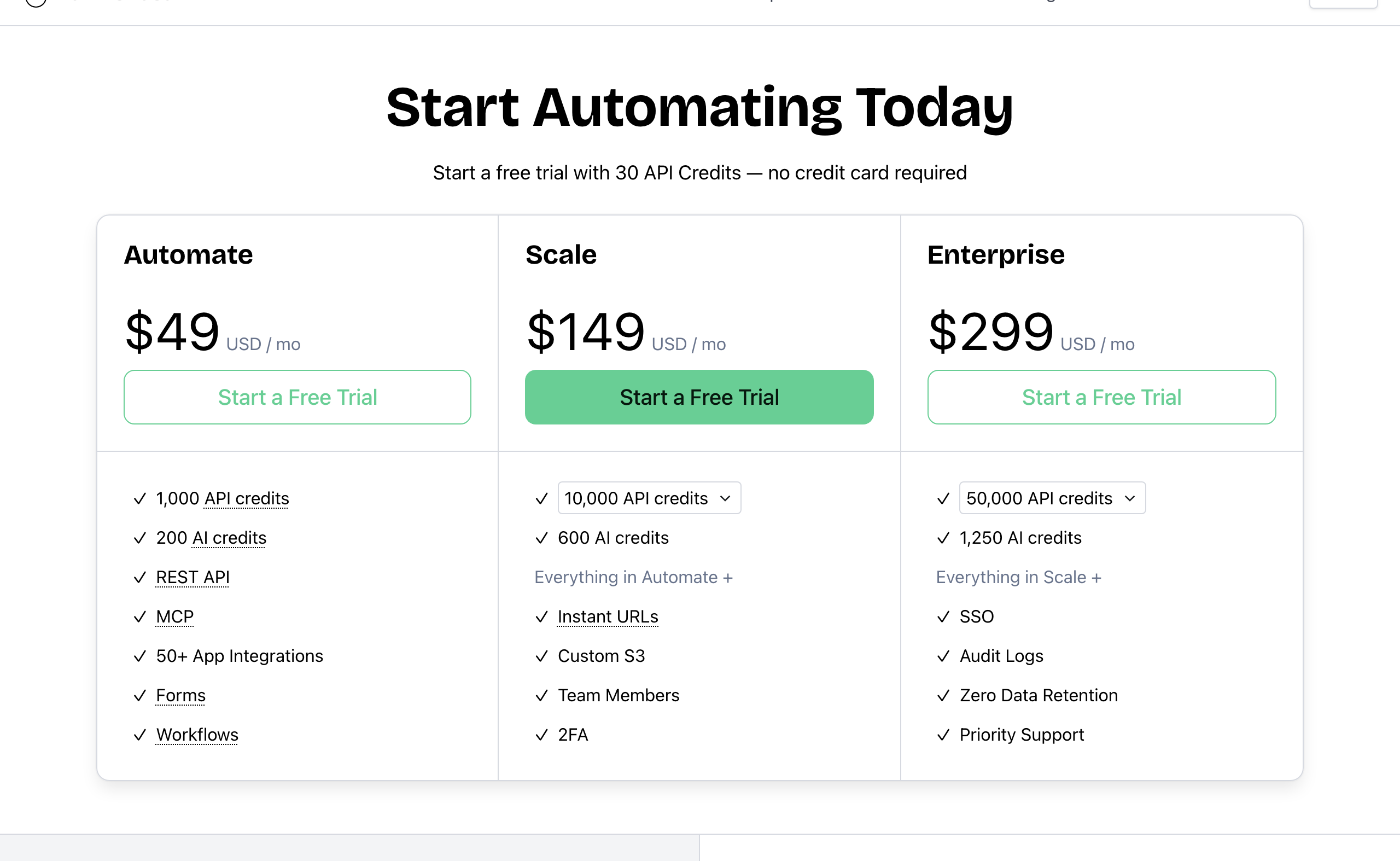 Bannerbear pricing. Source: bannerbear.com/pricing, captured 25 October 2026.
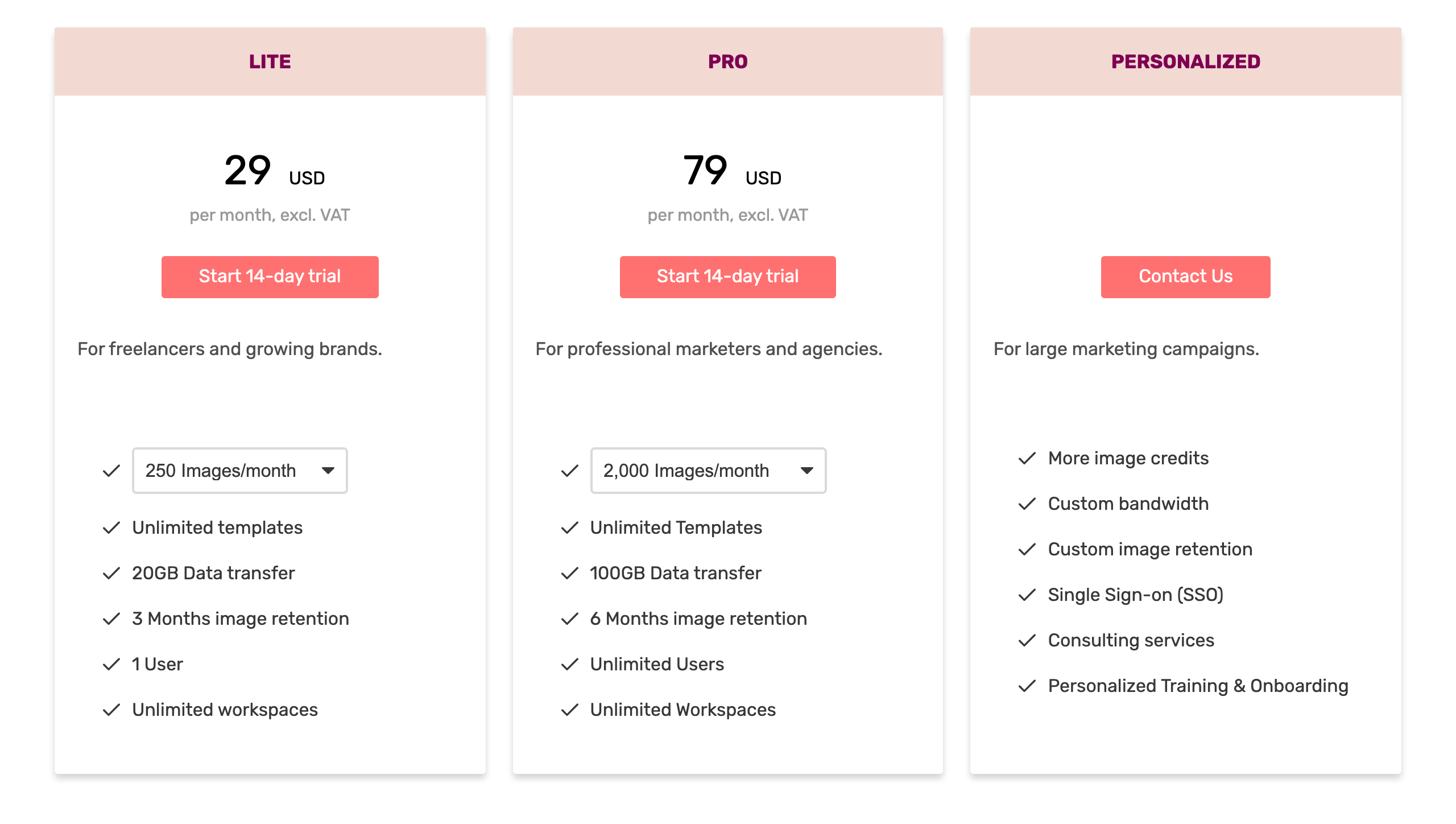 DynaPictures pricing. Source: dynapictures.com/p/pricing, captured 25 October 2026.
Cost for the same job
Standard-size static images, one output format, no AI features, monthly billing, on the cheapest plan that fits:
| Images per month | Bannerbear | DynaPictures | Cheaper |
|---|---|---|---|
| 30 | $49 (Automate) | $0 (Free) | DynaPictures |
| 250 | $49 (Automate) | $29 (Lite) | DynaPictures |
| 1,000 | $49 (Automate) | $49 (Lite) | Same |
| 2,000 | $149 (Scale) | $79 (Pro) | DynaPictures |
| 5,000 | $149 (Scale) | $119 (Pro) | DynaPictures |
| 7,500 | $149 (Scale) | $199 (Pro, 15,000 tier) | Bannerbear |
| 10,000 | $149 (Scale) | $199 (Pro, 15,000 tier) | Bannerbear |
| 15,000 | $198 (Scale, 20,000 tier) | $199 (Pro, 15,000 tier) | About the same |
| 25,000 | $247 (Scale, 30,000 tier) | $299 (Pro, 25,000 tier) | Bannerbear |
| 40,000 | $296 (Scale, 40,000 tier) | $399 (Pro, 50,000 tier) | Bannerbear |
| 50,000 | $299 (Enterprise) | $399 (Pro, 50,000 tier) | Bannerbear |
| 100,000 | $458 (Enterprise) | $499 (Pro, 100,000 tier) | Bannerbear |
| 200,000 | $617 (Enterprise, 500,000 tier) | $699 (Pro, 200,000 tier) | Bannerbear |
DynaPictures costs less up to 5,000 images per month, except from 251 to 1,000 images, where both cost $49. It also has a free plan. DynaPictures does not charge for live previews or for repeat opens of a cached URL image, so for URL-based use its real cost can be lower than this table shows.
Bannerbear costs less from 5,001 to 50,000 images per month, except from 10,001 to 15,000 images, where the two are about the same ($198 and $199). DynaPictures has no 10,000 tier, so from 5,001 images it uses its 15,000 tier.
AI features are priced differently. Bannerbear includes a monthly AI credit pool in each plan, and you can buy top-ups that do not expire. DynaPictures sells AI credits in packs that do not expire. We do not compare the cost per AI image, because the two lists of models and their credit costs differ.
We do not compare video prices, because DynaPictures's video credit cost is not in our data.
Who should choose DynaPictures
DynaPictures is the right choice if:
- You make 5,000 images per month or fewer, or you want to start on a free plan
- You want to embed a template editor or a generator widget in your own product
- Your team runs bulk jobs from a spreadsheet or CSV file
- Your images need charts, gauges or progress bars
- You run email campaigns with countdown timers, or event campaigns with speaker and attendee banners
- You use Pabbly, Integrately or Inxmail
- You want a wide choice of AI text-to-image models
- You want unlimited users on a mid-price plan, live chat support on every plan, or hosting in Germany
Who should choose Bannerbear
Bannerbear is the right choice for teams who:
- Produce social video or ads with keyframe motion, Lottie animation, or editing after the render
- Need AI background removal, AI voiceover or automatic transcription subtitles
- Want one API call to run a multi-step pipeline instead of connecting several tools
- Send large batches of separate images through the API
- Integrate the API into a product and need an OpenAPI file, client libraries, scoped keys or template version pinning
- Need 2FA, audit logs or member roles for a security review
- Publish to WordPress, Webflow or Ghost, or connect AI assistants through MCP
- Generate more than 5,000 and up to 50,000 images per month
- Want answers from real people: email and chat support from two full-time human support staff, who answer at almost any hour, plus priority support on Enterprise
- Want a provider with a track record: Bannerbear launched in January 2020, publishes a 99.9% uptime figure with a public status page, and runs Enterprise plans of up to 2,000,000 credits per month
FAQ
Is DynaPictures cheaper than Bannerbear? Up to 5,000 images per month, yes, except from 251 to 1,000 images, where both cost $49. DynaPictures also has a free plan of 30 images per month. From 5,001 to 50,000 images per month, Bannerbear costs less, except from 10,001 to 15,000 images, where the prices are about the same. For example, 7,500 images cost $149 per month on Bannerbear and $199 on DynaPictures, and 25,000 images cost $247 on Bannerbear and $299 on DynaPictures.
Does DynaPictures do video? Yes. DynaPictures generates video from templates, with overlays. A keyframe timeline, Lottie layers, AI voiceover and automatic transcription subtitles are not listed on its website as of October 2026. Bannerbear lists all four.
Which has an embeddable editor? DynaPictures offers a React SDK that embeds its template editor, and a generator widget. Bannerbear has an embeddable editor on its older V3 platform, and it still works there. The current V5 platform does not include one.
Does DynaPictures have an API and SDKs? DynaPictures has a REST API with webhooks, code samples in four languages, and a React SDK for embedding its editor. Its only official SDK is that React SDK, and an OpenAPI file is not listed on its website as of October 2026. Bannerbear lists an OpenAPI 3.1 file and libraries for Ruby, Node, Python and PHP.
Which has more AI features? Both have AI text-to-image and face detection, and DynaPictures lists more image models (12 against 4). Bannerbear adds AI background removal, AI voiceover, automatic subtitles and Auto Animate, which are not listed on DynaPictures's website.
What is a good DynaPictures alternative for video and workflows? If you need produced video, AI editing or multi-step pipelines in one API call, Bannerbear lists those tools. If you mainly fill image templates from a spreadsheet or an embedded widget, DynaPictures may already be the better fit.
How we compared
- Sources: each company's marketing website and pricing page, API documentation, help center and changelog. For DynaPictures, we also searched its sitemap (about 745 English pages), its npm packages and web search results for the main claims on this page. For Bannerbear, the API comparison used its published OpenAPI file.
- Date: all facts were checked on 25 October 2026. Products change; check the current pages before you decide.
- "Not listed" means we searched the company's own sites for the feature and found no mention. It is not proof that the feature does not exist.
- Screenshots show public pages as they appeared on the capture date in each caption.
- Pricing comes from the public pricing pages. DynaPictures's tier prices come from its checkout storefront data and exclude VAT. Its free plan is stated in the FAQ on its home page.
- What we did not measure: support response times, ease of use, rendering speed, render quality and reliability. We did not include third-party reviews.
- Disclosure: this page is published by Bannerbear.