Facts on this page come from each company's public website, documentation, help center, API specification and changelog, checked on 25 October 2026. See How we compared for the method and sources.
TL;DR: Bannerbear and Orshot both turn templates into images, PDFs and videos through an API, with batch rendering, workflows, AI generation and an MCP server. Orshot costs less at most volumes and has a free plan. It is also the stronger choice if you want to embed a design editor in your own app, publish straight to social accounts, or run approval flows with clients. Bannerbear goes deeper on the media itself: a visual keyframe timeline, Lottie layers and transparent video, standalone tools for video and PDF files you already have, AI face and subject cropping, and developer controls such as template version pinning. Choose Orshot if your work is about making and sending out designs. Choose Bannerbear if your pipeline needs more control over the rendered media.
At a glance
| Bannerbear | Orshot | |
|---|---|---|
| Images, PDFs and video from templates | ✅ Yes | ✅ Yes |
| Batch rendering | ✅ Yes, up to 100 images per request | ✅ Yes |
| Multi-step workflows with a visual builder | ✅ Yes | ✅ Yes |
| Render from a URL (Instant URLs) | ✅ Yes, open or HMAC-signed (Scale and up) | ✅ Yes, signed URLs (all paid plans) |
| AI video generation | ✅ Yes | ✅ Yes |
| Keyframe animation | ✅ Visual keyframe timeline with easing, hold and presets | ✅ Keyframes as JSON through the API |
| Lottie layers | ✅ Yes | Not listed |
| Transparent video output (MOV) | ✅ Yes | Not listed |
| AI-generated opening animation (Auto Animate) | ✅ Yes | Not listed |
| Standalone video overlay endpoint | ✅ Yes | Not listed |
| GIF preview from an uploaded video | ✅ Yes | Not listed (GIF is an output format for video templates) |
| Merge uploaded JPG, PNG and PDF files into one PDF | ✅ Yes, up to 50 files | Not listed (multi-page PDFs from one template) |
| AI face and subject crop | ✅ Yes | Not listed |
| Native QR code, barcode and rating layers | ✅ Yes | Not listed |
| Pin a render to a template version | ✅ Yes | Not listed |
| Two-factor authentication | ✅ Scale plan and up | Not listed |
| Zero data retention | ✅ Enterprise plan | Not listed |
| Embeddable editor for your own app | Older V3 platform only | ✅ Yes, React and Vue SDKs, white-label option |
| Publish to social accounts | Not listed | ✅ Yes, paid add-on |
| Approval flows | Not listed | ✅ Yes (Scale plan) |
| Import from Canva | Not listed | ✅ Yes |
| Multi-page templates (carousels) | Not listed | ✅ Yes |
| Free option | Trial: 30 API credits and 50 AI credits, no card | 100 credits per month, no card |
| Starting paid price | $49/mo | $39/mo |
| Launched | January 2020 | 2025 |
"Not listed" means we searched the company's website, docs, help center, API specification and changelog and found no mention, as of October 2026. It does not prove the feature is absent.
About the "10x more features" claim
Orshot's blog post A 2x cheaper Bannerbear Alternative with 10x more features (last updated 21 September 2026) compares the two products.
The price part is accurate at the entry plan. Orshot's Launch plan gives 1,500 credits for $39, and Bannerbear's Automate plan gives 1,000 credits for $49. Orshot's own post also shows that Bannerbear's monthly bill is lower at some volumes, and our table below agrees.
The feature part does not match our count. We checked 136 capabilities on both companies' official sites, in both directions. Bannerbear's sites list 106 of them and Orshot's list 101. Another 6 for Bannerbear and 13 for Orshot are partial, and about 70 are in both products. Feature counts depend on how you split capabilities, but by this count the two products are about the same size.
Several entries about Bannerbear in the post's comparison table do not match Bannerbear's current product:
| Topic | Orshot's post says about Bannerbear | Bannerbear's website and docs (October 2026) |
|---|---|---|
| Automation workflows | "Through Zapier or Make" | Built-in Workflows with a visual builder and run history, added on 18 August 2026 |
| Video generation | "Basic" | Keyframe timeline, Lottie layers, auto subtitles, AI voiceover, AI video generation, and tools to trim, crop, join and overlay video |
| Template creation | "Manual" | A Figma plugin that converts frames into templates, and Auto Animate |
| Carousels and multi-page | "No" | Multi-page PDFs, made by merging up to 50 renders. Multi-page templates are not listed. |
| Integrations | "Zapier, Make, n8n" | 50+ native data-source integrations, Zapier, Make, n8n, and an MCP server |
Two entries in the post are accurate today: social publishing is not listed for Bannerbear, and its current V5 platform does not include a white-label embeddable editor. We cover both in Embedding, publishing and teams.
What both products do well
These two products share many features.
- Template editor with responsive layers, text fitting, custom fonts and version history
- Image API with synchronous rendering, several output formats, transparent output and batch rendering
- PDF output, including a CMYK colour option
- Video from templates, with tools to join clips, add audio and make slideshows
- Workflows with a visual builder, plus no-code forms and signed or instant URLs
- AI features: image generation, video generation, voiceover, automatic subtitles and background removal
- MCP server, so AI assistants such as Claude can create assets
- OpenAPI 3.1 specification and official SDKs for Node.js, Python, PHP and Ruby, with scoped API keys
- Custom S3 storage, plus SSO and audit logs for larger teams
If your need is "fill a template with data and get an image or a short video back", either product will do the job. The differences are in how much control you have over the media, and in where the design work and the output go.
Motion design and animation
Both products make video from templates, and both animate layers.
Orshot has preset enter, exit and ambient animations with easing and stagger. Its Motion engine (September 2026) covers text reveals by word or character, count-ups, typewriter text and camera moves. It also accepts a per-layer keyframes array (position, scale, rotation, opacity) and camera moves with an ease value. These keyframes are set as JSON through the API. Studio has a drag timeline for layer timing. For backgrounds, Orshot can animate the paths inside an SVG layer and has ambient presets such as pulse, float, drift and Ken Burns.
Bannerbear's advantage is the control around the animation:
- Visual keyframe timeline with easing, delay, hold, grouped keyframe presets and animatable blur
- Animate endpoint that applies a named preset through the API, with the same result each time
- Auto Animate, which makes an opening animation from the layout for you to edit
- Per-word text effects such as pop-in and scale-in
- Named animated backgrounds: Aurora, Mesh, Conic spin and Pulse
- Lottie layers and transparent MOV output to put over other video
- Template conversion that turns an image template into an animation template
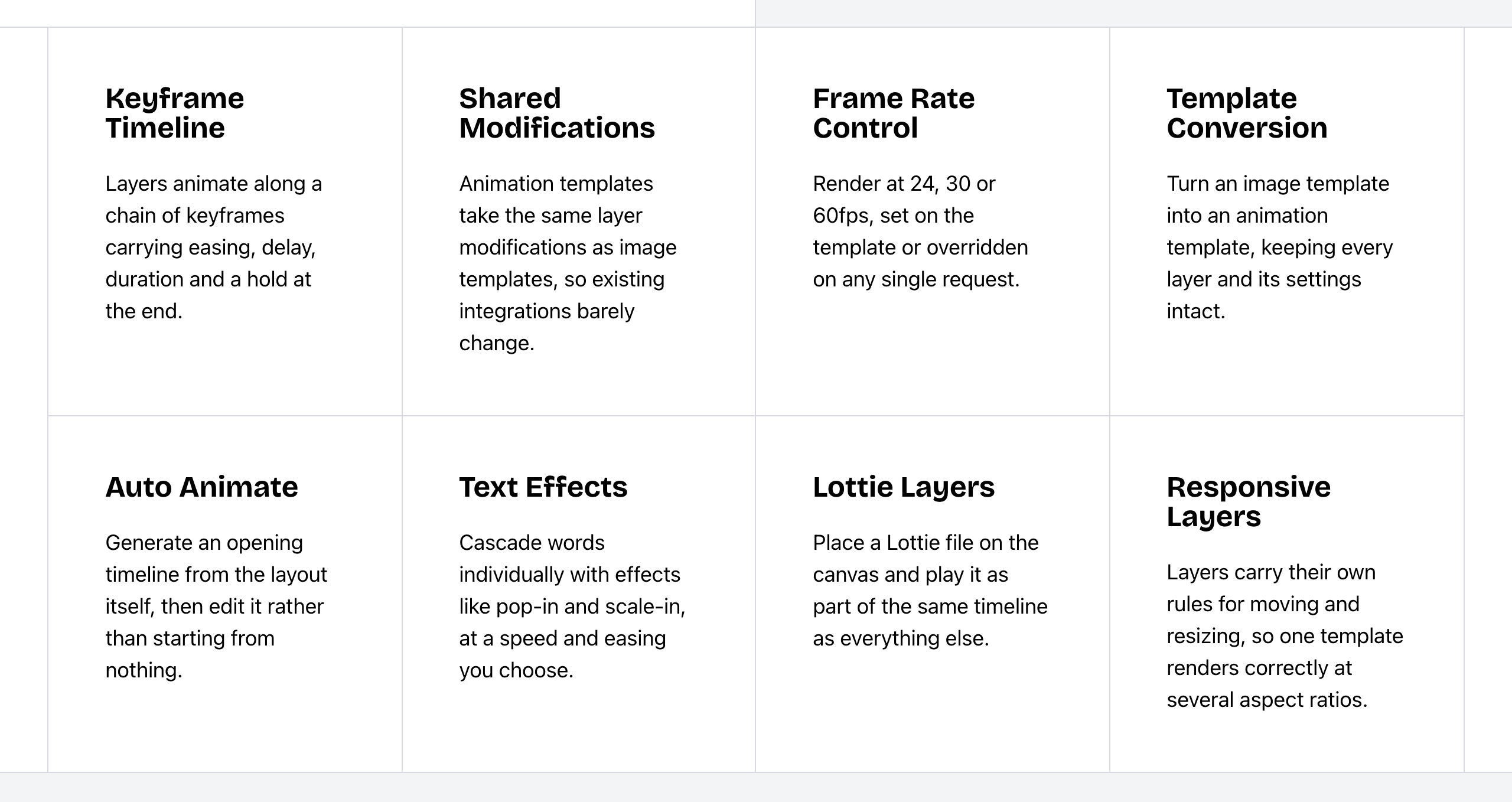 Bannerbear Animation API features. Source: bannerbear.com/v5/products/animation-api, captured 25 October 2026.
Orshot supports keyframes only as JSON through the API. A visual keyframe editor, hold control and keyframe presets are not listed on Orshot's website (as of October 2026). Pop-in and scale-in effects per word, and named Aurora, Mesh or Conic backgrounds, are not listed either. Lottie layers, transparent video output, an animate-preset endpoint, Auto Animate and image-to-animation conversion are not listed on Orshot's website (as of October 2026).
Bottom line: both work for templated social clips with text and camera motion. Choose Bannerbear if a designer needs to set keyframes on a visual timeline, or if you need Lottie files or transparent overlays for a video editor.
Tools for media files you already have
Both products can join videos, add or replace audio, and make slideshows.
Bannerbear has a set of single-purpose tool endpoints that act on any input file, not only on templates. You can call them one at a time or use them as steps in a workflow:
- Video overlay: picture-in-picture or a watermark, with position and margin
- Colour filters and soften for video
- Trim, crop and resize video
- GIF preview: a looping GIF made from an uploaded video
- Thumbnails and cover art from a video
- PDF merge: join up to 50 JPG, PNG and PDF files, in order, into one PDF
- PDF print tools: flatten a PDF, or turn a PDF into an image
Orshot handles video inside its templates. You can place video layers, trim, mute and loop them, render to GIF, and make subtitles from a video. It can trim video, and it combines the pages of one template into a multi-page PDF. Its PDF options include CMYK and DPI settings.
Standalone tool endpoints for video overlay, video colour filters, GIF previews from uploaded video, and thumbnail extraction are not listed on Orshot's website (as of October 2026). Orshot can still put a video on top of another video inside a template. Standalone video crop and resize, a merge tool for uploaded files, and PDF flatten or PDF-to-image tools are not listed either.
Bottom line: if your files start in a template, both products cover the basics. If you also process video and PDF files that come from somewhere else, Bannerbear lists the tools to do it in the same API.
Image detail for production output
Bannerbear adds detail that matters for product photos, profile photos, badges, tickets and print:
- AI face and subject detection: crop around the clearest face, the largest face, the group or the main subject
- AI background generation from a prompt, on image and animation templates
- Special objects: native QR code, barcode, rating and text image mask layers
- Print DPI: DPI metadata from 72 to 600 on images and PDFs
- Image URL proxy that fetches and resizes outside images before the render
- Text backgrounds with per-line highlight, padding, radius and shadow, and shape layers such as polygon, star, heart and custom SVG
- Multilingual text, including Chinese, Japanese, Arabic, Hebrew and right-to-left layout
- Template version pinning: a render request can name a saved template version
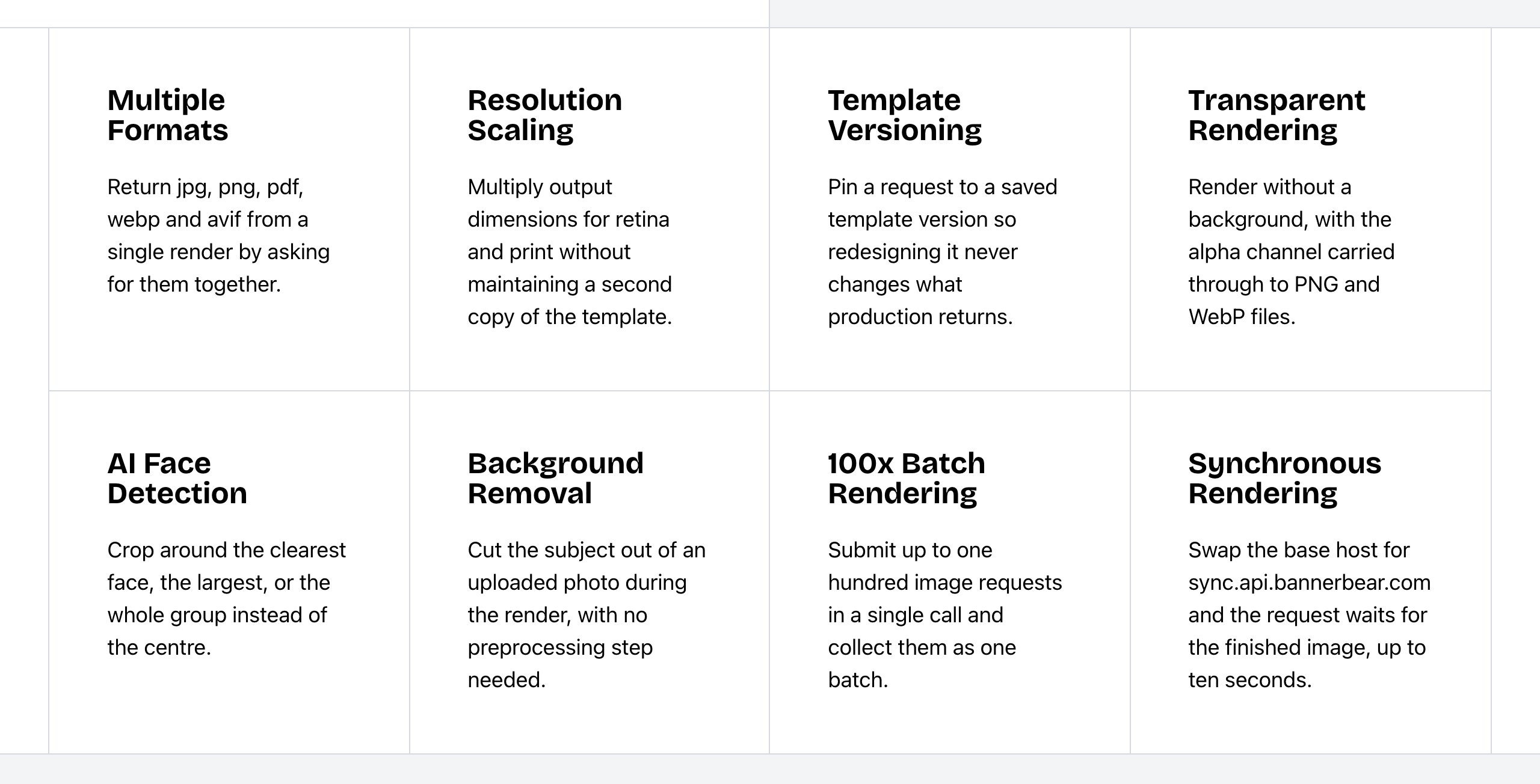 Bannerbear Image API features. Source: bannerbear.com/v5/products/image-api, captured 25 October 2026.
Orshot has general AI image layers in Studio and at render time; a feature made for backgrounds is not listed. Its text supports inline spans with a background colour. It has rectangle, circle, line and arrow shape layers, and its render docs say Greek, Cyrillic, Arabic and CJK text renders correctly, with a lang option for CJK line breaks. For cropping, it has a manual Crop Image tool and a focal-point setting. A QR code can be added as an image from an outside QR service.
AI face and subject cropping, native QR code, barcode and rating layers, DPI metadata and an image URL proxy are not listed on Orshot's website (as of October 2026). Orshot's dpi PDF option scales the page size; it does not set DPI metadata. Hebrew and right-to-left layout are not listed.
Bottom line: choose Bannerbear if your inputs are user photos or headshots, or your output is tickets, badges or print files that need QR codes, barcodes or DPI metadata.
AI features
Both products include AI image generation, AI video generation, AI voiceover, automatic subtitles and AI background removal. Both also have a separate AI credit pool.
Bannerbear also applies AI to the media inside the render: face and subject detection for cropping, and Auto Animate for a first animation. Its text-to-image models include Flux Schnell, Flux 1.1 Pro, Nano Banana and GPT Image 2, and its video models include Seedance, Kling and Veo.
Orshot puts more AI inside the editor:
- An Agent tab that edits a design from plain-language instructions, and Create with AI to start a template from a description
- AI variants of a design
- Creative translation of layers or whole templates, at 1 AI credit per 100 words
- Brand import that pulls logos, colours and fonts from a website
- An AI workflow builder that makes workflows from a description
- Bring your own key for Gemini or Claude, with no markup
These in-editor features are not listed on Bannerbear's website (as of October 2026). Bannerbear connects external AI clients through its MCP server instead.
Bottom line: choose Orshot if your designers want AI help while they design. Choose Bannerbear if you want AI to act on the photos and animation during the render.
Workflows and automation
Both products have workflows with a visual builder, no-code forms and instant or signed URLs.
Bannerbear Workflows chain image renders, animation renders and media tools into one API endpoint. The run history records each step's inputs, outputs and duration.
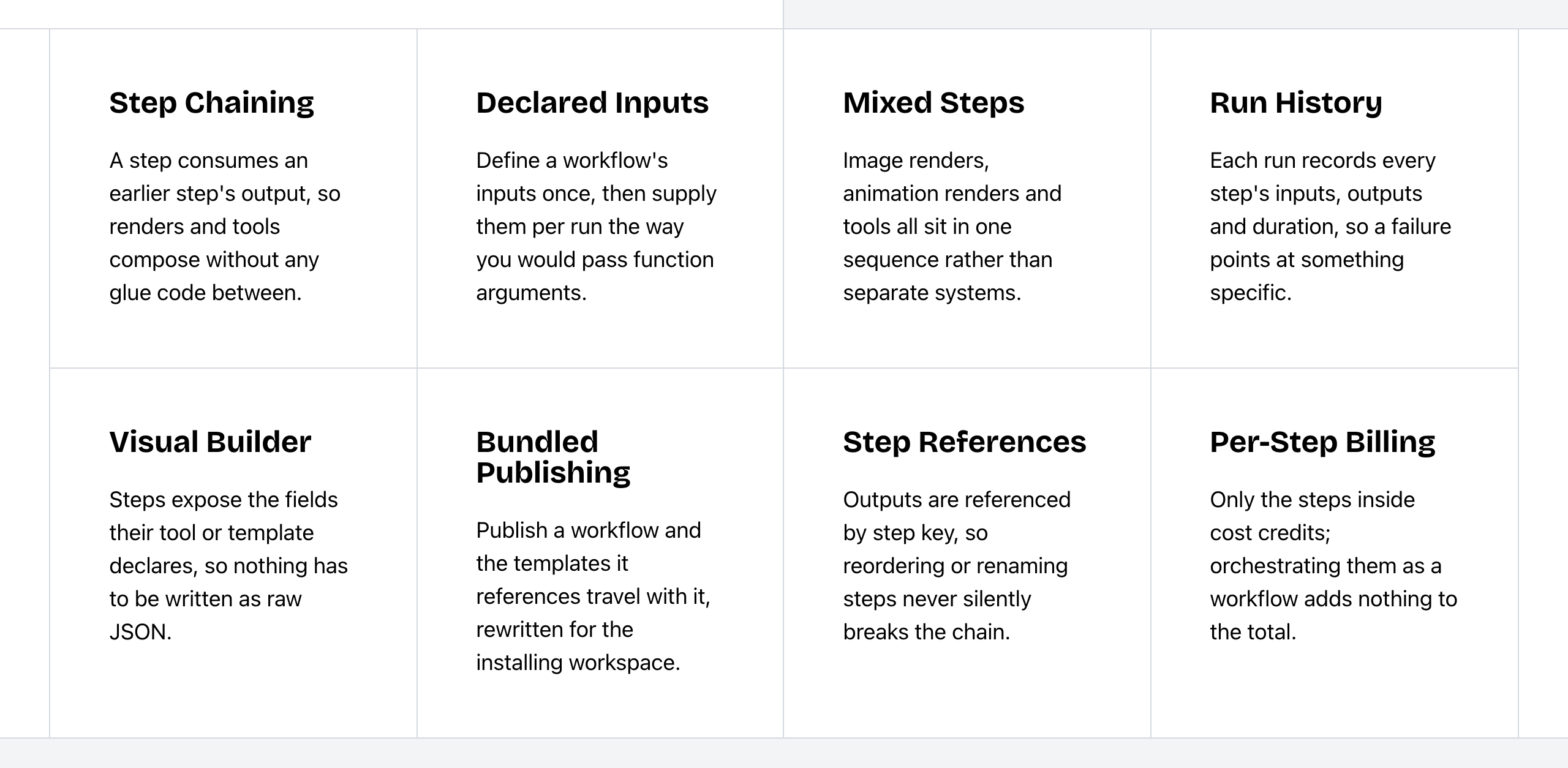 Bannerbear Workflows features. Source: bannerbear.com/v5/products/workflow-api, captured 25 October 2026.
Orshot workflows show run summaries. Orshot also has webhook triggers: each template can get its own inbound webhook URL that starts a render from form or automation data, with field mapping and an optional signing secret. An inbound webhook trigger is not listed on Bannerbear's website (as of October 2026).
Orshot caps workflow runs by plan: 200 to 500 runs per month on Launch, 800 to 1,500 on Grow, and 2,500 to 6,000 on Scale.
Bottom line: choose Orshot if forms and other tools will start your renders through a webhook. Choose Bannerbear if one run has several media steps and you need to see what each step did.
Embedding, publishing and teams: where Orshot leads
Orshot Embed puts its full Studio editor inside your product as an iframe or with React and Vue components. It has JWT authentication and per-user private libraries of templates, images, videos and fonts, so each of your users sees their own work. A white-label option lets you set the title, icon and accent colour and remove Orshot branding on higher tiers. Basic embed starts on the Launch plan ($39/month).
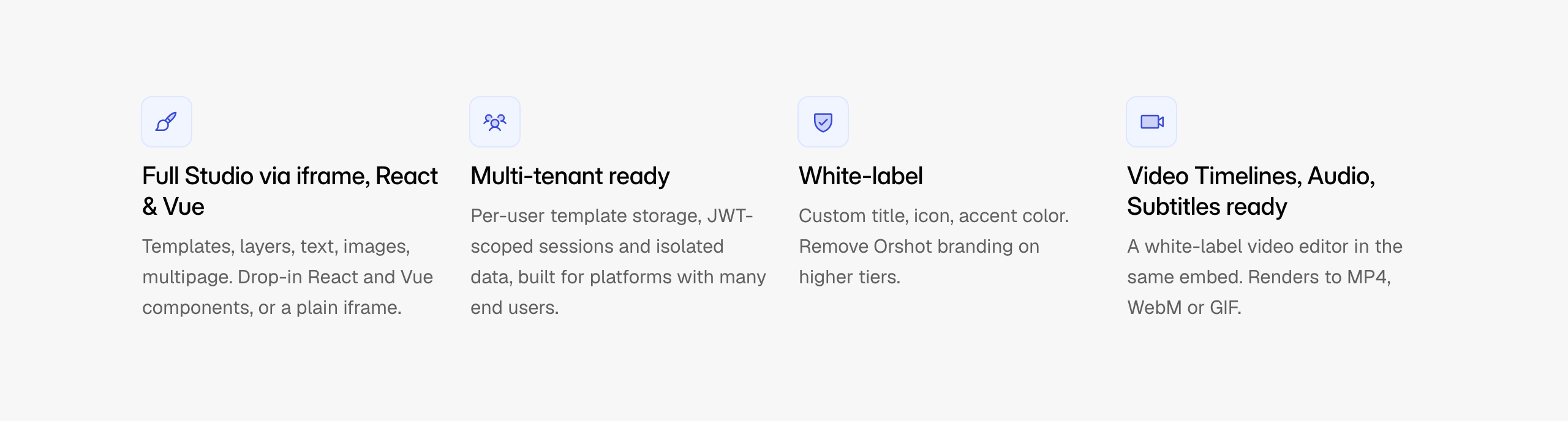 Orshot Embed features. Source: orshot.com/features/orshot-embed, captured 25 October 2026.
Bannerbear has an embeddable editor on its older V3 platform, and it still works there. The current V5 platform does not include one.
Orshot also leads on what happens after the render:
- Social publishing to 15+ platforms, as a paid add-on at $12 per month for each connected account, with social analytics for posts published from Orshot
- Approval flows with review stages, on the Scale plan (3 flows with 5 stages each on the entry Scale tier)
- Slack notifications for renders and usage
- An agency partner program with workspace transfer and sandbox access. Bannerbear has workspaces, template transfer and an affiliate program, which are a different thing.
- Team seats on every plan, from 1 seat on Free and 2 to 4 on Launch. Bannerbear's team members start on the Scale plan ($149/month).
And on design import:
- Import from Canva, Figma and Polotno. Bannerbear imports from Figma and Sketch.
- Multi-page templates for carousels and documents, filled in one call with page-prefixed parameters. Bannerbear's PDF merge joins separate renders instead.
- PDF print options that include photo compression, margins, title metadata, font embedding and alt-text tags. Bannerbear lists print DPI, a CMYK option and links in PDFs.
- A multi-track audio timeline for video. Bannerbear has subtitles and audio tools, and a multi-track audio timeline is not confirmed.
Social publishing, social analytics, approval flows, Slack, an agency partner program, Canva import and multi-page templates are not listed on Bannerbear's website (as of October 2026).
Bottom line: if your users will design inside your product, if renders go straight to social accounts, or if clients must approve designs first, Orshot is the better fit.
Integrations
Both connect to Zapier, Make, Airtable, Shopify, HubSpot, Notion, WordPress and Webflow, both have a Figma plugin, and both have an MCP server.
- Bannerbear lists 50+ data-source integrations with field mapping and write-back, and a Sketch plugin. A Sketch plugin is not listed on Orshot's website (as of October 2026).
- Orshot lists an official n8n integration, Canva import, a Framer plugin, Slack, Google Forms and social publishing. A Framer plugin and a Google Forms integration are not listed on Bannerbear's website (as of October 2026). Both products have a node in n8n.
Orshot's MCP server is on every plan, including Free. Bannerbear's MCP server is on Automate and up.
Developer experience
| Bannerbear | Orshot | |
|---|---|---|
| API specification | OpenAPI 3.1 for the V5 REST API | OpenAPI 3.1 in JSON and YAML (107 paths) |
| Official SDKs | Ruby, Node, Python, PHP; MCP package | Node.js, Python, PHP, Ruby; React and Vue embed SDKs; CLI |
| API keys | Scoped keys (22+ scopes), browser-origin allowlists, workspace-scoped keys | Per-workspace keys with scopes; OAuth2 apps (PKCE, device flow) |
| Rate limits | 60 POST requests per 10 seconds | 100 requests per minute on Free and Launch, 200 on Grow and Scale |
| Pin a render to a template version | Yes | Not listed |
| Completion webhooks | Signed, scoped to templates, managed by API | Completion callback to a webhook_url; signed template webhooks |
| Template create and update by API | Public V5 API | Enterprise or first-party clients only |
| Workflow run API | Public V5 API (workflows from Automate) | Enterprise or first-party clients only |
| Uptime (vendor-stated) | 99.9% trailing 12 months; public status page | 99.98% over 91 days (public metrics) |
| Support | Priority support on Enterprise | Enterprise: named solutions engineer, Slack channel, custom SLAs |
The two uptime figures cover different periods, so we do not compare them. Our data does not record support for plans below Enterprise for either company.
Orshot's API reference marks template create and update, and the workflow create, run and runs endpoints, as available only to first-party clients (such as the Orshot MCP server) and to workspaces on the Enterprise plan. Orshot keeps template version history in Studio, with a restore API for Enterprise, but no render parameter for pinning a template version is listed. Orshot's webhooks support is partial in our data: a completion callback is documented, and signed callbacks scoped to templates with a management API are not confirmed.
Orshot also lists render caching with cache clearing, an installable agent skill, a VS Code extension for AI agents, developer apps with a marketplace, template folders and tag filters. These are not listed on Bannerbear's website (as of October 2026), apart from template tags, which Bannerbear's V5 API stores on templates.
Orshot's changelog has 86 entries from November 2025 to 11 October 2026, with 5 to 11 entries in each full month. Bannerbear's changelog has entries most months in 2026, the latest on 18 September 2026.
Bottom line: choose Bannerbear if your engineers need template and workflow management in the public API on standard plans, or need to pin renders to a template version. Orshot's OAuth2 apps and developer tooling suit teams that build apps on top of it.
Security and enterprise
| Bannerbear | Orshot | |
|---|---|---|
| Single sign-on (SSO) | Enterprise plan | Enterprise, on request (Okta, Azure AD, Google Workspace) |
| Audit logs | Enterprise plan | Yes (plan not stated) |
| GDPR and DPA | Standard DPA on request; data hosted in the USA | Custom DPA on Enterprise |
| Two-factor authentication | Scale plan and up | Not listed |
| Zero data retention | Enterprise plan | Not listed |
| Restrict team sign-up to your email domain | Yes | Not listed |
| Passkey sign-in | Not listed | Yes |
Orshot added passkey sign-in on 11 October 2026. Its privacy and pricing pages say rendered files are kept for at least a year, or sent to your own storage. Orshot's Embed has a domain allowlist, which is a different feature from a sign-up restriction.
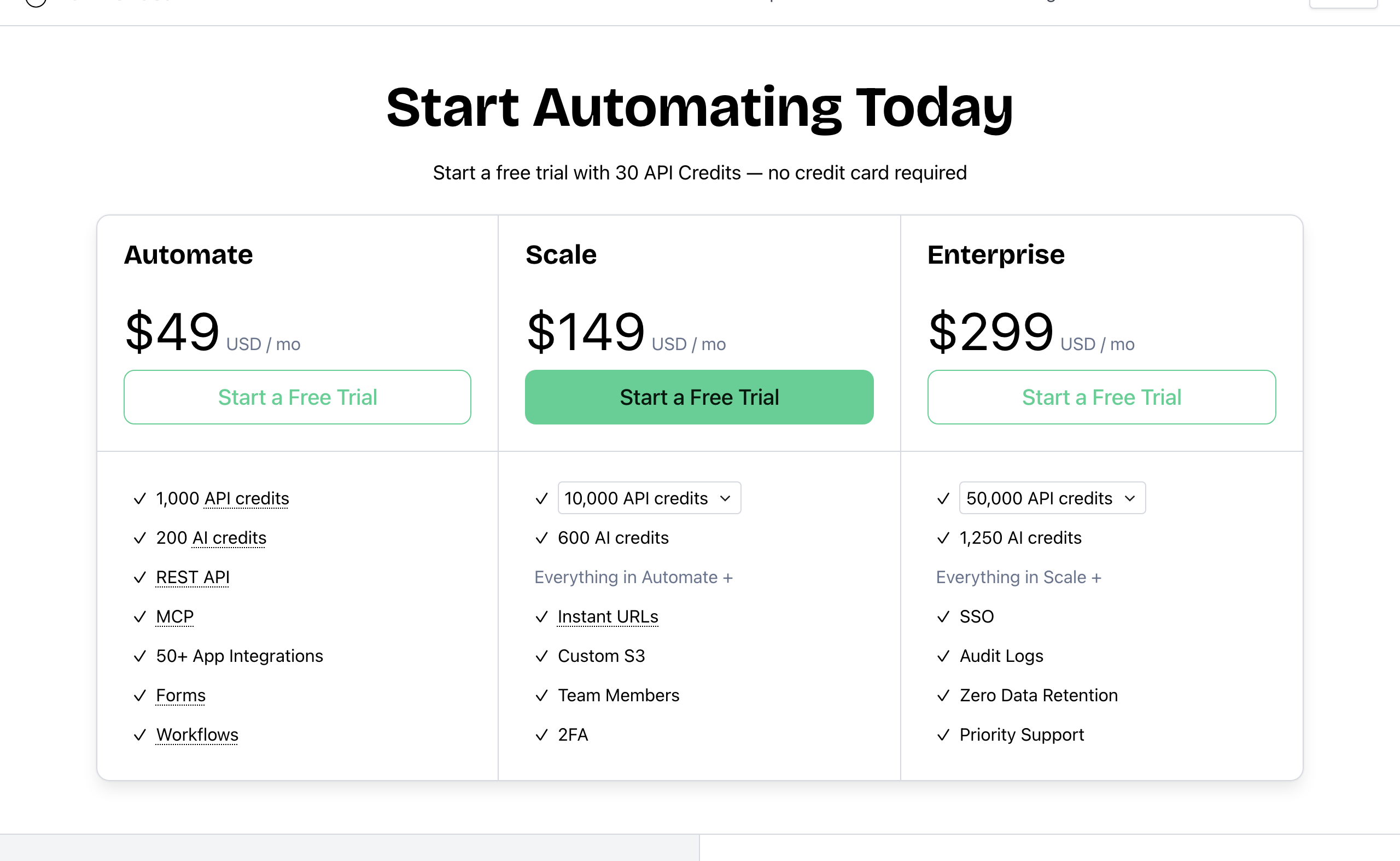 Bannerbear pricing. Source: bannerbear.com/pricing, captured 25 October 2026.
Bottom line: if your security review asks for 2FA on a mid-tier plan or for zero data retention, Bannerbear lists both. If you need passkeys, Orshot lists them. Ask Orshot directly about 2FA before you rule it out.
Pricing
| Bannerbear | Orshot | |
|---|---|---|
| Free option | One-time trial: 30 API credits, no card | Free plan: 100 credits every month, no card |
| Entry plan | Automate: $49/mo, 1,000 credits | Launch: $39/mo (1,500 credits) or $99/mo (5,000) |
| Mid plans | Scale: $149–$296/mo, 10,000–40,000 credits | Grow: $160/mo (20,000) or $280/mo (40,000) |
| High volume | Enterprise: from $299/mo, 50,000 credits and up | Scale: $349 (75,000), $480 (150,000) or $600/mo (300,000) |
| Annual pricing | Not shown on the pricing page | 12 months for the price of 10 |
| Unused credits | Reset on the 1st of each month | — |
| Overage | Not stated | Off by default; $0.024–$0.036 per credit, with a spending cap |
| AI features | Separate AI credit pool (Automate 200/mo, Scale 600–1,250) | Separate AI credit pool (Launch 300–750/mo, Grow 1,200–1,700) |
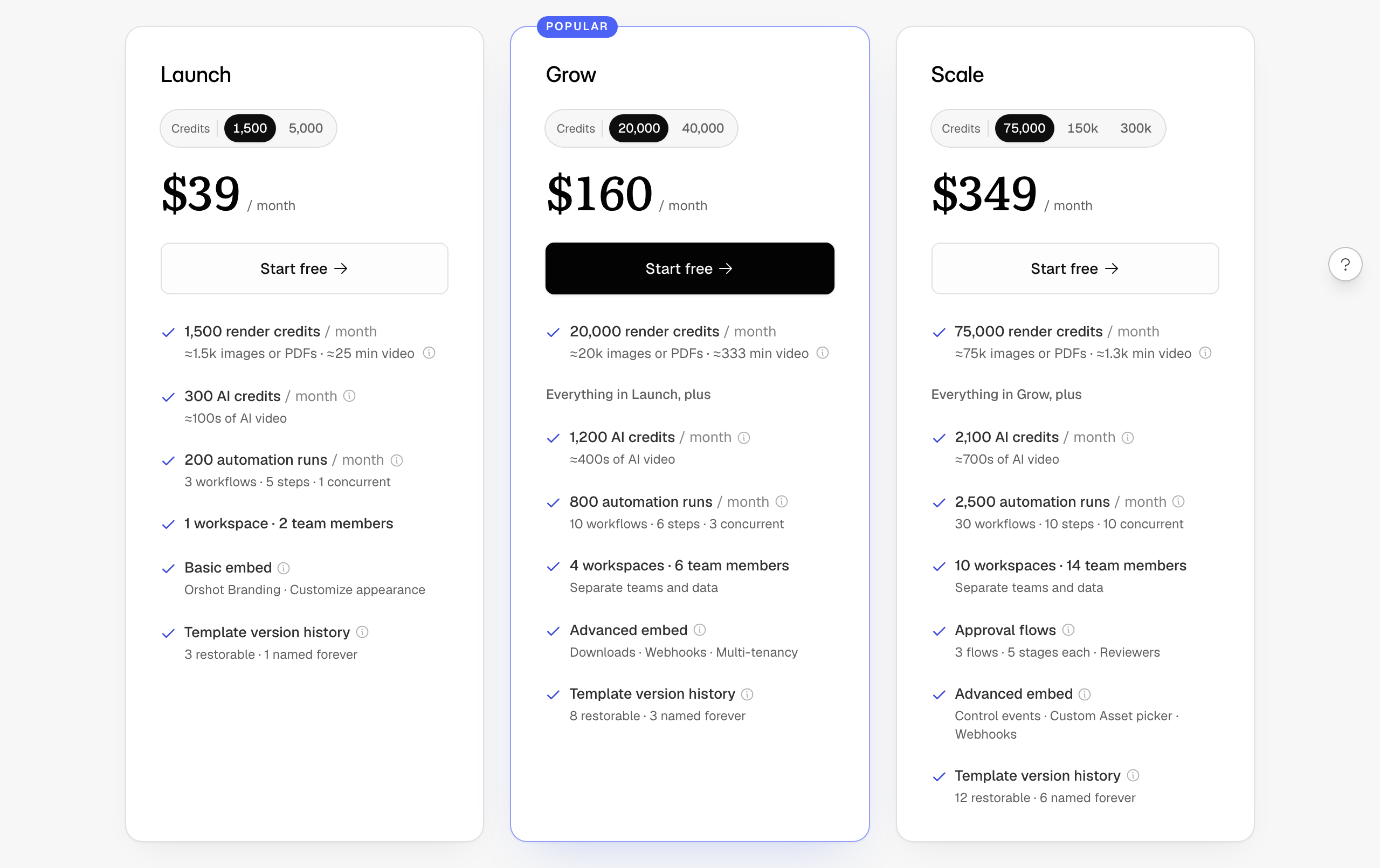 Orshot pricing (Launch, Grow and Scale at their lowest credit tier). Source: orshot.com/pricing, captured 25 October 2026.
Cost for the same job
Standard static images from a template, one output format, scale 1, no AI features, on the cheapest plan that fits, with monthly billing. For this job, 1 Bannerbear API credit and 1 Orshot credit each make one image.
| Images per month | Bannerbear | Orshot | Lower price |
|---|---|---|---|
| 100 | $49 (Automate) | $0 (Free) | Orshot |
| 1,000 | $49 (Automate) | $39 (Launch, 1,500) | Orshot |
| 2,500 | $149 (Scale, 10,000) | $99 (Launch, 5,000) | Orshot |
| 5,000 | $149 (Scale, 10,000) | $99 (Launch, 5,000) | Orshot |
| 10,000 | $149 (Scale) | $160 (Grow, 20,000) | Bannerbear |
| 20,000 | $198 (Scale) | $160 (Grow) | Orshot |
| 30,000 | $247 (Scale) | $280 (Grow, 40,000) | Bannerbear |
| 40,000 | $296 (Scale) | $280 (Grow) | Orshot |
| 50,000 | $299 (Enterprise) | $349 (Scale, 75,000) | Bannerbear |
| 100,000 | $458 (Enterprise) | $480 (Scale, 150,000) | Bannerbear |
| 300,000 | $617 (Enterprise, 500,000 tier) | $600 (Scale, 300,000) | Orshot |
For plain image generation, Orshot costs less at most volumes, and it has a free plan. Bannerbear costs less at 10,000, 30,000 and 50,000 images per month. The table uses plan prices only; Orshot's optional overage can lower its cost at some volumes. Orshot's annual billing (12 months for the price of 10) lowers its prices further, and Bannerbear's annual pricing is not public.
The comparison changes when your pipeline needs the animation and media-processing features above. Lottie layers, transparent video, Auto Animate and the standalone video and PDF tools are not listed on Orshot's website at any price (as of October 2026).
Video: by each company's stated rules, Orshot uses fewer credits per second of video. Bannerbear charges 1 credit plus 2 credits per second of animation, and 60 fps doubles that. Orshot charges 1 credit per second within the plan (8 per second in overage), and caps video length by plan at 3, 5 or 10 minutes. We do not make a video cost table, because the outputs and options differ.
PDF: Orshot charges 1 credit per page. Bannerbear charges 1 credit per PDF, however many pages it has. For multi-page documents, Bannerbear uses fewer credits.
AI: both use a separate AI credit pool, but the units and per-model rates differ, so we do not compare AI costs.
Who should choose Orshot
Orshot is the right choice if:
- Price is the main factor for image volume, or you want a free plan with 100 credits every month
- You want to embed a white-label design editor in your own product, with per-user libraries
- Your designers want AI help in the editor: a design agent, variants, translation or brand import
- You publish renders straight to social accounts, or need approval flows for clients
- Your designs start in Canva, or you build multi-page carousels
- You use Framer, Slack or Google Forms, or want inbound webhooks to start renders
- You need team seats on a lower plan
- You make a lot of video and want the lower credit cost per second
Who should choose Bannerbear
Bannerbear is the better fit for teams who:
- Design motion on a visual keyframe timeline, or need Lottie layers and transparent overlays
- Process video and PDF files they already have: overlays, filters, GIF previews, thumbnails, merges
- Start from user photos or headshots that need face or subject cropping
- Print tickets, badges or labels with QR codes, barcodes and set DPI
- Need template and workflow management in the public API, and renders pinned to a template version
- Need 2FA from the Scale plan, or zero data retention, for a security review
- Want answers from real people: email and chat support from two full-time human support staff, who answer at almost any hour, plus priority support on Enterprise
- Want a provider with a track record: Bannerbear launched in January 2020, five years before Orshot. It publishes a 99.9% uptime figure with a public status page and runs Enterprise plans of up to 2,000,000 credits per month
FAQ
Is Orshot cheaper than Bannerbear? For plain image generation, yes, at most volumes. Orshot has a free plan with 100 credits a month, and its Launch plan starts at $39. Bannerbear costs less at 10,000, 30,000, 50,000 and 100,000 images per month on monthly billing. Orshot also uses fewer credits per second of video.
Does Orshot have a keyframe animation editor? Orshot supports keyframes only as JSON through the API, plus preset enter, exit and ambient animations. A visual keyframe editor is not listed on Orshot's website (as of October 2026). Bannerbear has a visual keyframe timeline with easing, hold and presets.
Can I embed the editor in my own app? Orshot Embed puts its editor in your product with React and Vue SDKs, JWT authentication and a white-label option. Bannerbear has an embeddable editor on its older V3 platform, and it still works there. The current V5 platform does not include one.
Which is better for video? Both make video from templates, with subtitles, voiceover and AI video. Orshot adds a multi-track audio timeline and a lower credit cost per second. Bannerbear adds Lottie layers, transparent MOV output and standalone tools for overlays, filters, GIFs and thumbnails, which are not listed on Orshot's website (as of October 2026).
Can Orshot publish to social media? Yes. Orshot publishes to 15+ platforms as a paid add-on at $12 per month for each account. Social publishing is not listed on Bannerbear's website (as of October 2026).
Does Orshot have 10x more features than Bannerbear? Not by our count. We checked 136 capabilities in both directions: Bannerbear's sites list 106 and Orshot's list 101, and about 70 are in both. Each product has features the other does not list. See About the "10x more features" claim.
Do both work with AI assistants like Claude? Yes. Both have an MCP server. Orshot's is on every plan, including Free; Bannerbear's is on Automate and up.
How we compared
- Sources: each company's marketing website and pricing page, API documentation and OpenAPI file, help center and changelog. For Orshot, we also read llms.txt, pricing.md and the scripts on its pricing page.
- Date: all facts were checked on 25 October 2026. Orshot's changelog adds 5 to 11 entries each full month, so check the current pages before you decide.
- Re-check: on 25 October 2026 we searched Orshot's full sitemaps (488 URLs), its help center, API specification and changelog again for each "Not listed" claim on this page. Several features changed from "not listed" to a narrower version, and the page describes the narrower version.
- "Not listed" means we searched the company's own sites for the feature and found no mention. It is not proof that the feature does not exist.
- Screenshots show public pages as they appeared on the capture date in each caption.
- What we did not measure: support response times, ease of use, rendering speed, render quality and reliability. We did not include third-party reviews.
- Disclosure: this page is published by Bannerbear.
- Launch years come from Product Hunt, the companies' own pages and web archives.