

Claude Code vs. Cursor: Which AI Coding Tool Is Better in 2026?
Contents
Claude Code and Cursor are two of the most popular AI coding assistants in 2026, and you might be wondering: which one is better?
In this article, we'll compare Claude Code and Cursor side-by-side to help you decide. We'll break down their features, key differences, and pricing to help you make an informed decision.
Let’s get started!
What Is Claude Code?
Claude Code is a powerful agentic coding tool built on Claude Opus 4.5, which is optimized specifically for code understanding and generation. It can understand your entire codebase and edit files across multiple directories.
Claude Code uses agentic search to grasp the full context of your project. This means it can debug errors with awareness of how everything connects, generate comprehensive tests, and even handle git workflows for you. That said, you have full control over how Claude Code works in your codebase.
Claude Code is available as a CLI tool, an IDE extension, a web app, or a desktop app. Because you can install Claude Code locally either as a CLI tool or a desktop app, it can handle tasks beyond coding, like executing CLI commands to write docs, run builds, search files, automate workflow, and more.
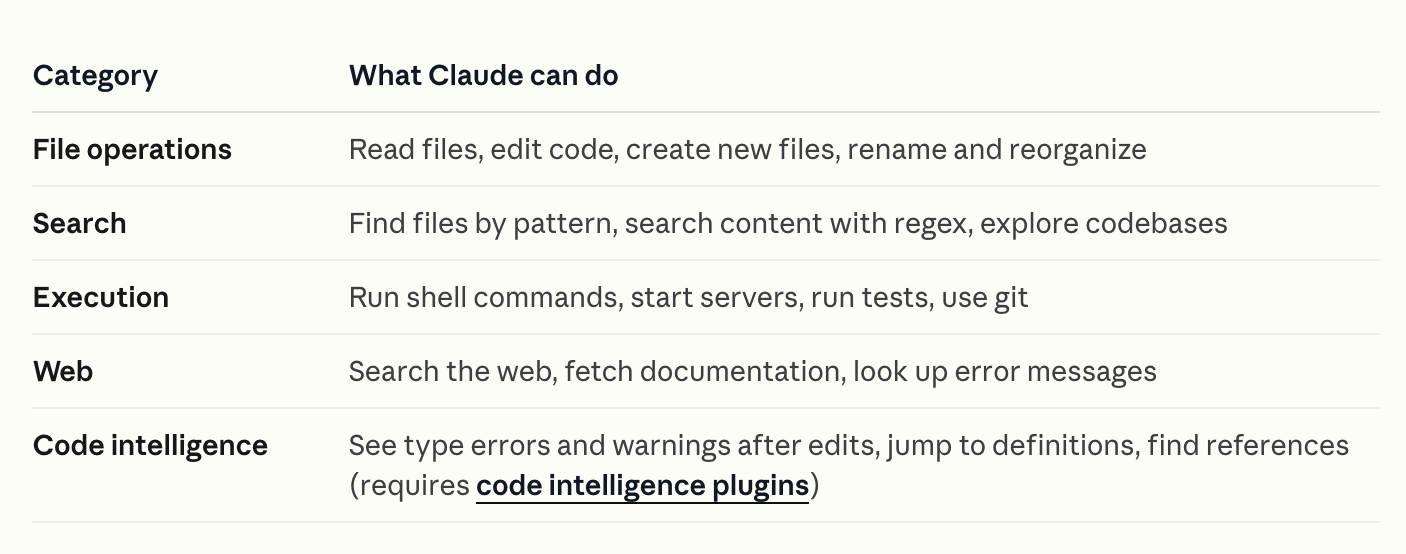
Here’s a table from Claude Code’s official documentation showing what it can do:
What Is Cursor?
Cursor is an AI-powered IDE and coding agent. Instead of writing every line of code yourself, you describe what you want to build or change in natural language, and Cursor writes the code for you.
Cursor offers four modes for different workflows:
- Agent (default) - It has full access to all tools for complex coding tasks. It can edit files, run terminal commands, and make coordinated changes across your project.
- Plan - Cursor doesn't code directly in this mode. Instead, it researches your codebase, asks clarifying questions, and creates a plan that you can review or edit before building.
- Debug - This mode is specifically designed for troubleshooting. It analyzes errors, traces through code paths, and suggests fixes based on the actual problem rather than symptoms.
- Ask - This mode is read-only. Cursor only answers your questions about your codebase without making any modifications.
Claude Code’s Features
Agentic Search with 200k Context Window
Claude Code uses agentic search and can understand up to 200,000 tokens of context. This enables it to comprehend your entire codebase and gather the necessary context. So even if you don't manually provide context, it knows where to make changes and can coordinate edits across multiple files to ensure nothing breaks.
🐻 Bear Tip: The Opus 4.5 model is optimized specifically for code understanding and generation.
Built-in Tools
Claude Code comes with built-in tools that make it agentic and autonomous, categorized into four groups: file operations, search, execution, and code intelligence. It automatically chooses which tools to use based on your prompt and uses them to read, edit, create files, explore codebases, run shell commands, search the web, etc., to complete the task.
Plan Mode
Plan mode lets you use Claude Code to analyze the codebase and research a solution without immediately implementing code. You can review the plan, refine it, and finally implement it when you're happy with the approach.
CLAUDE.md, Skills, and MCP Servers for Extended Features
CLAUDE.md, Skills, and MCP servers let you further customize what Claude Code can do. The CLAUDE.md file stores and loads persistent context throughout every session. Skills let you add reusable knowledge and workflows that you can trigger using slash commands, and MCP allows Claude Code to connect to external services and tools like Slack, Notion, GitHub, and more. These features make Claude Code not only an AI coding tool but also connect it to external services and automate workflows.
Subagents for Isolated and Parallel Work
Subagents are AI agents that handle specific tasks in their own context window, running parallel to the main one. After completing the task, they return the result to the main context window. This helps reduce costs by routing tasks to faster, cheaper models and lets you reuse configurations across projects.
Cursor’s Features
Tab Completion with AI Predictions
Cursor's Tab feature uses an AI model to predict your next actions as you type. It suggests code completions, multi-line blocks, and even entire functions based on your current context. Simply press Tab to accept the suggestion, or keep typing to see updated predictions.
Multiple AI Models
Besides Cursor's own Composer model, you can choose between multiple AI models from different providers depending on your task. For example, you can switch to Claude Sonnet or Opus for complex reasoning, GPT-4.1 or GPT-5.2 for general tasks, Gemini 3 Pro, or Grok Code.
Manual + AI Coding
You can switch seamlessly between writing code yourself and letting AI do the work. If you want more control, type the code yourself and use tab completions to speed things up. If you need help with larger tasks, switch to Agent mode and let Cursor handle them autonomously.
Works Everywhere
Use Cursor on desktop, mobile, web, Slack, or GitHub. The Cursor CLI also lets you run the agent in any terminal or script to write, review, and modify code programmatically.
Smart Context
Cursor indexes your entire codebase for semantic search, understanding not just what your code says but what it means. This context awareness enables Cursor to answer any questions about it, make targeted edits, and give better suggestions without you explaining your project repeatedly.
Pricing Comparison
Claude Code
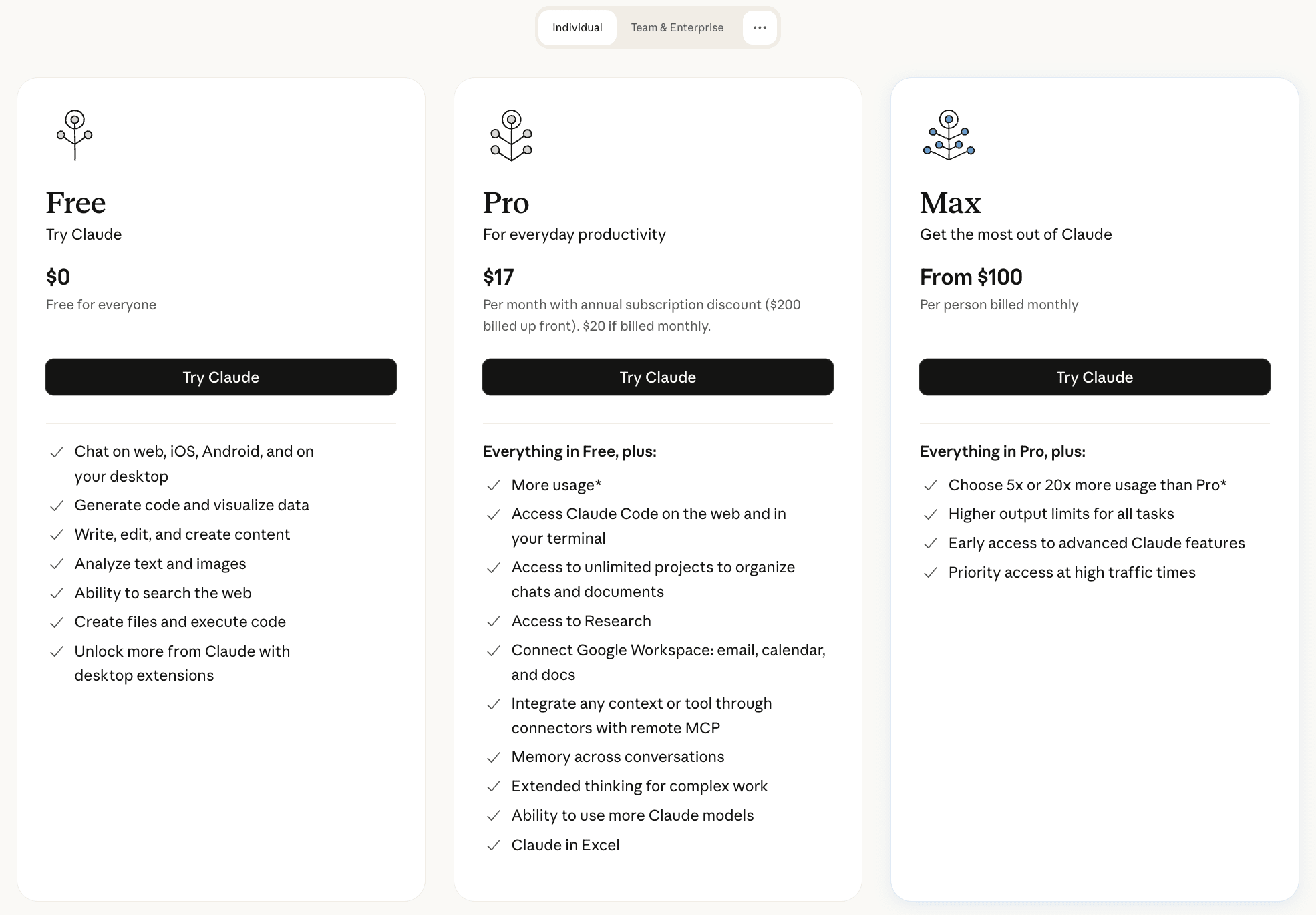
Claude Code is only available to paid users as of February 2025. Since Claude Code can be accessed via multiple interfaces, there are two payment options: either a Claude subscription from $20/month…
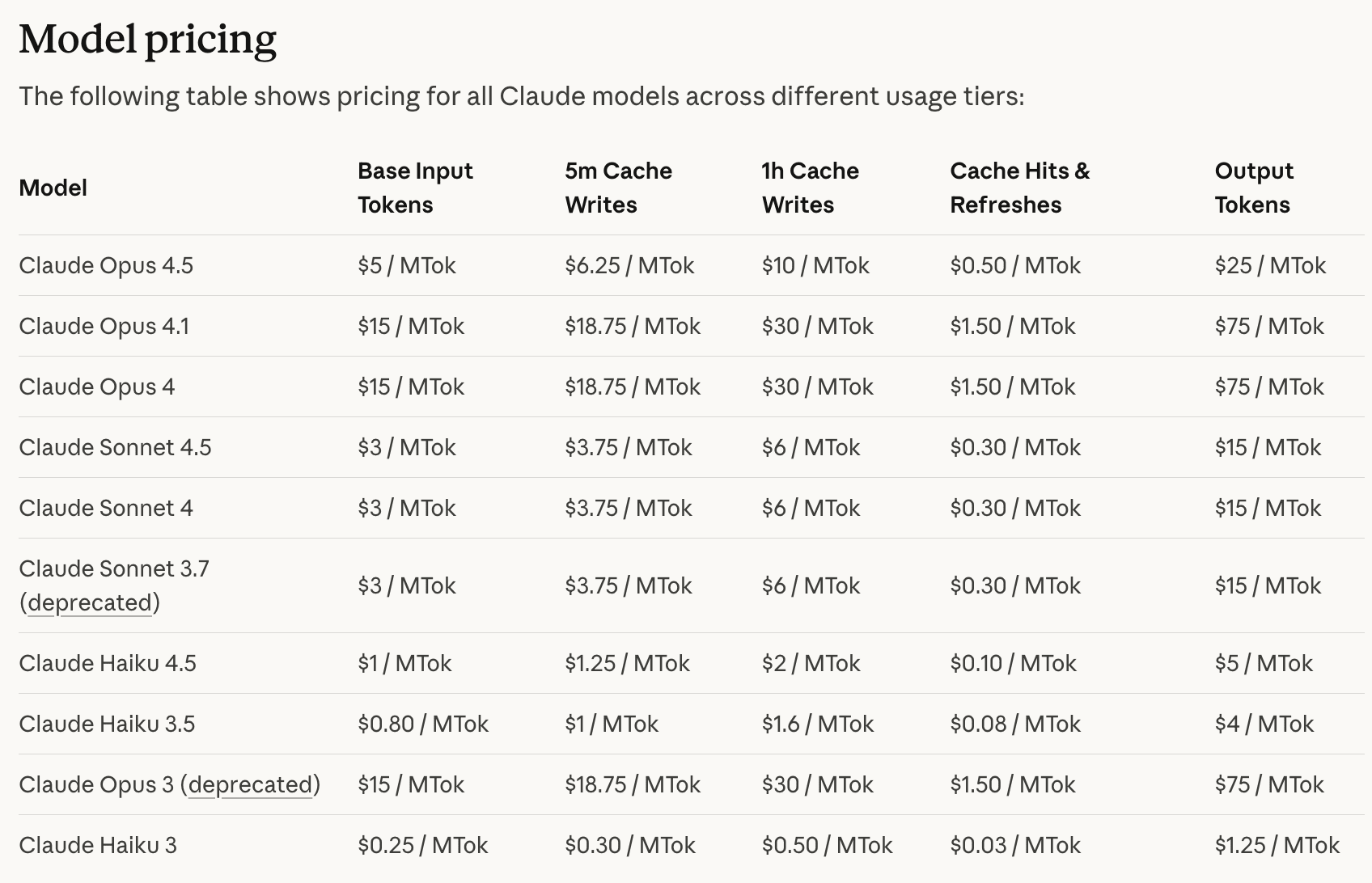
…or a Claude Developer Platform account with API credits. You’ll be charged for whatever you used, and here's the pricing:
Cursor
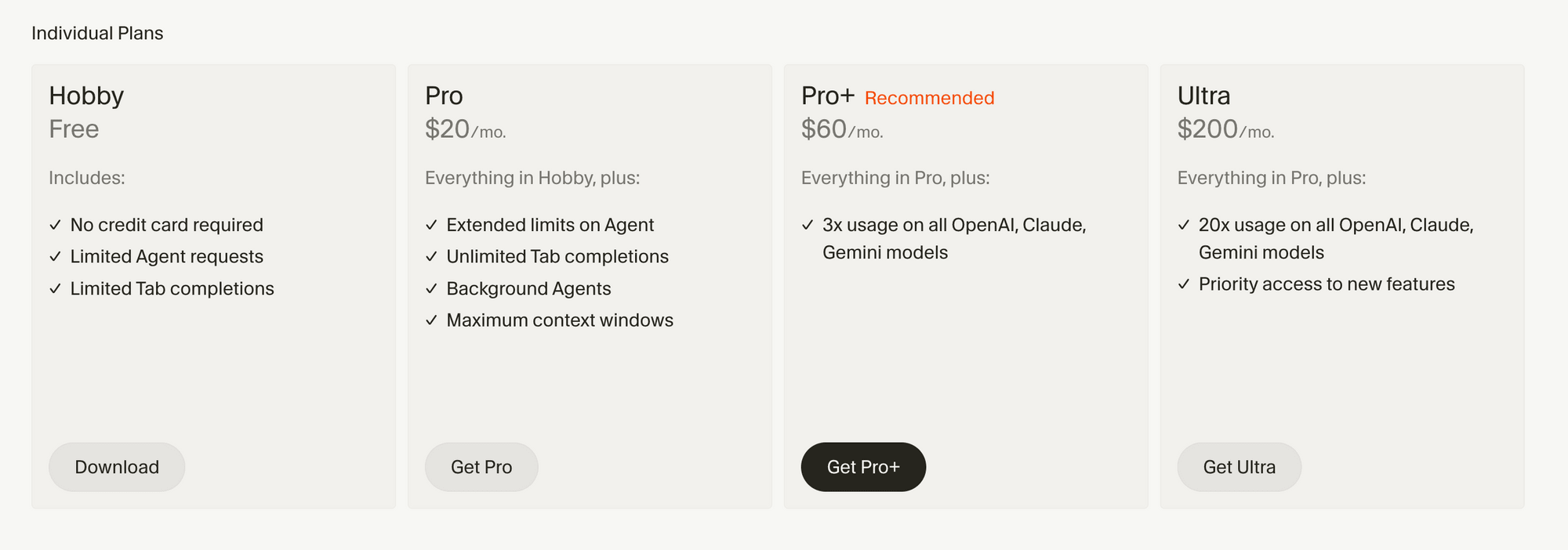
You can use Cursor for free, but with limited Agent requests and tab completions. To unlock higher usage limits, pricing starts at $20/month:
Claude Code vs. Cursor: Key Differences
Even though both Cursor and Claude Code are AI coding assistants, they work quite differently. The table below shows a quick overview of their key differences:
| Aspect | Claude Code | Cursor |
|---|---|---|
| Interface | CLI, IDE plugin, web app, or desktop app | IDE |
| Interaction | Prompting | Prompting + autocomplete |
| AI models | Claude models only (Sonnet, Haiku, Opus) | Its own Composer model + OpenAI, Anthropic, Gemini, and xAI models |
| Learning curve | Medium high - uses the concept of Skills, MCP, subagents, hooks, and more. | Low |
| Best for | Large tasks, automation | Quick edits, iterative work |
Claude Code offers more flexibility in how you use it as it's accessible through the terminal CLI, an IDE plugin, web, or desktop app. However, it works exclusively with Anthropic's Claude models (Sonnet, Haiku, and Opus) and has no option to switch providers. The learning curve is also steeper because Claude Code introduces concepts like Skills, MCP servers, subagents, and hooks that take time to master.
On the other hand, Cursor keeps things simpler as a standalone IDE with AI built in. Besides prompting, the AI autocomplete suggests code as you type. It also gives you model flexibility as you can choose between its own Composer model or switch to OpenAI, Anthropic, Gemini, or xAI models depending on the task. This is something Claude Code doesn't offer. The learning curve is also lower, as most of its core concepts, like auto-completion, inline edits, chats, etc., are intuitive and easy to pick up.
Conclusion
Both Claude Code and Cursor are excellent AI coding assistants, but they can feel quite different in practice.
Claude Code is good when you want to delegate complex work and let AI handle everything autonomously, while Cursor might be the better option if you want to maintain control with AI's assistance. The best way to decide is to try them both and see which one fits your workflow better.
If you need help getting started, check out our setup guides: