
Nano Banana vs. Nano Banana Pro: Which Google AI Image Generator is Better
Contents
Since the release of OpenAI’s DALL-E 2 in April 2022, AI image generation has become a major focus in AI development. Tech companies are competing to release the next best AI image generation model, including Google.
In November 2025, Google launched Nano Banana Pro, and it absolutely took over the internet. Within hours of release, social media feeds were flooded with images showing the massive quality leap compared to the original Nano Banana.
Nano Banana (the "Fast" model) and Nano Banana Pro (the "Thinking" model) both live under Google's Gemini AI umbrella, but they're designed for different use cases. One prioritizes speed for casual edits, while the other delivers studio-quality control for professional projects.
In this article, we'll compare Nano Banana vs. Nano Banana Pro side-by-side, covering their features, pricing, and actual test results so you can easily decide which one suits your needs best.
What is Nano Banana?
Nano Banana (a.k.a. Gemini 2.5 Flash Image) is the first image model released by Google in August 2025. It is accessible via Gemini by selecting “Create images” from the tools menu and then choosing "Fast" as the model.
As you can tell from its name, Nano Banana prioritizes speed. An image can be generated from a text prompt in seconds, making it the best choice for quick, casual creativity like prototyping and experimental creative work.
What is Nano Banana Pro?
Nano Banana Pro, powered by the Gemini 3 Pro Image model, represents Google's professional-grade offering. It introduces a suite of professional-grade features that are not offered by the Nano Banana, including advanced text rendering, precise editing controls, 2k resolution, enhanced world knowledge, and support for more photo references.
Unlike Nano Banana's quick generation, Nano Banana Pro takes more time to process your requests. The model actually "thinks" through your prompt, factoring in spatial relationships, lighting physics, composition rules, and overall creative intent before generating the image. This extra processing time translates into higher-quality results for professional work.
🐻 Bear Tip: Nano Banana Pro is accessible via Gemini under the “Thinking” model.
Nano Banana vs. Nano Banana Pro: Key Differences
Let's break down the five major new features that Nano Banana Pro brings to the table. These are what set these two models apart.
1. Advanced Text Rendering (New in Pro)
This is one of Nano Banana Pro's standout new features, as AI image generation models often struggle with text. The standard Nano Banana can include text in images, but it often struggles with clarity, accuracy, and complex layouts. Letters might be malformed and spacing can be inconsistent.
Nano Banana Pro features advanced text rendering that creates images with clearer and more accurate text. It also understands typography, can render text in multiple languages with proper grammar, and handles complex layouts where text integrates naturally with other visual elements.
This enables professional use cases like generating posters with sharp headlines, creating product mockups with legible labels, designing infographics with readable data tables, and building multilingual marketing materials.
2. Precise Editing Controls (New in Pro)
While Nano Banana offers local edits that enable users to make quick and specific changes to parts of an image, like changing a character's outfit or swapping backgrounds, Nano Banana Pro takes it to the next level.
Nano Banana Pro offers enhanced control over the images, like lighting, camera angle, and aspect ratio control. For example, you can adjust lighting direction and intensity (like changing from bright noon to golden hour), modify camera angle and perspective (switching between wide-angle to telephoto views), control aspect ratio for different platforms and formats, and adjust depth-of-field effects to focus on specific elements. This gives users much greater control over every detail of the final image.
3. 2K Resolution (New in Pro)
Nano Banana outputs at approximately 1 megapixel resolution, which translates to around 1024x1024 pixels for its square output images. This is fine for most use cases, including using it for web content, social media, and digital displays where images are viewed on screens.
On the other hand, Nano Banana Pro produces crisp, high-resolution images up to 2K resolution. For a typical landscape image, the output image is about 2048×1080 pixels, or more. This enables a higher level of detail compared to Nano Banana and produces significantly sharper images that are suitable for print materials, large-format displays, professional presentations, and high-quality digital publishing.
4. Enhanced World Knowledge (New in Pro)
This is one of Nano Banana Pro's more unique capabilities that sets it apart from most AI image generators. With enhanced world knowledge from Google Search, the model allows for more accurate and detailed generations for use cases like infographics and diagrams.
For example, you can prompt Nano Banana Pro to “create an infographic showing today’s weather in major cities” and it will use current temperature data to generate the visuals. Or you could ask it to “generate a diagram explaining how photosynthesis works,” and it will pull factual scientific knowledge to produce a clear and accurate educational illustration.
5. Combining More Photos (New in Pro)
Both models support photo blending, but the scale differs. With Nano Banana Pro, you can upload up to 14 reference images to guide the AI in generating the final image. You can include images of logos, color palettes, characters, backgrounds, etc., to help Nano Banana Pro understand the complete context needed to generate the image.
This enables brands and businesses to visualize their ideas and bring them to life faster. Other than uploading images of different elements, users can also combine various angle references to generate new perspectives, making different variations of an image faster and easier.
Nano Banana vs. Nano Banana Pro: Side-by-Side Results
We’ve covered the key differences. Now, let’s look at how both models perform in real-world scenarios. For each test, we used the same prompts and compared their results.
Test 1: Text Rendering Quality
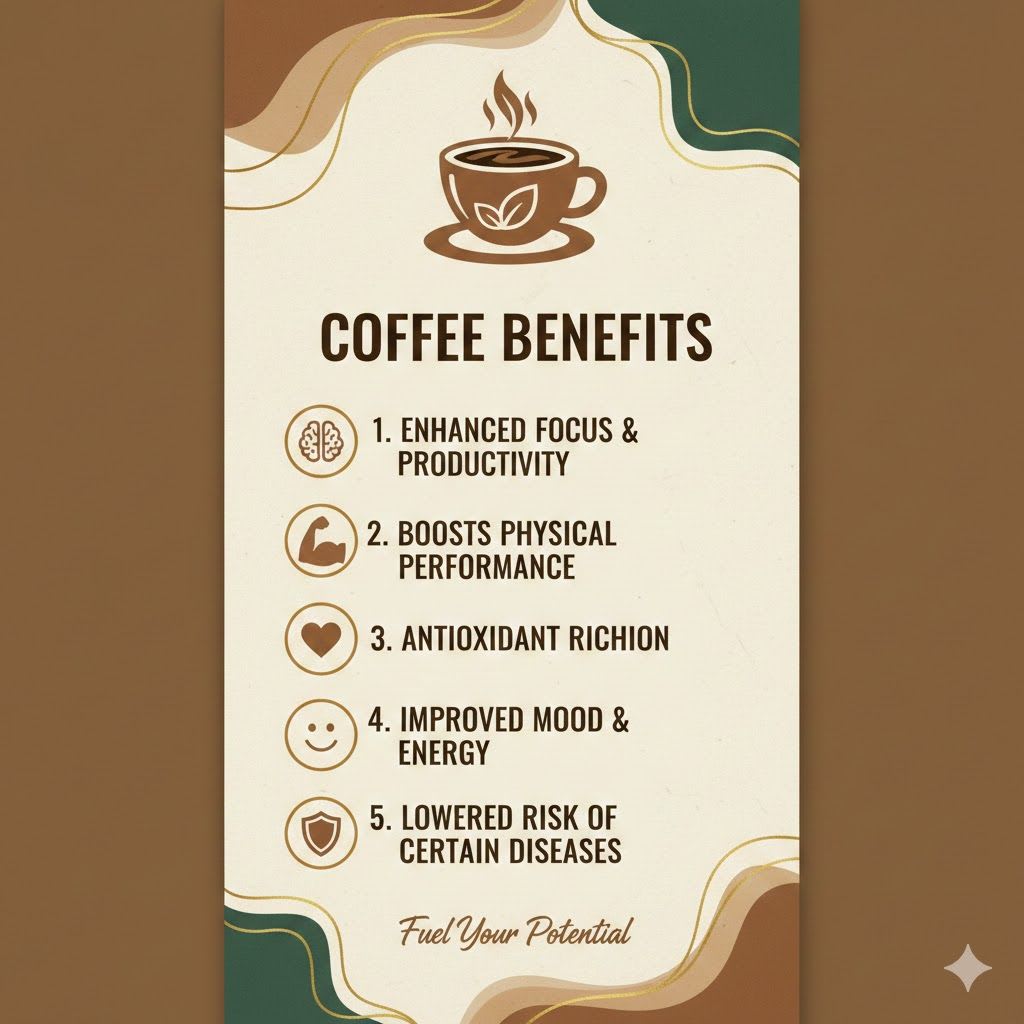
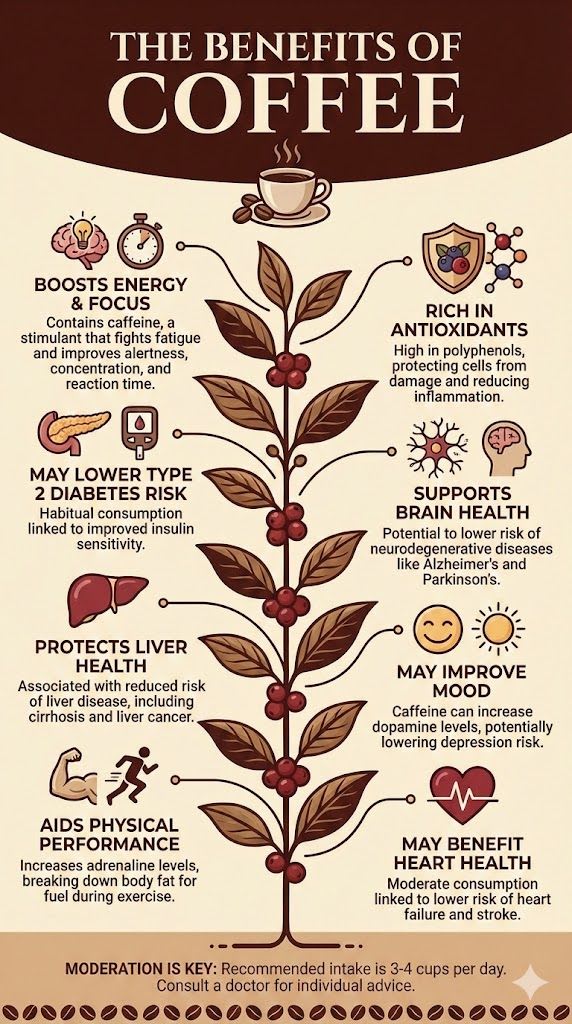
Text Prompt: "Create a portrait infographic listing the benefits of coffee.”
Nano Banana’s Image:
Nano Banana Pro’s Image:
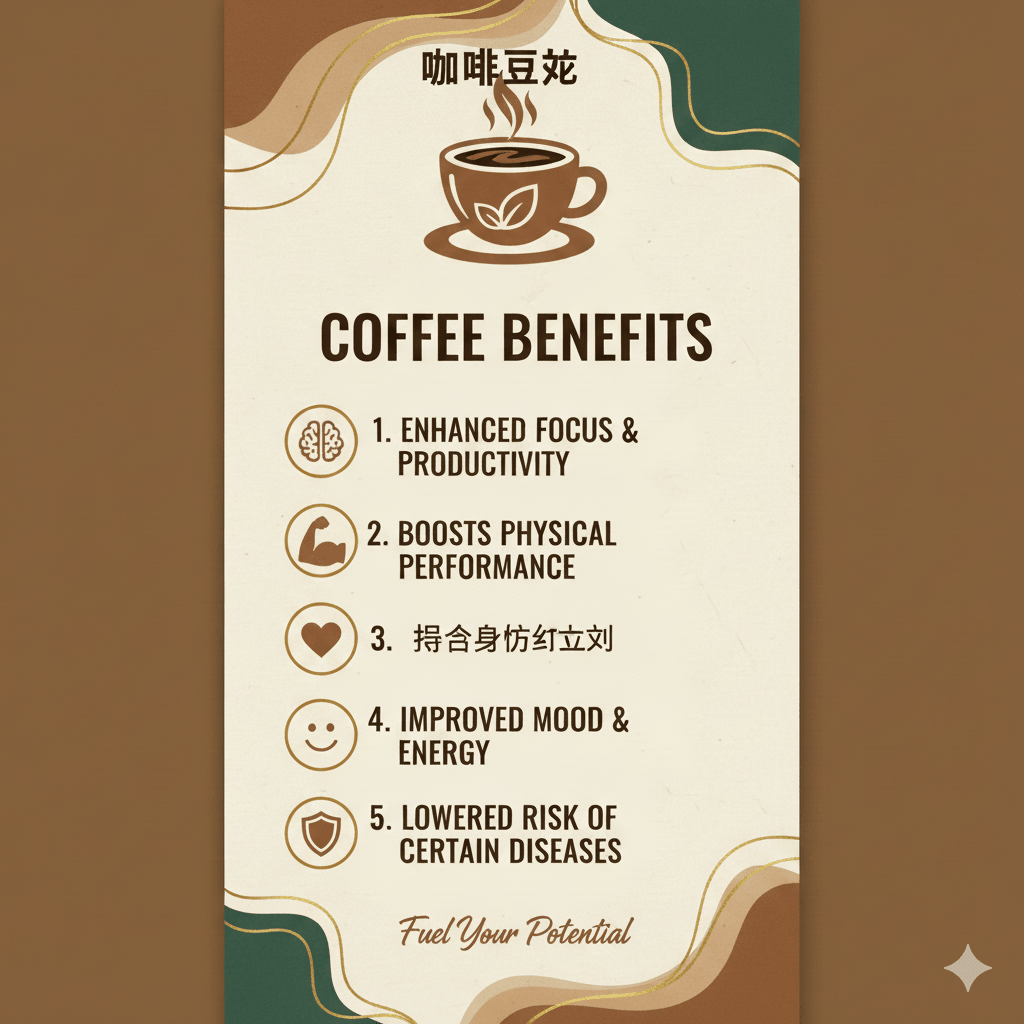
We also asked the models to translate the same images into Chinese. Here’s what they produced:
Nano Banana’s Image:
Nano Banana Pro’s Image:
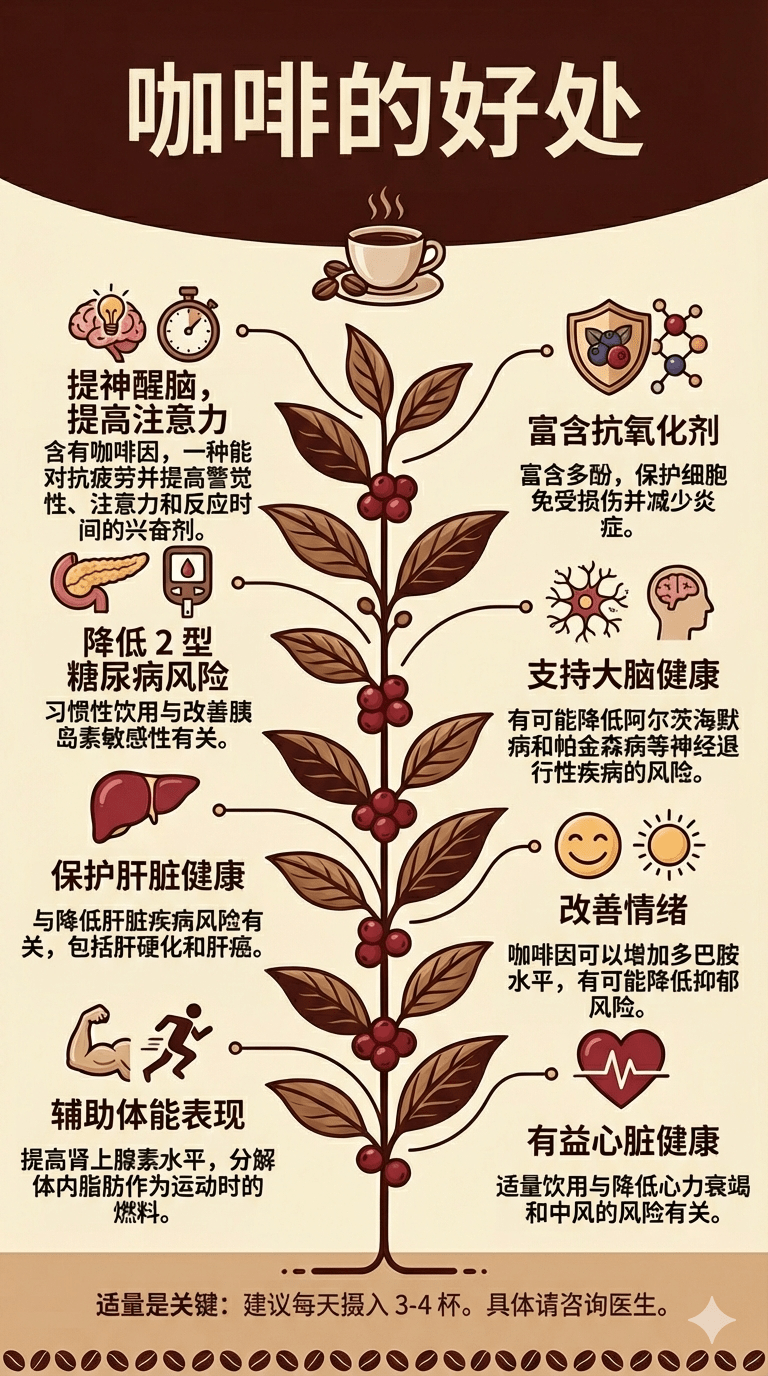
Even though Nano Banana isn’t known for strong text generation, it still did a decent job producing the image based on the prompt, with only a small typo. Meanwhile, Nano Banana Pro generated a more detailed infographic, complete with additional information and clear illustrations for each point.
When it came to translating the image into Chinese, Nano Banana Pro clearly won. It translated the text accurately while keeping the rest of the design and layout intact. Nano Banana, on the other hand, struggled to produce a completely translated version.
Our take: For most English-language use cases, Nano Banana is good enough, but for other languages, Nano Banana Pro is clearly the better choice.
Test 2: Detail Quality
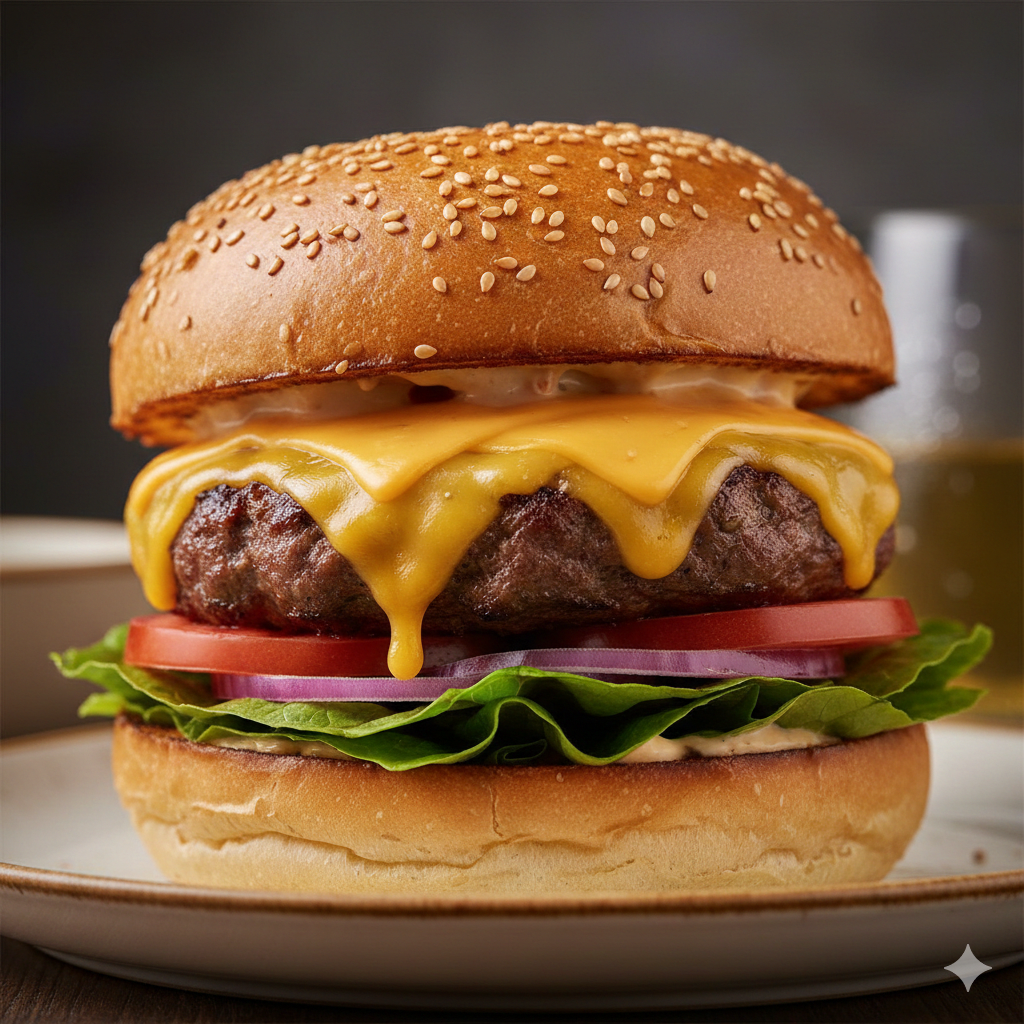
Text Prompt 1: "A detailed close-up photograph of a gourmet burger with visible sesame seeds on the brioche bun, melted cheese, fresh lettuce, restaurant food photography style, professional lighting."
Nano Banana’s Image:
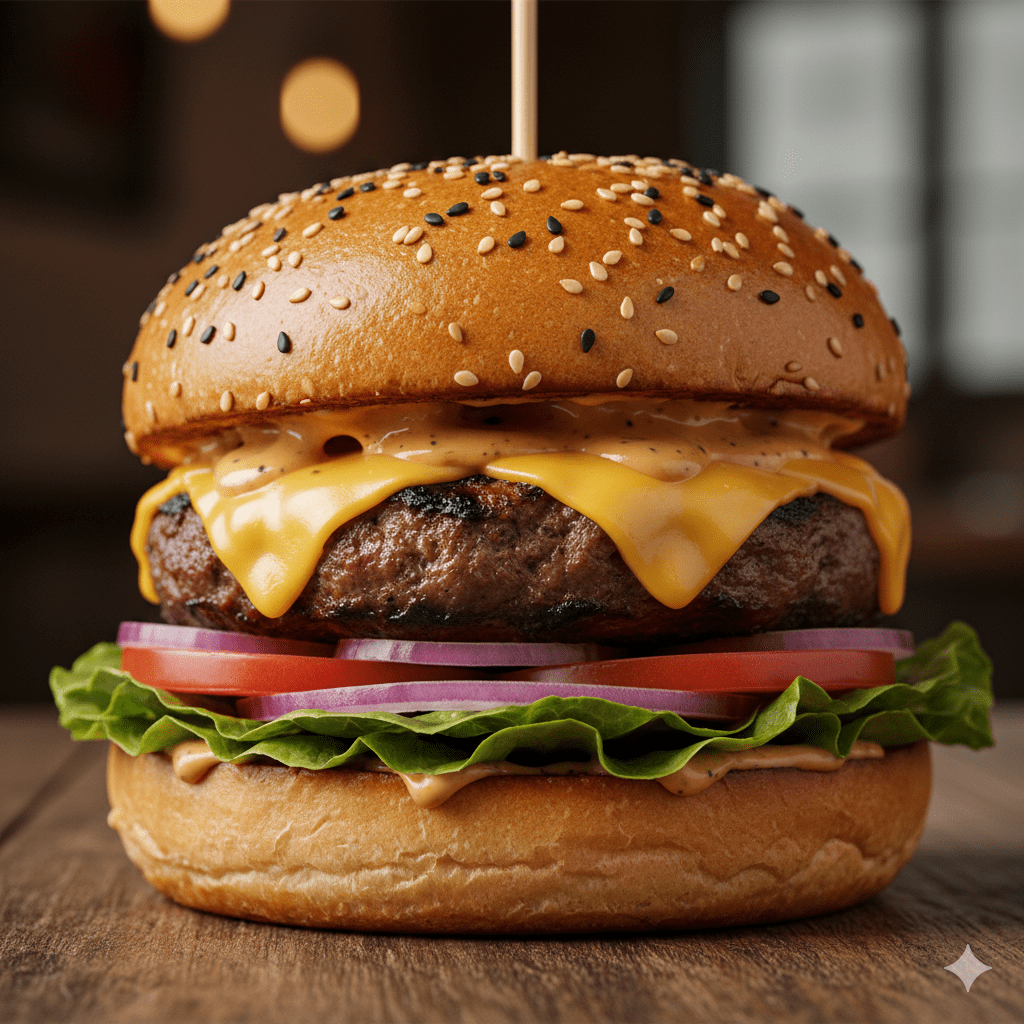
Nano Banana Pro’s Image:
Text Prompt 2: “A high-quality photorealistic portrait of a young woman sitting on the edge of a swimming pool on a sunny day. She has voluminous long wavy hair styled with a white flower hair clip on one side. She is wearing a vintage-inspired matching two-piece set: a white sleeveless crop top with a delicate sky blue floral print and a prominent sky blue collar with a bow and a matching mini skirt. She is looking directly at the camera with a soft expression. The background features bright blue shimmering pool water and blurred tropical greenery. The lighting is bright and natural highlighting the details of her outfit and hair. 8k resolution cinematic lighting.”
Nano Banana’s Image:
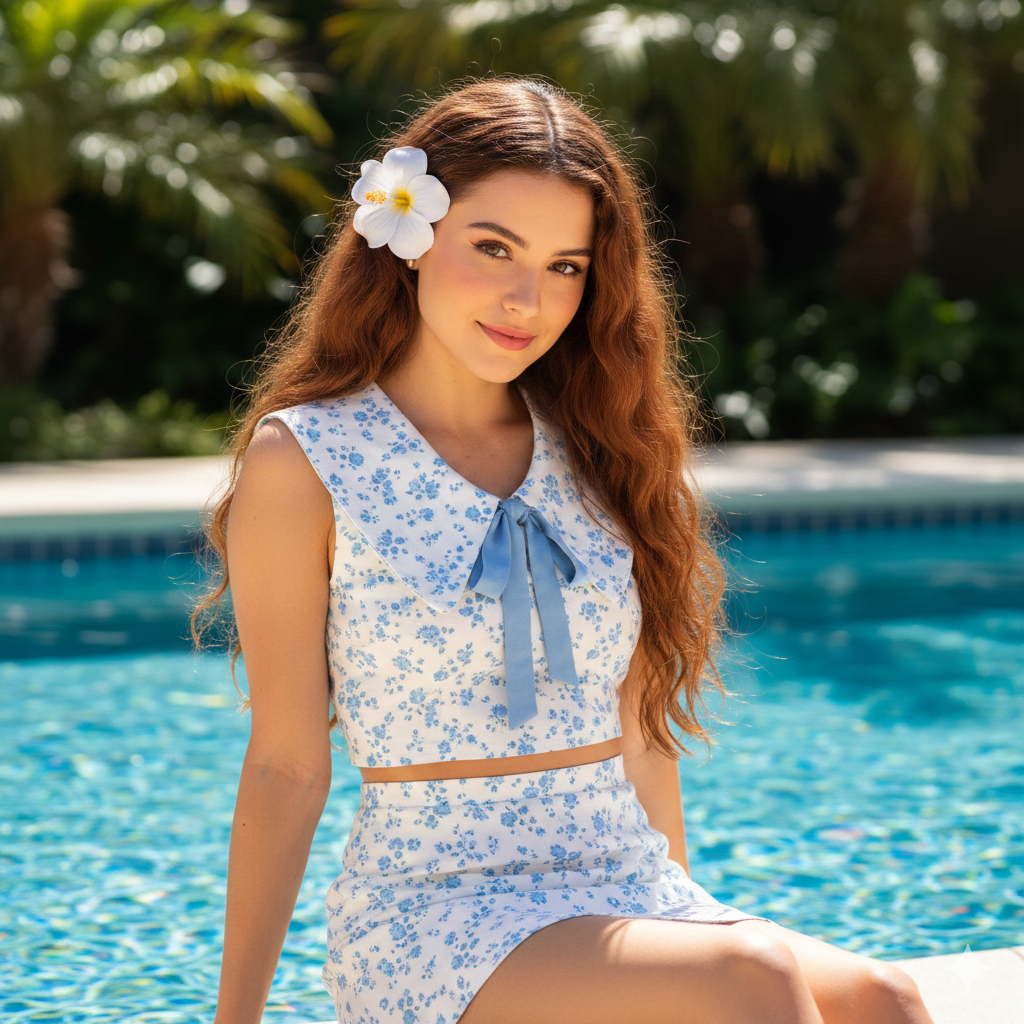
Nano Banana Pro’s Image:
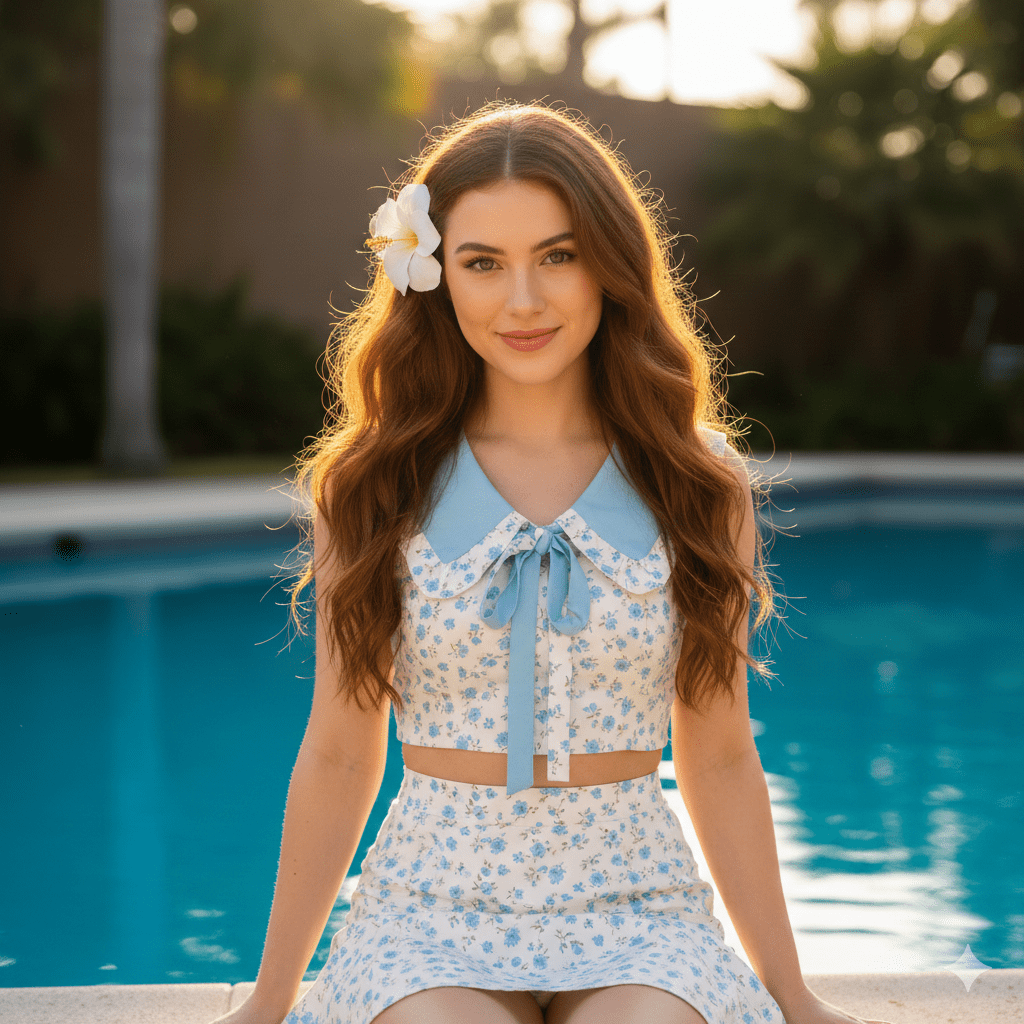
Unlike many examples online that show a clear contrast between the two models (usually with Nano Banana Pro producing a more realistic output), I found Nano Banana’s results to look more natural overall with the same text prompt. In the first example, Nano Banana’s burger looks more appetizing, and in the second, the girl appears more like a real person, especially when you look at the hair details.
Our take: Both Nano Banana and Nano Banana Pro produce great results. However, I personally lean towards Nano Banana, as its outputs feel more natural and realistic.
Test 3: Lighting and Depth of Field
Text Prompt: "Modern home office workspace with a laptop on a wooden desk, natural window light coming from the left side, shallow depth of field with the laptop in sharp focus and background softly blurred, professional photography style, warm afternoon lighting."
Nano Banana’s Image:

Nano Banana Pro’s Image:

Nano Banana produced a decent workspace image, but Nano Banana Pro’s result included more detail and looked more realistic overall. Both models followed the instructions correctly.
Our take: Nano Banana Pro delivers a better result in this test. Its precise editing controls allow you to fine-tune how the lighting falls and where the viewer’s eye should focus. Most importantly, the final output looks more realistic.
Test 4: Combining Photos
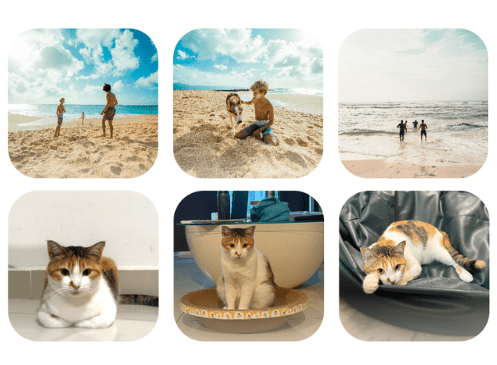
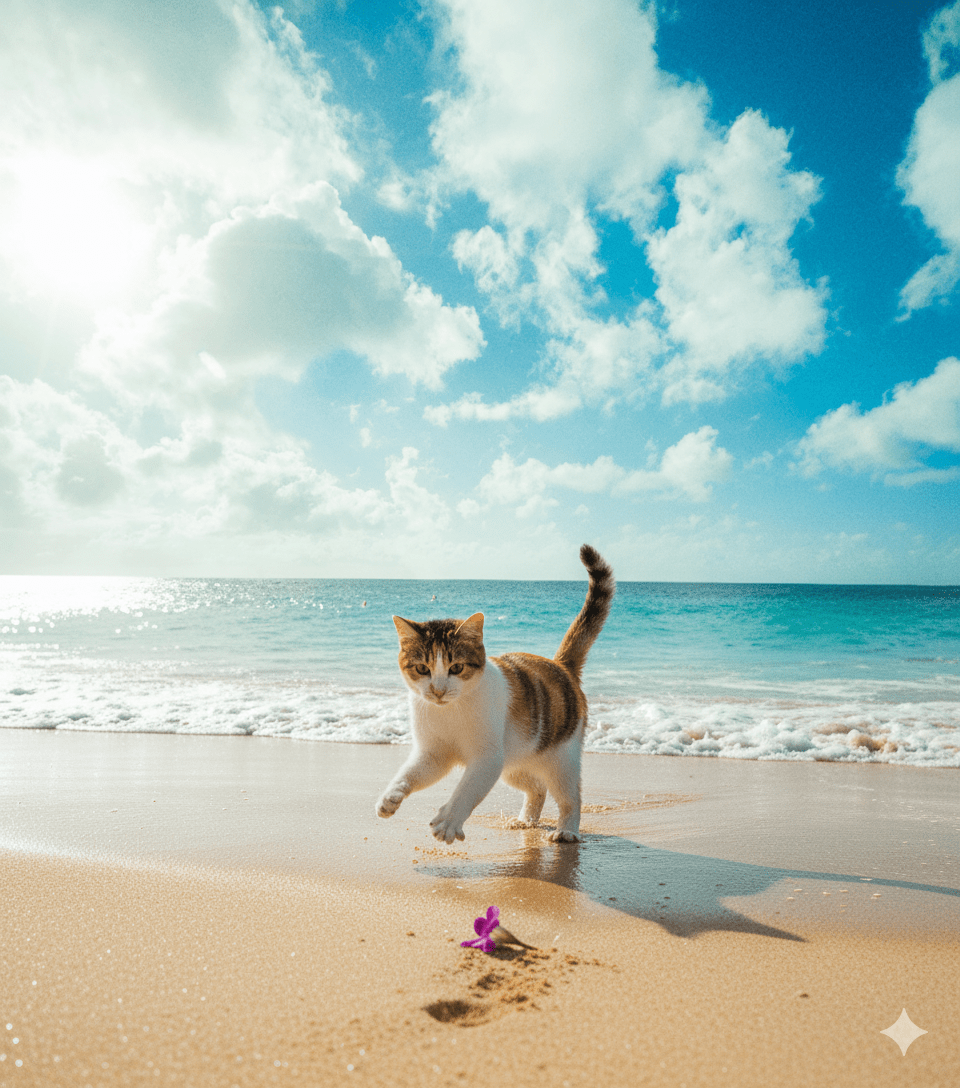
Text Prompt: “Create a 64K DSLR shot resolution of the cat playing on the beach based on the provided image reference.”
Input images:
Nano Banana’s Image:
Nano Banana Pro’s Image:
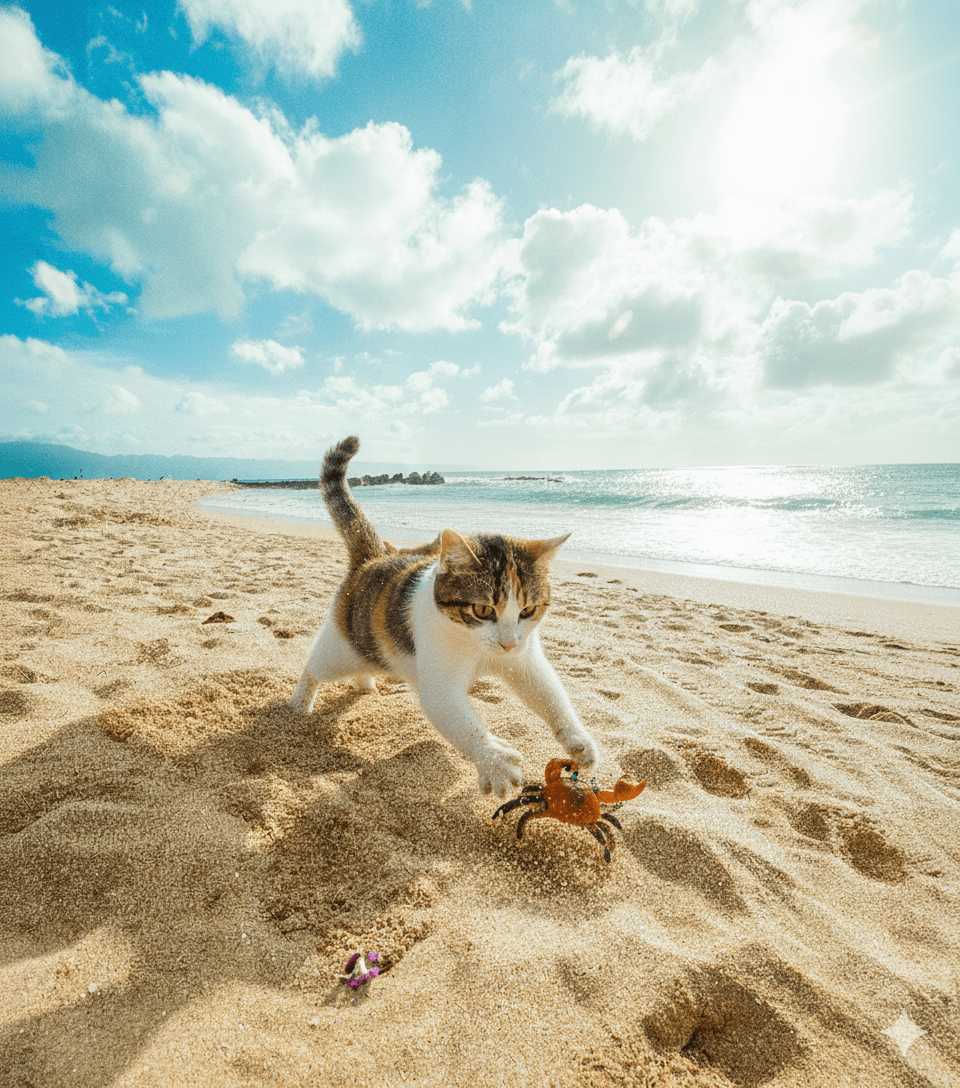
Both Nano Banana and Nano Banana Pro produced solid results, but I would say that Nano Banana Pro felt “smarter” overall. It added a crab to the scene based on its understanding of the context of a “cat playing on the beach” and the overall composition also looked more natural.
Our take: When it comes to generating a new image from photo references, Nano Banana Pro did a better job. It not only supports more input images but also has a stronger understanding of context, resulting in images with better lighting and more natural-looking movement.
Pricing: Is Nano Banana Free?
Yes, both Nano Banana and Nano Banana Pro offer free access, but with usage limits. If you’re subscribed to the Google AI Pro or Google AI Ultra plans, you’ll get a higher usage limit. However, the exact numbers aren’t clearly stated on the website, as these limits may change due to capacity constraints.
Which One is Better?
The right choice depends on your specific use case and requirements. Choose:
Nano Banana , if you:
- Need speed over perfection - Nano Banana's faster generation time allows you to test different concepts and variations quickly.
- Work on personal projects - Generating concept art, graphics, or social media content for personal projects all work perfectly within Nano Banana's capabilities and free tier limits.
Nano Banana Pro , if you:
- Create professional marketing materials - Nano Banana Pro does a better job when it comes to generating professional marketing materials like posters, print advertisements, product packaging mockups, etc.
- Need multi-lingual images - Nano Banana Pro creates social media graphics, infographics with data labels and statistics in various languages accurately.
- Generate data-driven or educational content - Nano Banana Pro’s enhanced world knowledge allows it to create more accurate infographics using current statistics, visualise real-time data more effectively, and produce educational diagrams and technical illustrations with better factual accuracy.
Feel free to try both models and see which one is better. Both are accessible through Gemini, and you can experiment with the free tier before committing to a paid plan!