Online Certificate of Completion Generator

Make a certificate of completion for a course, a workshop or a training. Pick a template, add the name, the course and the date, and download a free PDF.

Create a Certificate of Completion

Reward Learners with a Certificate of Completion

A certificate of completion is a short, formal proof that a person finished a course, a workshop or a training. It names the learner and the program, and it shows the date and who issued it. Learners add it to a CV or a LinkedIn profile, and employers use it as a record.

This generator starts with designs for completion and training, and also has workshop and bootcamp designs. It starts with wording for a finished course. Change the name, the course, the date and the signer in the form, and the preview changes as you type.

It is 100% private. The certificate is drawn in your browser, and the PNG and PDF are made there too. Nothing is uploaded to our servers, and there is no signup and no daily limit.

Do you give certificates to every student of every cohort? The Bannerbear API makes a PDF for each learner from your course platform, a spreadsheet or a no-code workflow, with a certificate ID on each one.

See how course and training teams send certificates in bulk

Need a different type? Open the main certificate generator

Send a certificate of completion to every learner automatically with the Bannerbear PDF API
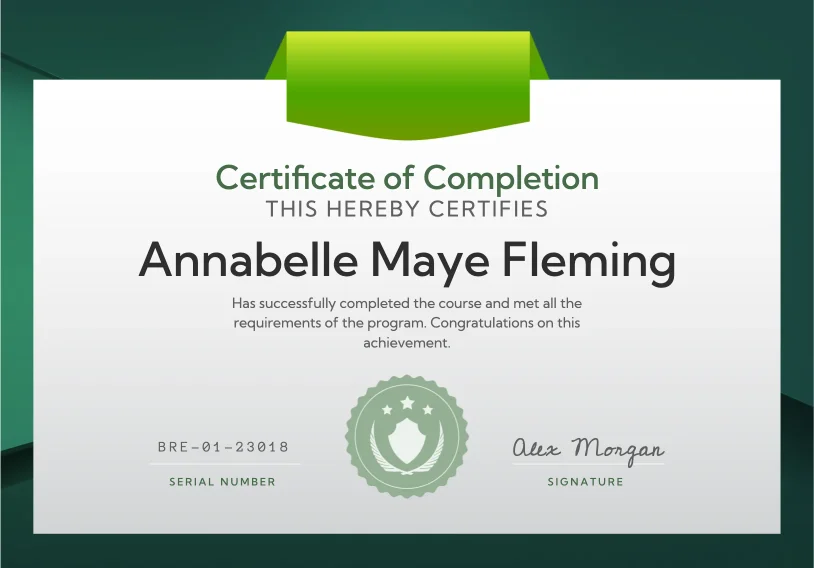
A certificate of completion made with the free generator

High Quality Templates

Choose from completion, training, workshop and bootcamp designs, with room for the course, the date and one or two signers on most of them. The PDF has the certificate at 300 dpi, so it stays sharp in print.

No Design Skills Needed

No design skills or special programs needed. Pick a design, type the name and the course, add the date and the signer, and the preview changes as you type. Add your logo and a signature image if you like.

Download for Free

The generator is free, with no signup, no watermark and no daily limit. Use it on your computer, iPad or iPhone and download the PNG or PDF instantly.

How to Make a Certificate of Completion

Making a certificate of completion takes a few minutes and needs no signup.

  1. Pick a design in the Create Your Certificate of Completion section. The first designs are made for completion and training.
  2. Type the name of the learner.
  3. Change the description. Name the course, the workshop or the training, and add the hours if you track them. The sample wordings below give you a start.
  4. Add the completion date, the name of the issuer, a certificate ID if the design has a place for it, and the names and titles of the people who sign. Add your logo and a signature image if you like.
  5. Select US Letter or A4, then click Download PDF to print it, or Download PNG to send it by email.

What a Certificate of Completion Must Show

A certificate is only useful if someone can check it. Make sure each one shows these six items.

The Name of the Learner

Write the full name as the learner wants it to appear. Check the spelling, because a wrong name is hard to fix after you send the file.

The Course or Program

Give the exact name of the course, the workshop or the training, so a reader knows what the person finished.

The Completion Date

Show the day the learner finished, not the day you made the file. If the course ran over several weeks, you can show the start and end dates.

The Hours

Add the length of the course, such as 12 hours of training. It helps employers and professional bodies that count learning hours.

The Issuer

Show the name of your school, company or trainer, with your logo and the name and title of the person who signs.

A Certificate ID

Give each certificate a unique ID, so anyone can ask you to confirm it. The Bannerbear PDF API can add a different ID to each certificate.

Sample Wordings for a Certificate of Completion

Copy a wording into the Description field and change the details to fit your course.

Online Course

Has successfully completed the online course Introduction to Digital Marketing, 12 hours of study, with all lessons and quizzes passed.

Workshop

Has attended and completed the one-day workshop Writing Clear Emails, and has taken part in all the practical sessions.

Employee Training

Has completed the Workplace Safety Training, 4 hours, and has passed the final test. This training must be renewed each year.

Bootcamp

Has completed the 12-week Web Development Bootcamp, with 240 hours of lessons and 3 finished projects.

Professional Development

Has completed 8 hours of professional development in Team Leadership and has met all the requirements of the program.

Student Course

Has completed the Spring Term course in Beginner Photography with full attendance and has shown good skill and effort.

Instant Download

Download a PNG, or a 300 dpi PDF on US Letter or A4. No signup or payment required

Auto Resizing

The text gets smaller to fit its space, so a long name or a long course title stays on the certificate

Many Names at Once

Paste up to 100 names and get one PDF with a certificate for each name

Private

The certificate is made in your browser. Your text, logo and signature are not uploaded

Create Your Certificate of Completion

Choose a design, type the learner name and the course, then download a PNG or a PDF

Put words between asterisks, for example *Essay Writing*, to show them in the accent style of the design. Leave a field empty to remove that text. The text gets smaller to fit its space.

Make a certificate for each person on a list from a spreadsheet or your app with the Bannerbear PDF API.

Certificate of Completion FAQ

What should a certificate of completion include?

It should show the name of the learner, the name of the course or training, the completion date, the number of hours, the issuer with the name and title of the signer, and a certificate ID. The list above explains each item.

What do you write on a certificate of completion?

Write the name of the learner and one or two lines that name the course and say what the person did, such as "Has successfully completed the Web Development Bootcamp, 240 hours". The sample wordings above give you a start.

Is the certificate of completion generator free?

Yes. You do not need to sign up or pay. There is no daily limit and no watermark.

Is a certificate of completion the same as a certificate of participation?

No. A certificate of completion says that the person finished the course and met its requirements. A certificate of participation only says that the person took part.

Do you upload my details?

No. The certificate, the PNG and the PDF are made in your browser. Your text, your logo and your signature image stay on your device.

How do I make certificates for a whole class?

Paste up to 100 names in the Names box, one on each line, and click Download PDF. You get one PDF with a page for each name. To make certificates from your course platform or a spreadsheet, with a different course, date and certificate ID for each person, use the Bannerbear PDF API.

Can I make other types of certificates?

Yes. The main certificate generator has more designs for appreciation, achievement, participation and award certificates.

Need to Auto Generate Certificates of Completion?

Generate PDF Certificates of Completion via API, Zapier, Airtable, Make and more

Image Generation APIPDF Generation API

More Free Generators

Start a Free Trial

Start a free trial with 30 API credits, no credit card required

Resize Video
Add Intro Animation
Add Subtitles

Get Started for Free