Contents
Bannerbear V5 is here! We've spent the past several months rebuilding the template engine, editor, and API from the ground up.
The result is a faster, more flexible Bannerbear with an even more powerful API.
How to Use V5
To switch to the new V5 interface and editor, use the green toggle in the top right of the Bannerbear interface. You can toggle between V3 and V5 anytime.
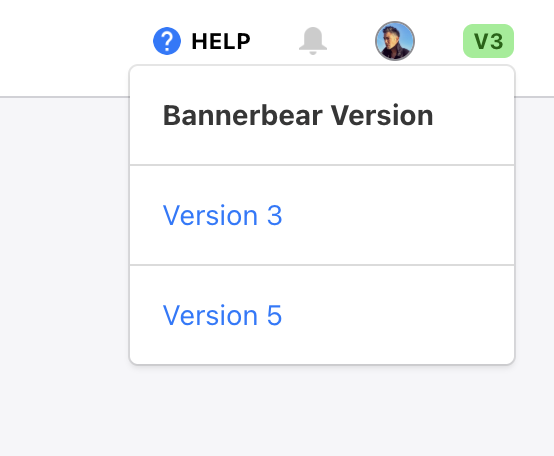
All existing V3 features and API endpoints will continue to work as normal.
Updated September 2026: V5 has grown a lot since launch. Workflows, the MCP server, animation templates, media tools and more are covered further down.
Here's what's new:
AI
- Generate backgrounds from a text prompt at render time
- Remove backgrounds from any image at render time
- Face and subject AI detection with anchor and zoom controls
Editor
- Object attributes search
- New image features: PNG stroke, PNG shadow, blend modes
- Anchor any layer to any other with point and gap controls
- Adaptive layout per object, make templates resize gracefully
Image API
- Multi-format output: JPG, PNG, PDF, WebP, AVIF
- scale up to 4× for high-res renders
- Adaptive renders, override width / height per request
Batch API
- Generate up to 100 images per request
- Completion webhook
Instant URLs
- Two encoding styles: base64 or query params
- Two security levels: signed or unsigned
- Optional version pinning, rate limiting
API Keys
- Read / write modes per key
- Scope to all templates or specific templates
Webhooks
- Scope to all events or specific events
- Scope to all templates or specific templates
- Delivery history log
Storage Buckets
- S3 and Cloudflare R2 now supported
- Scope to all templates or specific templates
Logs
- Filtering options including date, API key used, status etc
OpenAPI
- Auto-generated specs at api.bannerbear.com/v5/openapi.json
- Always in sync with code
Workflows
- Chain templates, animations and media tools into one API endpoint
- Named steps with sample data, an API console and a live run view
- Run a workflow from the dashboard, the API, Zapier or an AI agent
- Install a demo workflow from the workflows index to start from
MCP Server
- Connect Claude, ChatGPT, Cursor and other MCP-enabled agents to your Bannerbear account
- Tools for templates, image and animation generation, batches, workflows, webhooks and Instant URLs
- A curated default tool set, and a full tool set with every media tool
- OAuth authentication, with tools that match your API key's permissions
Animation Templates
- Animate a single image canvas with keyframes, presets and a timeline
- Auto Animate generates an opening animation from a template's layout
- Animated background layer with Aurora, Mesh, Conic spin and Pulse presets
- Animation endpoints in the API, plus an animate endpoint for presets
Media Tools
- Subtitle video with AI transcription, add audio and AI voiceover
- Join videos with transitions, images to slideshow, colour filters and soften video
- Join multi-page PDFs
- 8 async tools in the API with a
tool_jobsendpoint
AI Tools & Credits
- Generate AI Image tool, and
ai-promptfor AI-generated layers - Choose the AI model per template layer
- AI credits: a dedicated balance for AI operations, with usage warnings and top-ups
Template Library
- Browse and install published image templates, animation templates and workflows
- Publications API with filters by kind, category and name
Forms
- Attach a form to an image template, an animation template or a workflow
- Share it with people who do not have a Bannerbear login
Assets
- Assets library with automatic deduplication
- Assets endpoints with content-hash deduplication
Integrations
- Zapier: run workflows, create animations and use the media tools as actions
- Figma plugin: convert a Figma frame into a V5 template
- Dozens of new data sources for automations, with an API Playground and demo datasets