On-Brand Visuals on Demand, Without the Design Queue

Campaign posts, event graphics, certificates and one-pagers rendered from your templates by a spreadsheet, an AI agent or the tools you already use. Ship this week's content in minutes.

>Generate this week's social posts from the Campaigns sheet using our Brand Post template
●Done, 5 posts are rendered from the Brand Post template and saved to your Campaigns folder


Get Started for Free

Why Marketing Teams Automate With Bannerbear

Most requests to design are the same layout with new words. Bannerbear turns those layouts into templates anyone on the team can render, from a sheet, a form or an AI agent, so designers keep the interesting work.

Key Features

  • Social posts from a spreadsheet
  • Event graphics in every size
  • Certificates, invites and one-pagers as PDF
  • Ask an AI agent, get the finished file
  • Brand fonts, colours and logos locked in
  • Zapier, Airtable and Notion integrations
Read Campaign Row
Render Post
Resize for Channels
Send to Scheduler

On-Brand Posts From a Sheet

Fill a row per post, and the workflow renders it, sizes it for each channel and hands it to your scheduler. Copywriters ship without waiting on design.

Event Graphics in Any Size

Speaker cards, banners and stories for an event from one responsive template. Change a date and every size regenerates.

fetch('https://api.bannerbear.com/v5/images', {
  method: 'POST',
  headers: { 'Authorization': `Bearer ${API_KEY}` },
  body: EVENT_DATA
})
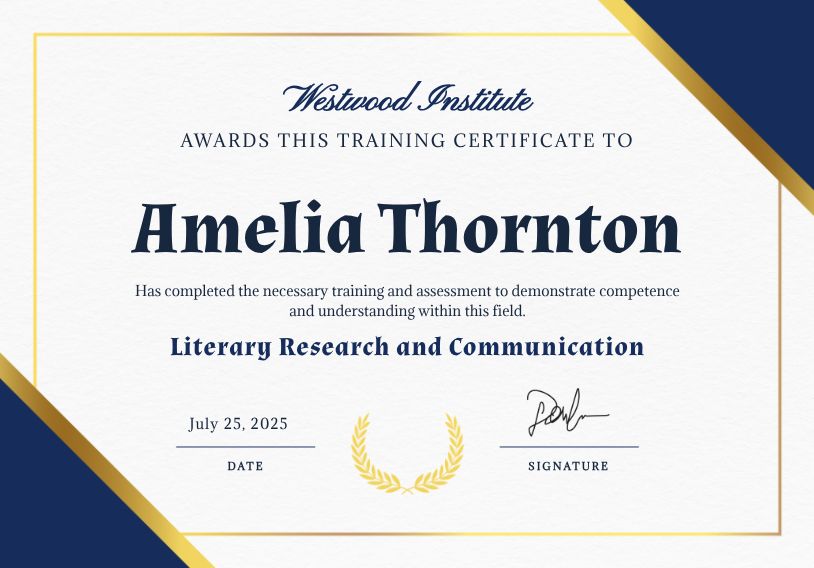
>Generate a PDF certificate for every attendee in my Course Attendees google sheet using my Course Certificate template

Certificates and Invites as PDF

Personalised, print-ready PDFs for every name on a list, generated by asking your agent or from a form submission.

Works With Your Tools

Connect the tools your team already plans in, or use the API, Zapier and the MCP server

Airtable

Pull rows from an Airtable base and (optionally) write generated image URLs back to a column.

Notion

Pull pages from a Notion database, and optionally write generated image URLs back to a URL property.

HubSpot

Pull contacts, companies, deals, tickets and optionally write generated image URLs back to a property.

X (Twitter)

Pull posts from an X account timeline via the v2 API.

Everything You Need for Marketing Teams

The Bannerbear features marketing teams teams use most

Brand Lock

Fonts, colours and logos live in the template, so every render is on brand.

Sheet to Posts

A row per post, rendered and sized for every channel automatically.

AI Agent Access

Ask Claude or ChatGPT for the graphic and get the finished file back.

Forms

Let colleagues request visuals through a form, no Bannerbear login needed.

PDF Output

Certificates, invites and one-pagers as print-ready PDFs.

Approval Flow

Route renders through Slack or email for a quick sign-off before posting.

99.9% Uptime

12 month trailing 99.9% uptime. 6 years providing image and video API services. Check our current status.

API Status

NovDecJanFebMarAprMayJunJulAugSepOct

Marketing Teams FAQ

Common questions from teams automating their everyday visuals.

Do we need a designer to use Bannerbear?

A designer sets up the templates once, in the Bannerbear editor or by importing from Figma. After that anyone on the team can render from them with a sheet, a form or an AI agent.

How do we keep everything on brand?

Brand fonts, colours, logos and layouts are locked in the template. Renders only change the layers you allow, such as the headline and photo.

Can we generate visuals from Claude or ChatGPT?

Yes. The Bannerbear MCP server gives AI agents your templates and workflows as tools, so a plain request returns the finished image, video or PDF.

Do we need to write code?

No. Zapier, Make, Airtable, forms and the MCP server cover most teams. The API is there when your developers want it.

Start a Free Trial

Start a free trial with 30 API credits, no credit card required

Resize Video
Add Intro Animation
Add Subtitles

Get Started for Free