
Use Add Image Overlay tool to burn a logo, watermark, or badge onto your videos.
In-app method
- Click Tools on the left panel
- Select Add Image Overlay
- In the Input Files field, upload or paste your Video URL (base video) and Overlay Image URL (logo)
- Define your styling parameters like position, opacity, etc
- Hit Send Request
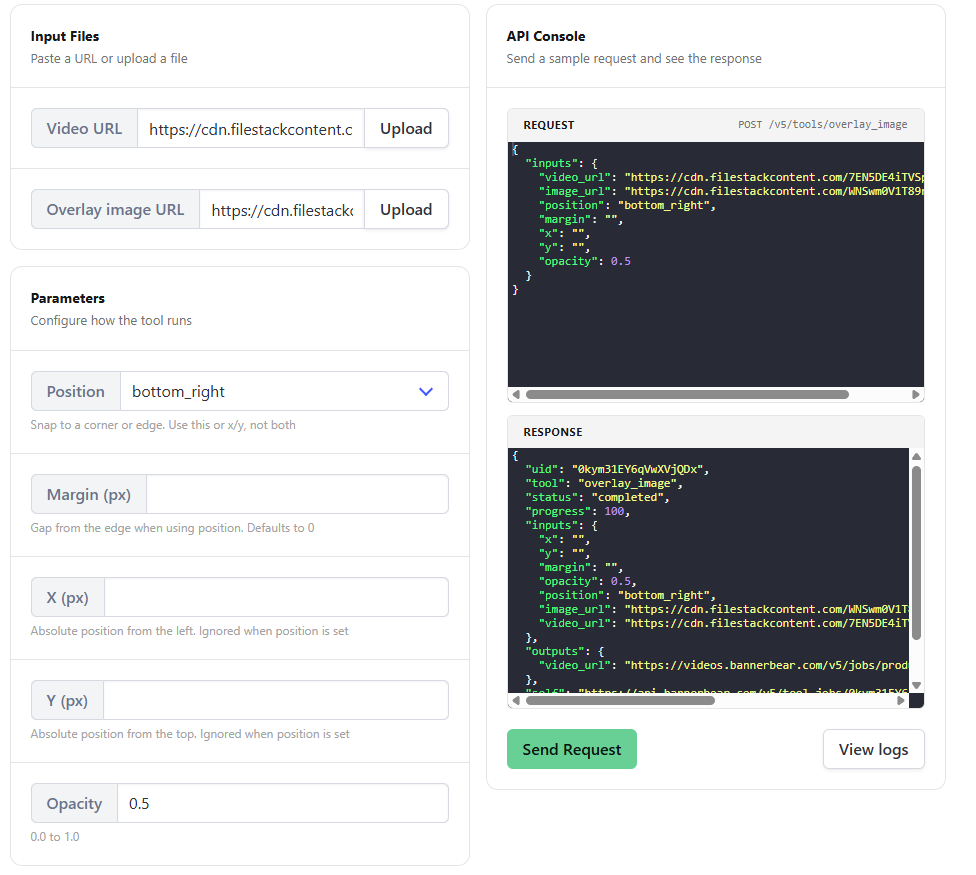
Note: Opacity is 0 by default so ensure you set an input for the visibility of your watermark/logo.
API method
Send a POST request to the /v5/tools/overlay_image endpoint with a strings of your "video_url" and "image_url" inputs for layering.
var data = {
  "video_url": "https://cdn.bannerbear.com/sample_videos/clip.mp4",
  "image_url": "https://cdn.bannerbear.com/sample_images/logo.png",
  "x": 40,
  "y": 40,
  "opacity": 0.8
}
fetch('https://api.bannerbear.com/v5/tools/overlay_image', {
  method: 'POST',
  body: JSON.stringify(data),
  headers: {
    'Content-Type' : 'application/json',
    'Authorization' : `Bearer ${API_KEY}`
  }
})

